
Prepare the physical DVD, ISO image, or VIDEO_TS folder you want to convert.
GiliSoft Home DVD Converter User Guide
Home DVD Converter User Guide for Windows
Convert DVD discs, ISO images, and VIDEO_TS folders into practical video or audio files.
- Load a disc, ISO image, or VIDEO_TS folder
- Choose titles, audio tracks, subtitles, and output profiles
- Convert to MP4, MP3, device formats, ISO, or DVD folder
Before you convert a DVD
A little preparation makes the title, subtitle, and output decisions easier once the DVD source is loaded.
Choose whether the result should be a complete video, selected title, audio track, or shorter segment.
Select a folder with enough free space for the converted video, audio, ISO, or DVD folder.
Consider the target device, preferred format, resolution, subtitle language, and audio track.
 Review DVD titles, output settings, preview, and the conversion queue
1. Load a DVD disc, ISO image, or VIDEO_TS folder
Choose the correct source from one Load DVD menu
- Open GiliSoft Home DVD Converter and click Load DVD.
- Choose DVD Disc for media in an optical drive, DVD Folder for a VIDEO_TS directory, or DVD ISO for an image file.
- Select the drive, folder, or ISO file and wait while the available titles are read.
- Confirm that the expected movie or program titles appear in the main list.
The three sources use the same conversion steps after loading. You do not need separate workflows for DVD disc, ISO, and VIDEO_TS input.
 Open a physical DVD, ISO image, or VIDEO_TS folder
2. Choose titles, audio tracks, and subtitles
Convert only the content and language options you need
- Review the detected DVD titles and durations.
- Select the main title or the individual episodes, chapters, or bonus titles needed for output.
- Choose the preferred audio track when the DVD contains more than one language or soundtrack.
- Select the available subtitle track, or leave subtitles disabled when they are not required.
- Preview the selected title before configuring the output.
For episodic or training DVDs, title duration is often the clearest way to distinguish the main programs from short menu or bonus clips.
Select the titles, tracks, and subtitle options to convert3. Choose a video, audio, or device output profile
Match the format to the way the result will be used
- Open the output profile list.
- Choose MP4, AVI, MOV, MKV, WMV, or another video format for playback and editing.
- Choose MP3, WAV, FLAC, AAC, or another audio format when only dialog, music, or a soundtrack is needed.
- Use a device profile when the result is intended for a particular phone, tablet, television, console, or media player.
- Open Output Settings to adjust resolution, bitrate, frame rate, audio quality, and destination when needed.
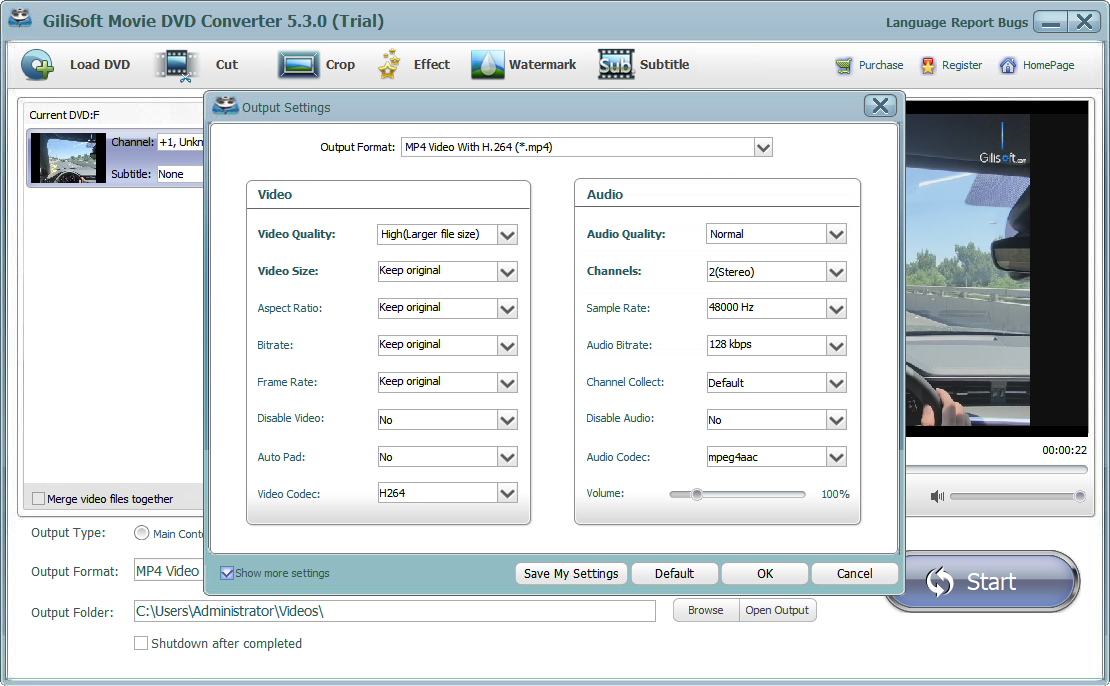 Set the output format, quality parameters, and destination
Video output
Use MP4 or another video profile when the DVD should become a normal playable or editable video file.
Common targets: PC, phone, tablet, TV, media serverAudio output
Extract dialog, music, lectures, or selected soundtracks without keeping the video picture.
Common targets: MP3, WAV, FLAC, AACDevice profile
Start from a prepared profile when compatibility with a specific playback device matters more than manual settings.
Review resolution and storage before conversion4. Preview and prepare the DVD content
The built-in processing tools let you prepare the selected DVD title inside the same conversion job instead of moving it through a separate application.
 Cut unwanted beginnings, endings, or middle sections
 Crop black bars or refocus the visible frame
 Adjust brightness, contrast, saturation, and other effects
 Add visible text or image ownership marks
 Choose an embedded track or add an external subtitle file
Preview and still images
Preview the selected title and prepared changes before conversion. When a still frame is needed, use the available snapshot control in the preview area and confirm the saved image location.
5. Start the conversion and check the result
Convert the prepared titles to the selected format
- Confirm the selected source titles and output profile.
- Check the destination folder and available free space.
- Click Start to begin the conversion queue.
- Wait for the selected titles to complete.
- Click Open Output and test the video or audio file in a suitable player.
Check the beginning, a middle section, and the ending of the result. Also verify the chosen audio language and subtitles before distributing or archiving the file.
 Open the output folder and verify the converted files
6. Save a DVD disc as an ISO image or DVD folder
When the goal is preserving the DVD structure rather than creating a normal MP4 or MP3 file, use the archive output available for a loaded DVD disc.
DVD to ISO image
Save the DVD structure as one ISO image for storage, transfer, mounting, or later handling with compatible disc software.
One image fileDVD to folder
Save the DVD structure as a folder such as VIDEO_TS when direct file access or folder-based archiving is preferred.
Accessible folder structureVideo or audio conversion
Choose a normal output profile instead when the content needs to play without DVD structure or optical-disc software.
MP4, MP3, and other usable formatsChoose ISO when you prefer one archive image, or DVD Folder when you want direct access to the VIDEO_TS structure. Both preserve the authored DVD structure rather than converting it to a normal video or audio file.
Final conversion checklist
SourceThe correct disc, ISO, or VIDEO_TS folder is loaded.
TitlesOnly the required movie, episodes, or chapters are selected.
LanguageThe intended audio track and subtitle option are selected.
FormatThe output profile matches the playback or archive target.
PreparationCut, crop, effects, watermark, and subtitle changes were previewed.
ResultThe finished video or audio file was opened and checked.
Home DVD Converter troubleshooting and FAQ
Why does the DVD fail to load?
Check that the optical drive can read the disc, close other software using the drive, and try loading the source again. For an ISO or folder, confirm that the file or VIDEO_TS structure is complete.
How do I find the main movie title?
Compare title durations and preview likely candidates. The longest title is often the main movie, while episodic DVDs may contain several titles of similar length.
Why is the converted video in the wrong language?
Return to the title list and choose the intended audio track before conversion. Test a short section when the track labels are unclear.
Why are subtitles missing or out of sync?
Confirm the correct embedded subtitle track or external subtitle file was selected. Preview its timing before starting the full conversion.
How can I reduce the output file size?
Choose a more efficient format, lower the video bitrate or resolution, or convert only the titles and segments you need. Preview the settings so file size is not reduced at the expense of necessary quality.
What is the difference between an ISO image and a DVD folder?
An ISO stores the DVD structure in one image file. A DVD folder keeps the VIDEO_TS structure directly accessible as files and folders. Choose the form that better fits your archive and playback tools.
Ready to convert your DVD content?
Load the source, choose the required titles and language tracks, select an output profile, and check the converted result.


