
First Identify What Kind of Text Is in the Video
The correct removal method depends on how the text was added. Do not reconstruct pixels when the words are still an editable layer or a separate subtitle stream.
Editable text preserves the real background underneath, so delete or hide that layer and export again. A selectable subtitle track can be omitted from the output container; FFmpeg documents stream selection and the -sn option for excluding subtitle streams. Burned-in text is part of the video pixels and requires reconstruction, covering, cropping, or access to a clean source.
Choose the Correct Text Removal Workflow
| Text type | How to recognize it | Best action | Recommended GiliSoft path |
|---|---|---|---|
| Editable title layer | Original project contains text or graphics tracks | Disable the layer and re-export | No pixel cleanup required |
| Selectable subtitle track | Player CC/Subtitles control can hide it | Remove or exclude the subtitle stream | Use ordinary subtitle-track controls |
| Burned-in label or text box | Words remain part of every decoded frame | Reconstruct a tightly selected timed region | GiliSoft ClipMark |
| Full-line burned subtitles | Many changing caption lines appear in the picture | Use subtitle-focused repeated-region cleanup | GiliSoft Subtitle Remover |
| Replaceable old label | A new authorized title can occupy the same area | Cover with a designed text box or graphic | ClipMark add-text workflow |
Static corner label
A small fixed label over a plain surface is a good starting point for fast region cleanup.
Date or time text
Select the complete digit area and split the time range when position or background changes.
Lower-third title
Large boxes may cover a wide unique background; a clean project or authorized replacement graphic can be more reliable.
Moving text animation
Continuous movement can require tracked masks or separate stable ranges rather than one oversized rectangle.
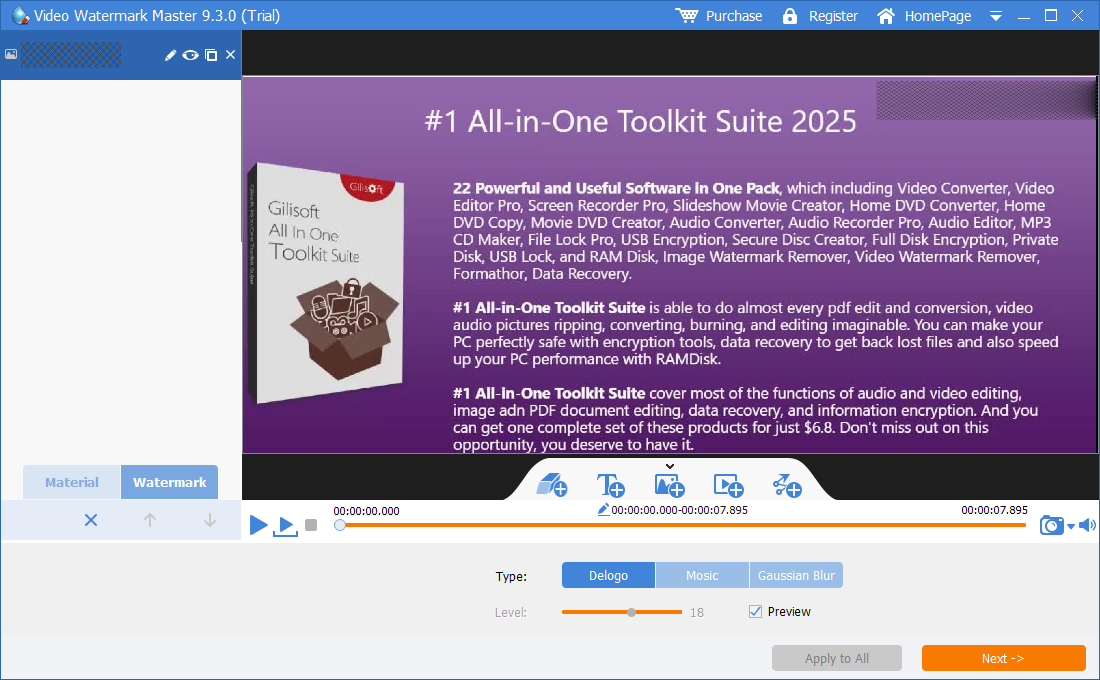
How to Remove Burned-In Text with GiliSoft ClipMark
These steps apply only when the words are part of the picture. Test a short section containing the most difficult background before processing the full video.
- Add the highest-quality authorized sourceUse the original export where possible and keep an untouched copy.
- Open Remove Watermark or text cleanupMove to the first frame where the complete text, outline, shadow, and background box are visible.
- Select the full text area closelyInclude every character edge without covering unnecessary faces, subtitles, interface details, or scenery.
- Set the exact start and end timeDo not process frames before the title appears or after it disappears.
- Split changing text and scene cutsCreate separate regions when wording, position, size, background, or camera shot changes.
- Compare fast and AI-assisted cleanupUse standard cleanup for simple flat backgrounds; test AI assistance for motion, gradients, or detailed texture.
- Export and inspect the repaired areaLook for character outlines, soft rectangles, repeated texture, flicker, bent lines, and compression loss.

Test burned-in text cleanup in GiliSoft ClipMark
Download the Windows trial and inspect one representative title or label before processing the complete authorized video.
Download ClipMark TrialHow to Get Cleaner Text Removal Results
Why letters can be harder than a small logo
Text often contains many thin high-contrast edges, shadows, outlines, and transparent antialiasing. A long sentence can cross several unrelated textures. Adobe's official guidance recommends masks and time ranges suited to the footage, with reference frames for difficult backgrounds; the same principle favors smaller, carefully reviewed text regions.
Remove Text or Remove Subtitles: Use the Right Product
Selectable subtitle track
If a player can turn captions off, remove or exclude that subtitle stream instead of modifying the picture. YouTube lets channel owners delete caption tracks, and FFmpeg supports manual stream selection or excluding subtitle output with -sn.
One fixed label, title, date, or text watermark
Use GiliSoft ClipMark. Its region and timing controls fit localized burned-in text and also support adding replacement text or branding after cleanup.
Many changing burned-in subtitle lines
Use GiliSoft Subtitle Remover for subtitle-focused processing across repeated caption areas. It is a better product match than treating every caption line as an unrelated logo.
Need new captions after removing old text?
Keep the clean output, then add editable or selectable captions where possible. The ClipMark guide also covers smart subtitle preparation and visible text overlays.
Why Removed Video Text Leaves Shadows or Blur
| Problem | Likely cause | What to change |
|---|---|---|
| Letters are still readable | Outline, shadow, or glow was not selected | Expand the region slightly around all visible character edges |
| Wide soft rectangle remains | One large selection covers too much background | Use smaller line or time-specific regions |
| Background flickers when wording changes | One range spans different text and scene content | Split the operation when text or shot changes |
| Lines or faces look damaged | Unique underlying detail is hidden | Use a clean project, reference repair, or authorized cover |
| Text returns later | A later occurrence lies outside the range | Add a new timed region for each appearance |
| Captions could have been switched off | A subtitle stream was mistaken for burned-in text | Return to the source and remove the subtitle track instead |
Remove Text from Video FAQ
Can ClipMark remove text from an MP4?
Yes, for supported sources when the text is burned into the video image. File extension alone does not determine cleanup quality.
How do I know whether text is a subtitle track?
Open the file in a player with subtitle controls. If the words can be disabled, remove or exclude the track instead of repairing pixels.
Can text be removed without cropping?
Yes. Region reconstruction can preserve the complete frame, although the hidden background must still be synthesized.
Can moving text be removed?
Use separate timed regions for stable positions. Continuously animated text can require mask tracking and manual restoration.
Which product fits full burned-in subtitles?
Use GiliSoft Subtitle Remover for many changing caption lines; use ClipMark for localized labels, titles, dates, and text watermarks.
Can ClipMark add replacement text?
Yes. After cleaning the old authorized text, use its visible text-watermark workflow to add an updated label or message.
Technical References and Related Text Guides
The workflow was checked against FFmpeg stream-selection and subtitle options, YouTube caption removal, Adobe Content-Aware Fill, and Blackmagic Design surrounding-frame object removal.