Clear Windows Activity History
Remove Windows search and run history, recent document records, temporary traces, and other local activity details that can reveal how a shared PC was used.

Browsers, Windows tools, and everyday desktop applications can leave history, cache, recent-file records, typed addresses, temporary files, and other local traces behind. GiliSoft Privacy Protector lets you review and clean those records from one Windows desktop utility.
It also handles the personal data connected to that activity. You can hide or password lock private files, folders, and local drives, prevent unwanted changes, create a personal private space, or securely shred selected data when ordinary deletion is not enough.
Scheduled cleanup, recovery-email settings, self-protection, and trusted exclusions make the product practical for shared home PCs, office workstations, school labs, support desks, and computers being prepared for lending or reassignment.


Remove Windows search and run history, recent document records, temporary traces, and other local activity details that can reveal how a shared PC was used.
Select browser history, cookies, cache, typed URLs, saved form information, download records, and other internet traces for cleanup.
Scan supported Windows applications and remove selected usage records left by office, media, communication, and utility software.
Choose Windows, application, and internet-history categories and set automatic cleanup to run around common Windows usage events.
Hide personal photos, videos, documents, folders, or an entire local drive so they no longer appear during ordinary browsing.
Lock selected files, folders, or local drives and require the Privacy Protector password before they can be opened again.
Protect files, folders, or drives against unwanted modification and removal while keeping them available for approved use.
Keep documents, pictures, music, and videos in a dedicated private space with quick access to each protected content category.
Securely erase selected files and folders, or use disk-wiping options when ordinary deletion would leave recoverable confidential data behind.
Respond to repeated wrong passwords, use stealth settings, configure recovery email, and exclude trusted disks, files, or folders.

We use Privacy Protector to clean trace data on shared support PCs after each shift, which improved our internal privacy controls.
Windows activity cleanup is straightforward, and scheduled maintenance checks now take less manual effort.
Browser trace cleanup helped us reduce exposed session data on training-room computers used by multiple teams.
Explore Windows, browser, and application-history cleanup together with file hiding, locking, private storage, secure deletion, scheduled cleanup, and protection settings. Click the large screenshot to inspect it in detail.
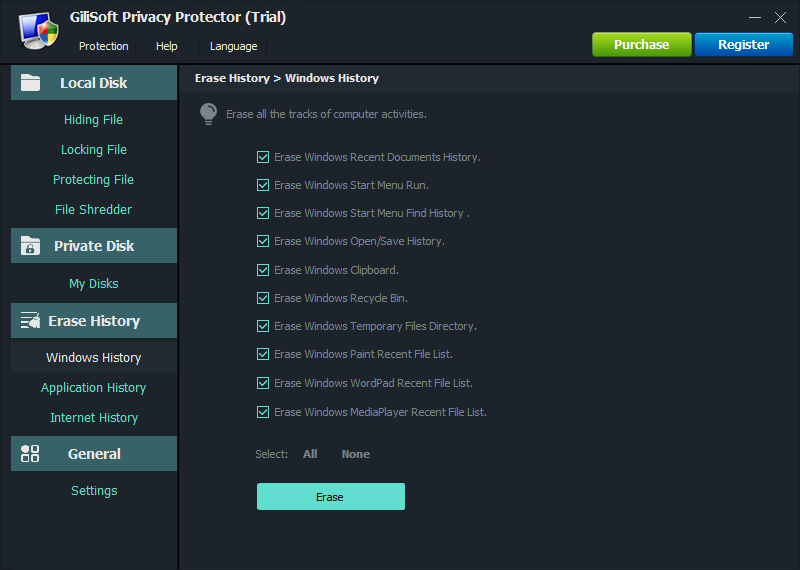
Select Windows usage traces such as recent activity and temporary records, then erase the items that should not remain visible on a shared PC.
Privacy Protector is for Windows users who need routine privacy cleanup plus practical protection for personal files, private folders, and sensitive documents.
Clean browsing traces, recent documents, temporary files, and personal activity records after family or shared-account use.
Reduce leftover customer files, exported reports, browser traces, and temporary work records on shared business computers.
Clean recent activity and protect private project files on school, lab, training-room, or borrowed Windows PCs.
Hide, lock, or shred files that contain IDs, account records, payroll documents, contracts, or personal archives.
Run cleanup and secure deletion before lending, returning, selling, or reassigning a computer.
Use one practical toolkit instead of separate cleaners, folder lockers, and file shredding utilities.
Privacy Protector brings routine trace cleanup and personal file protection into one Windows utility, so the same privacy check can cover what the PC remembers and which local files remain exposed.
Review Windows activity, browser history, and supported application traces without opening a different cleanup utility for each source.
Select history and privacy categories before cleanup instead of treating every local record as disposable.
Configure automatic cleanup for routine shared-PC use, then keep manual control for files or traces that need closer review.
Hide, lock, protect, and shred personal data from the Windows desktop without turning privacy maintenance into a cloud-storage task.
Use Privacy Protector when sensitive local traces and private files should not remain exposed after normal Windows work.
Remove browsing history, cookies, cache, typed URLs, autocomplete records, and other browser residue on shared PCs.
Clean recent documents, run history, search history, temporary files, and local activity records that reveal daily usage.
Keep personal media, private documents, and sensitive folders out of normal browsing paths.
Add password-based protection to folders and storage areas that should not be opened casually by other users.
Permanently delete selected files and folders when ordinary deletion would leave recoverable data behind.
Reduce privacy residue before returning, lending, selling, or reassigning a Windows PC.
It can clean browser traces, Windows activity history, recent document records, temporary files, application traces, and other local privacy residue.
Yes. It includes file and folder protection features for hiding and password protecting private content.
Yes. The file shredder helps securely delete selected files and folders so they are harder to recover with common recovery tools.
No. Privacy Protector is broader privacy maintenance. File Lock Pro is better when the main requirement is stronger file and folder locking.
Choose based on the main risk: privacy traces, local file access, encrypted private storage, USB device policy, or automated PC control.
Use Privacy Protector for browser cleanup, Windows trace cleaning, file hiding, folder locking, and secure deletion.
Use File Lock Pro for dedicated file and folder access control, shared-folder protection, hide mode, and stronger locking workflows.
Use Private Disk when you want a password-protected private drive for storing confidential personal or business data.
Need removable-device policy instead? Review USB Lock. Need protection against automated PC operation? Review AI Agent Lock.

 Editors highlighted the software's all-in-one privacy workflow for cleaning traces, locking files, and shredding sensitive data.
Coverage noted practical setup for users who need daily privacy maintenance on Windows.
Privacy Protector brings trace cleanup, file hiding, folder locking, and secure deletion into one practical Windows utility.

Reviewers praised the balance between file protection controls and cleanup automation for shared computers.
Lab observations mentioned stable behavior during repeated cleanup and lock operations.
The product is strongest when users need a broader privacy workflow instead of a single-purpose cleaner.

Independent write-ups described Privacy Protector as a practical desktop utility for personal and office privacy hygiene.
Commentary emphasized low learning curve and consistent day-to-day operation.
GiliSoft Privacy Protector combines file hiding, folder locking, history cleaning, and secure shredding in one Windows privacy workflow.


Enter your email address to get our latest newsletter