Convert Between Popular Audio Formats
Convert MP3, WAV, WMA, M4A, AAC, OGG, FLAC, APE, AMR, MP2 and other audio formats for players, editing apps, archives, and mobile devices.

Prepare music, voice files, ringtone clips, CD tracks, and video soundtracks for playback, editing, sharing, archiving, or device delivery. Convert between MP3, WAV, FLAC, AAC, M4A, OGG, WMA, APE and other practical audio formats with trimming, merging, compression, volume, speed, and fade controls.

GiliSoft Audio Converter Ripper is designed for users who need to make audio files usable across players, phones, editing apps, archives, and older CD collections. It converts common and less common audio formats, extracts sound from video files, and rips Audio CDs to digital files for easier storage and playback.
Use it to convert WAV to MP3, FLAC to MP3, APE to common formats, video to audio, CD tracks to MP3 or FLAC, and ringtone-ready M4A/M4R style outputs. Preparation controls such as trimming, joining, mixing, volume adjustment, audio speed, fade in/out, compression, equalizer adjustment, voice effects, ID3 tag editing, and output parameter settings help prepare files before export.
For recording new sound, see Audio Recorder Pro. For broader editing and audio utilities, see Audio Toolkit Suite.

Convert MP3, WAV, WMA, M4A, AAC, OGG, FLAC, APE, AMR, MP2 and other audio formats for players, editing apps, archives, and mobile devices.
Extract soundtracks from AVI, MPEG, WMV, MP4, FLV, MKV, H.264, AVCHD and other video sources when only the audio is needed.
Read Audio CDs and save tracks to MP3, FLAC, WAV, WMA, AAC and other digital formats so older discs are easier to store, search, and play.
Convert only the section you need by setting start time and duration before export, useful for clips, samples, ringtones, and short references.
Combine multiple audio files into one output, merge files from different source formats, or mix tracks when a single delivery file is required.
Use CDDB support to help retrieve album, artist, title, and genre information for CD tracks instead of entering every item manually.
Adjust bitrate, channel, sample rate, and output format to reduce large audio files for email, storage, web delivery, or mobile playback.
Add simple fade-in and fade-out effects so converted clips start and end more smoothly without needing a separate editor.
Speed up or slow down audio, increase weak volume, reduce loud tracks, and adjust equalizer settings before export.
Edit MP3 tag information, apply simple voice effects, create FLAC archives, or convert to MP3, M4A, WMA, and ringtone-friendly formats.

We use Audio Converter Ripper to standardize WAV, FLAC, and MP3 files before uploading training audio to our LMS.
CD ripping and CDDB support helped us archive older audio discs without manually typing every track name.
Extracting audio from MP4 and MKV files saves time when we only need narration tracks from finished videos.
The trim, merge, fade, and compression options are enough for simple conversion jobs before final delivery.
Preview the main audio workflow: convert formats in batches, cut clips, mix audio, adjust equalizer settings, apply voice effects, and edit ID3 tag information before export.
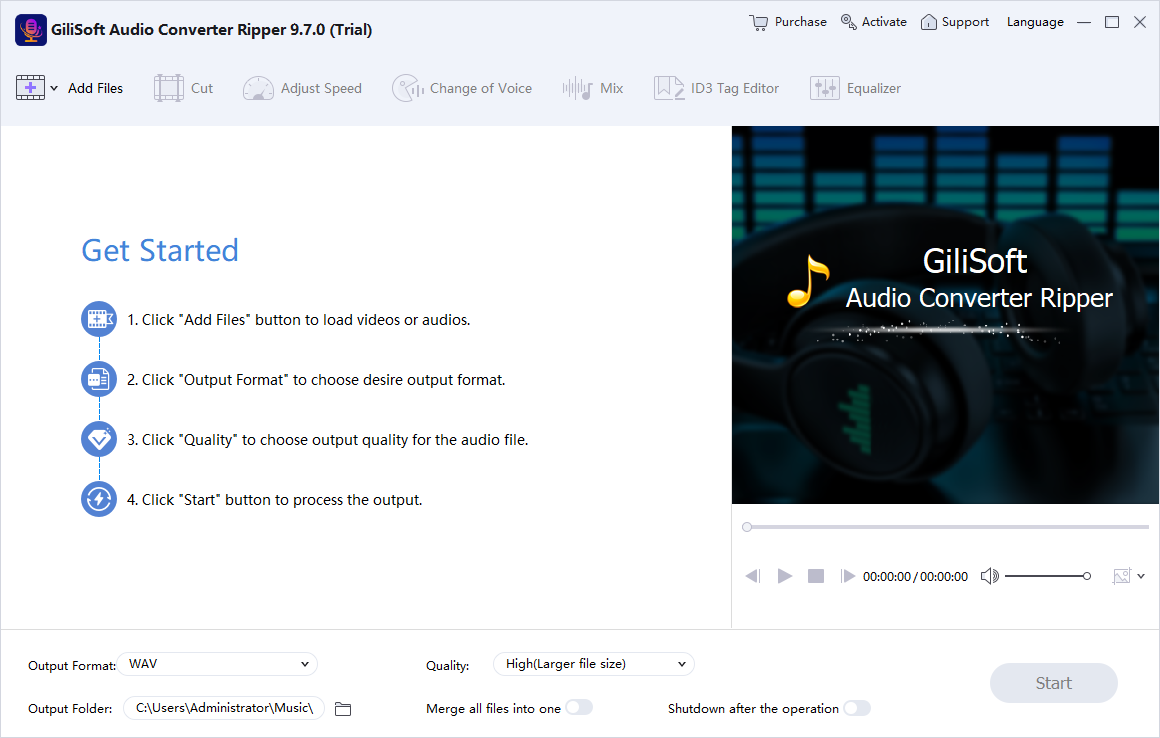
Add audio or video files, choose the output format, review the conversion list, and prepare files for playback, archive, upload, or device delivery.
Convert old, lossless, downloaded, recorded, or device-specific audio files into formats that open reliably on current players and apps.
Rip Audio CDs to digital files for easier storage, backup, playback, and long-term access without relying on the physical disc.
Pull narration, music, lessons, or meeting audio from video files when the final task needs only the sound.
Trim audio, merge files, adjust volume, add fades, and prepare smaller outputs for phone playback, short clips, or ringtone-style use.
Use this product when the main job is converting audio, ripping CDs, or extracting sound from video, not recording new audio from a microphone.
Prepare clean source files in the right format, size, and quality before they move into an editor, course platform, podcast tool, or archive.
Conversion, trimming, joining, mixing, compression, fade, speed, volume, equalizer, ID3 tags, CDDB, and output settings stay in one practical Windows tool.
Use Audio Converter Ripper for conversion, CD ripping, and video-to-audio extraction. For recording, see Audio Recorder Pro; for a broader audio bundle, see Audio Toolkit Suite.
Make source audio easier to play, edit, upload, archive, or deliver across Windows PCs, phones, web apps, and media players.
Convert FLAC to MP3 | Convert WAV to MP3 | APE to MP3 Converter
Convert disc-based music or spoken-word CDs to digital files, then add album information when CDDB data is available.
Save a soundtrack, lecture, narration, meeting, or music bed from MP4, AVI, MKV, WMV, FLV, and other video formats.
Create shorter clips, merge audio tracks, reduce file size, add fades, and adjust output quality before sharing or publishing.
Audio Compressor for Windows | Audio Joiner for Windows | Ringtone Maker for Windows

Editors highlighted dependable conversion across common audio formats, with useful bitrate, channel, sample rate, and volume controls.
Coverage noted that the product is most useful when users need to prepare music libraries, clips, and archive files for different players or devices.

Reviewers praised the straightforward interface for converting CDs and audio files without requiring advanced technical knowledge.
The CD ripper, CDDB support, and output settings make older music collections easier to digitize and organize.

Independent write-ups described the converter as reliable for multiformat audio preparation, including video-to-audio extraction and file-size reduction.
The strongest value is repeatable conversion output for everyday audio libraries, lessons, clips, and device-ready files.


Enter your email address to get our latest newsletter