Password Protect CDs and DVDs
Create password-protected CD/DVD media for secure offline distribution. Recipients enter the correct password before opening protected files, while normal disc access remains straightforward.

Build discs with a public area for open files and a password-protected secure area for confidential content, then validate ISO images and burn final media from one workflow.

GiliSoft Secure Disc Creator is a secure disc authoring tool for creating encrypted CDs, DVDs, and ISO image files for controlled offline distribution. It can build one disc with a public area and a password-protected secure area, so open files stay accessible while confidential files remain protected with AES-256 encryption.
This makes it practical for compliance packs, secure training media, customer delivery, field-service kits, and archive workflows. Protected content can be opened after password verification without requiring a separate full software suite on the target computer.
For enterprise deployment and integration workflows, a command-line version is also available.

Create password-protected CD/DVD media for secure offline distribution. Recipients enter the correct password before opening protected files, while normal disc access remains straightforward.
Place confidential files and folders inside the encrypted secure area so they are not exposed as ordinary open files on the disc.
Mount ISO images into virtual drives to test protected disc content before burning or delivering final media.
Share protected discs with partners, customers, or field teams while keeping sensitive content behind password verification.
Create encrypted ISO image files with AES-256 protection for archive, transfer, validation, or later burning to CD/DVD media.
Burn protected discs and finalized ISO images without splitting the workflow across separate disc authoring tools.
Create one disc with a public section for open files and an encrypted section for confidential content, so external delivery stays convenient and secure.
Apply strong AES-256 protection with password-gated access so only authorized users can open protected files after disc insertion.
Generate encrypted ISO files for archiving or transfer, then burn finalized ISO images to CD/DVD when release-ready media is required.
Recipients can open protected disc content with password verification without installing a separate full software suite.

Secure Disc Creator helped us distribute confidential training packs on DVD without exposing source files in transit.
Password-protected disc creation was easy to roll out, and access behavior stayed stable across repeated use.
The secure/public area split gave us a practical way to share public documents while keeping private data protected.
Virtual drive support made it easier for our team to test encrypted ISO content before final disc delivery.
Built-in burning and encrypted ISO workflows reduced handoff errors in our secure media preparation process.
We use command-line automation to generate protected discs for field distribution, and it fits cleanly into our packaging scripts.
Encrypted ISO output helped us prepare archive images first and burn final discs only after review was complete.
The public and secure area design made customer handoff easier because instructions could stay open while private files stayed locked.
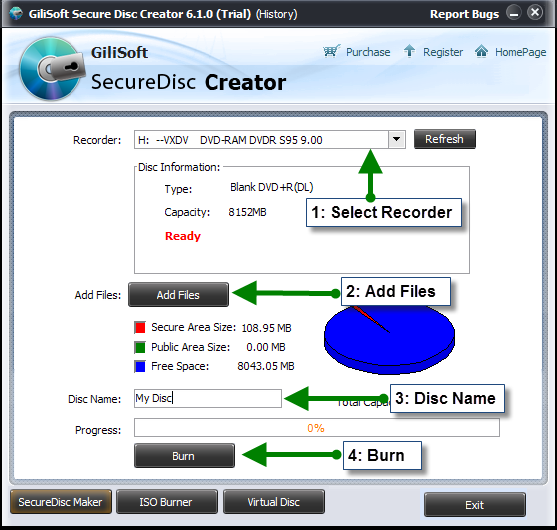
Create discs with secure and public areas for mixed delivery needs.

Generate encrypted ISO image files for archive, testing, or later burning.
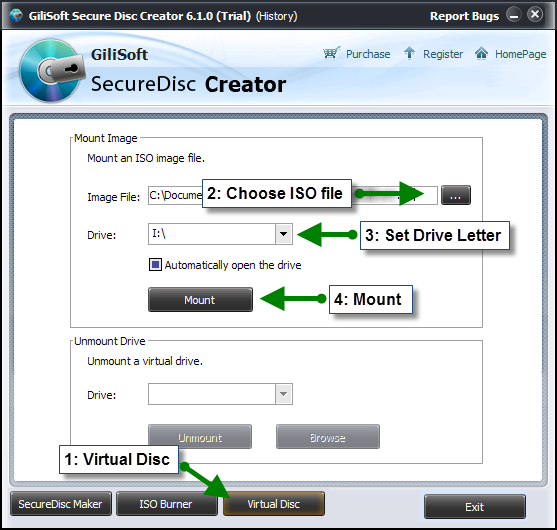
Mount encrypted ISO images in a virtual drive to validate content before release.
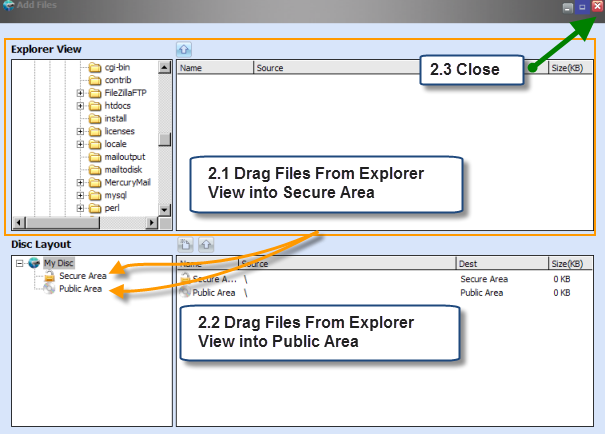
Add public files and protected files into the right disc area before creating final media.
Use encrypted discs or ISO files for partner delivery, customer kits, field deployment, and secure offline content sharing.
Build protected media for controlled document handoff, archive storage, and portable delivery with stronger access control.
Keep CD/DVD and ISO distribution alive while adding password protection, public and secure area separation, and predictable access behavior.
Mount virtual discs, test encrypted image output, and burn finalized secure media from the same environment.
Deliver offline training packs, manuals, and protected reference media to locations where cloud access is limited or not preferred.
Create encrypted ISO archives, validate them in a virtual drive, and burn release-ready discs when physical media is required.
It focuses on encrypted CD/DVD and ISO creation instead of trying to be a general file locker or endpoint control tool.
Mix open files with protected files on the same media so external delivery remains practical without exposing sensitive content.
Create encrypted ISO files, mount them for validation, and burn final media without splitting the job across separate utilities.
Password protected ISO creator | Secure disc burning software for Windows
Use this tool when the core job is secure optical-media or ISO delivery, not USB device blocking or full-disc encryption.
Prepare media that can include instructions, public files, and protected business content in one controlled disc or ISO package.
Choose secure disc or ISO delivery when recipients need offline access, stable archives, or controlled physical media instead of download links.
Create encrypted discs for field teams, classrooms, or secure offline environments that still need simple access after password entry.
Secure training disc creator for offline delivery | Encrypted CD and DVD creator
Keep public readme files open while restricting confidential documents, installers, or licensed content inside the secure area.
Create a protected disc for customers | Secure and public disc areas on the same CD or DVD
Generate protected ISO files for storage, transfer, validation, or delayed optical media production.
Encrypted ISO for archive and delivery | How to burn an encrypted ISO to a disc
Mount encrypted ISO workflows in virtual drives so teams can validate access behavior before final handoff.
Mount encrypted ISO in a virtual drive | How to make a virtual drive from an ISO image
Store project files, compliance documents, release packages, or legacy records in encrypted ISO media that can be kept offline.
Build a single protected package for installers, manuals, license files, and supporting media when the delivery must remain portable.
Yes. It can create password-protected CD or DVD media and encrypted ISO image files for secure distribution and storage.
Encrypted CD and DVD creator | How to create an encrypted ISO file
Yes. You can build discs that include both a public area and an encrypted secure area for mixed open and protected delivery.
Yes. Protected content can be accessed after password verification without requiring a separate full software suite.
Encrypted CD and DVD creator | Secure and public disc areas on the same CD or DVD
Yes. It includes built-in ISO burning support and can also mount ISO images into virtual drives for testing.
Mount encrypted ISO in a virtual drive | How to burn an encrypted ISO to a disc

 Editors highlighted practical CD/DVD encryption workflows for controlled media distribution. Coverage noted straightforward setup for teams that need immediate confidentiality controls.
GiliSoft Secure Disc Creator is an easy-to-use, intuitive application for the creation of encrypted CDs and DVDs.

Reviewers praised password protection and ISO handling options aligned with compliance-oriented delivery routines. Lab observations mentioned stable lock and unlock behavior under repeated operations.
In addition to encrypting CDs and DVDs, the utility can create encrypted ISO images for later burning or virtual drive mounting.
Independent write-ups described the product as dependable for routine encrypted media creation. Commentary emphasized clear administration and predictable recovery access flows.
A simple tool that provides users with the option to burn encrypted CDs and DVDs, with solid ease of use for protected disc delivery.


Enter your email address to get our latest newsletter