What an encrypted disc creator does
GiliSoft Secure Disc Creator is built for Windows users who still deliver content on CD/DVD media or who need an encrypted ISO before physical production. It creates two clearly separated areas: a public area for readme files, catalogs, instructions, or installers that recipients may open immediately, and an AES-256 encrypted secure area for documents, media, archives, and other confidential files.
This is especially useful when the delivery must work offline. A recipient can read the public area normally and run the included disc agent to enter the secure-area password. The full authoring application does not need to be installed on the recipient's computer.
Choose the right encrypted disc output
Use a blank CD or DVD when the physical media is ready to be produced and delivered immediately.
Save a reviewable image for archiving, transfer, approval, or delayed production.
Check file placement, the public area, and password access in a virtual drive before burning.
Write a completed image to blank media without rebuilding its public and secure contents.
| Method | What recipients see | Best use |
|---|---|---|
| Ordinary Windows data disc | All files are visible as normal disc content. | Open, non-confidential delivery |
| Password archive copied to disc | An archive file that must be extracted separately. | Small protected file sets |
| GiliSoft encrypted CD/DVD | Open public files plus a password-protected secure area. | Mixed public and confidential delivery |
| GiliSoft encrypted ISO | The approved disc structure remains in one image for mounting or later burning. | Review, archive, transfer, and production |
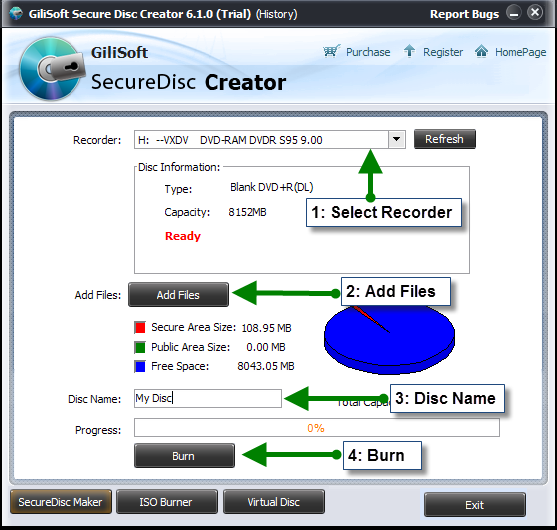
See the Windows disc creation process
The software keeps creation and verification in one place: select the output, organize public and secure content, set the password, and test the result before release.
How to create an encrypted disc on Windows
- Insert a compatible blank CD or DVD, or choose the ISO image output when physical media will be produced later.
- Add readme files, instructions, and other open content to the Public Area.
- Add confidential documents, installers, media, or archives to the Secure Area.
- Set and confirm the secure-area password, then create the encrypted disc or ISO image.
- If you created an ISO, mount it in the virtual-drive tool and test both areas before burning.
- Open the completed disc on a second Windows PC, verify the public files, and use the included agent to test the secure-area password.
Why use GiliSoft Secure Disc Creator

Encrypted disc authoring, ISO validation, and burning in one Windows application
Create AES-256 protected CD/DVD media, separate public and secure areas, build encrypted ISO images, mount them for verification, and burn approved images without moving the project between unrelated utilities.
Where encrypted disc delivery still makes sense
Keep welcome instructions public while contracts, reports, project files, or licensed assets require a password.
Deliver offline lessons, manuals, videos, and reference materials to locations where cloud access is limited.
Create an ISO, validate it, obtain approval, and then burn consistent physical copies from the approved image.
Keep a protected ISO as the master image and produce optical media only when a physical copy is required.
Final verification checklist
- Public files open without entering the secure password.
- Secure files are not exposed as ordinary disc files.
- The secure-area password works on a second Windows PC.
- The included agent launches correctly from the final media.
- The mounted ISO matches the approved file layout.
- The burned disc is finalized and readable in the target drive.
Encrypted disc creator FAQ
Can one disc contain public and encrypted files?
Yes. The public area remains open, while the secure area requires the password. This is useful when instructions and protected payload files must travel together.
Can I create an encrypted ISO without burning a disc?
Yes. The ISO can be stored, transferred, mounted for verification, or burned later.
Does the recipient need Secure Disc Creator?
No. The full creator application is for authoring. Recipients use the included disc agent and the correct password to open the secure area.
Can an encrypted ISO be tested before release?
Yes. Mount it in the virtual-drive tool and verify the file layout and password behavior before producing physical media.
Is this the same as an audio CD or movie DVD?
No. This page concerns protected data delivery on CD/DVD media and ISO images. Audio-CD authoring and DVD-Video authoring use different disc structures.
References
Create protected offline media on Windows
Prepare public instructions and encrypted files, validate the ISO, and burn final CD/DVD media when it is ready for delivery.
View Secure Disc Creator