
Free MP4 Joiner for Windows: Compare 6 Ways to Merge Videos
An MP4 joiner combines clips into one video, but the right method depends on whether the files share compatible encoding settings. This guide compares free tools with an offline desktop workflow and explains how to order clips, choose export settings, and check the finished file.
Quick answer
For compatible clips, a stream-copy tool can join files with little processing; when their codecs, frame rates, or audio settings differ, use an editor that can export a normalized file. For a visual offline workflow on Windows, open Video > Joiner in GiliSoft Video Editor Pro, add clips, arrange their order, review trim points, and export a test. GiliSoft Video Editor Pro is commercial software with a trial, not a free MP4 joiner. Use Video Studio only when the project needs multiple tracks, overlays, titles, or detailed transitions.
What to check before joining MP4 files
MP4 is a container, not a single video format. Two files can both end in .mp4 while using different video codecs, resolutions, frame rates, audio codecs, sample rates, or timestamp structures.
| Check | Why it matters | What to do if clips differ |
|---|---|---|
| Video codec and profile | Stream-copy joining expects compatible encoded streams. | Export the clips to one common codec first. |
| Resolution and orientation | Mixed dimensions can produce errors or abrupt frame changes. | Scale and rotate to a consistent output size. |
| Frame rate and time base | Differences can cause timing errors or uneven playback. | Normalize through a new export. |
| Audio codec and sample rate | Mismatched audio streams can fail or drift out of sync. | Convert audio to the same settings. |
| Privacy and file size | Online tools require an upload and may impose limits. | Use an offline Windows joiner for sensitive or large files. |
Compare 6 ways to merge MP4 videos on Windows
| Method | Best for | Re-encoding | Main tradeoff |
|---|---|---|---|
| Clipchamp | Free visual joining, trimming, and simple transitions | Exports a new video | Less direct than a dedicated joiner |
| FFmpeg concat | Technical users and repeatable command-line workflows | Can stream-copy compatible files | Commands and compatibility errors require care |
| LosslessCut | Fast cuts and compatible stream-copy operations | Often avoids re-encoding | Not a full multi-track editor |
| Avidemux | Basic joining and copy-mode output | Can avoid it when streams match | Limited timeline and design tools |
| Online MP4 joiner | Small, non-sensitive, one-off files | Usually creates a new export | Upload time, privacy, and size limits |
| GiliSoft Joiner | Focused visual ordering plus a broader editing toolkit | Depends on chosen output | Commercial software with a trial |
Merge MP4 files with the GiliSoft Joiner
GiliSoft Video Editor Pro keeps the simple merge task inside a dedicated Joiner rather than forcing it into a full editing project. This is the recommended starting point when the goal is to combine files in sequence.
- Open the Joiner
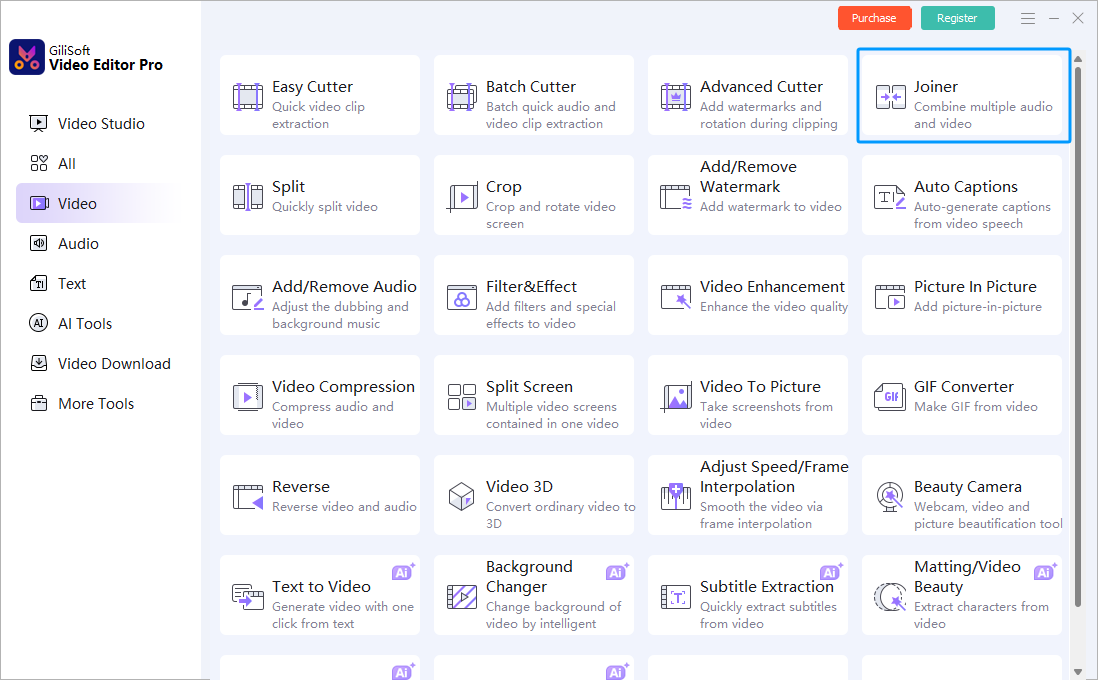
Start GiliSoft Video Editor Pro, select Video, and choose Joiner.
- Add the MP4 files
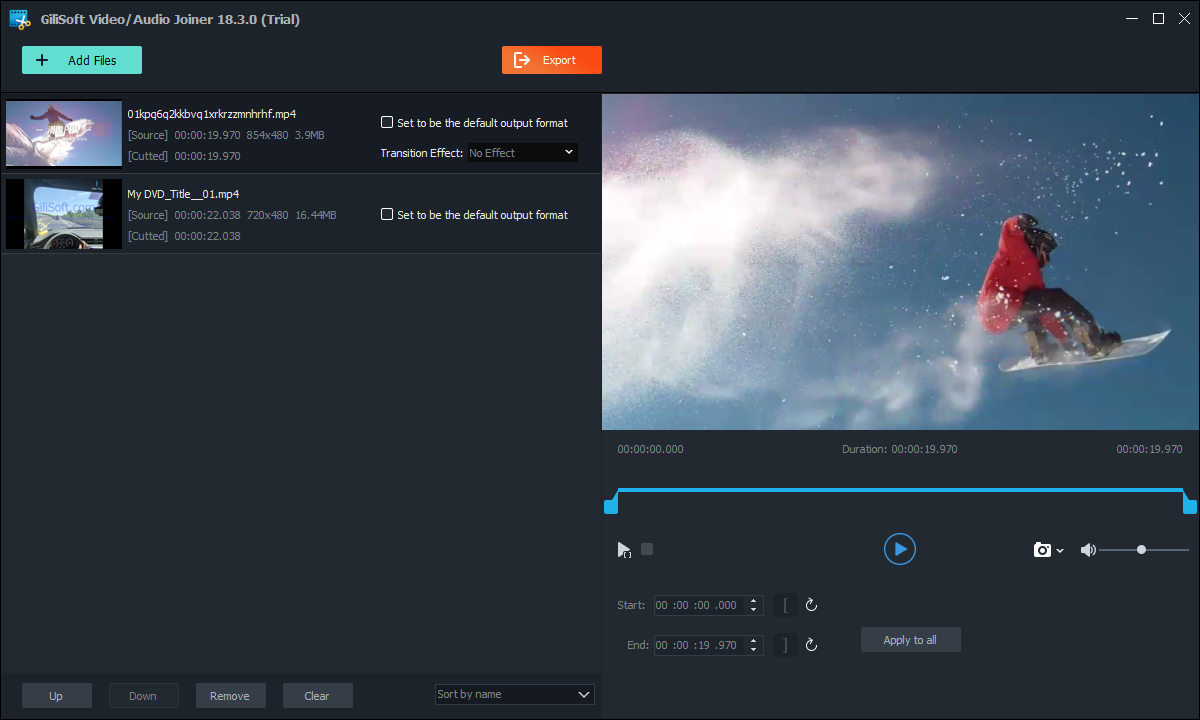
Select the clips that belong in the finished video. Keep a backup of the originals before editing.
- Set the playback order
Use the Up and Down controls to arrange the clips from first to last, and remove any file added by mistake.
- Preview and adjust each clip
Check the start and end positions and apply the same choice across files only when that matches the project.
- Set the default output format and export
If the clips use different formats, select the source format you want as the default output, then click Export. Play the finished file and check every join for gaps, picture changes, and audio sync; an .mp4 extension alone does not guarantee matching codecs.
Use Video Studio only for a more complex edit
The dedicated Joiner is the better fit for straightforward sequencing. Switch to the Video Studio timeline when the finished project needs several video or audio tracks, picture-in-picture, overlays, titles, detailed transitions, or scene-level timing that goes beyond simple joining.
How the free MP4 joiner options differ
Clipchamp: easiest free visual timeline
Import the clips, place them side by side on the timeline, remove unwanted gaps, trim rough edges, and export. It is a practical choice when a new encoded output is acceptable and you prefer a graphical workflow.
FFmpeg: best for controlled command-line joining
FFmpeg provides concat workflows for both compatible streams and projects that need filtering or re-encoding. It is powerful and automatable, but a failed direct join usually means the source streams or timestamps are not compatible.
LosslessCut: fast processing for compatible media
LosslessCut is designed around lossless cutting and stream-copy operations. Its own documentation warns that merged files need matching codec parameters and that more advanced multi-file editing may require separate operations.
Avidemux: simple copy-mode joining
Avidemux suits users who want a lightweight graphical tool for compatible clips. It is less appropriate when the project needs layered audio, titles, overlays, or a polished multi-track timeline.
Online tools: convenient but upload-dependent
An online joiner can handle a small public clip without installation. For client media, internal meetings, family footage, or very large recordings, an offline workflow avoids uploading the source files and usually removes browser-based size limits.
Fix common MP4 joining problems
The files will not join
Compare the codec, resolution, frame rate, audio format, and time base. If they do not match, convert all source clips to one common preset before merging.
The result has audio drift
Variable-frame-rate phone or screen recordings and inconsistent timestamps are common causes. Re-encode the affected clips to a constant, shared output profile, then join the normalized files.
A black frame or gap appears between clips
Check for empty timeline space, unusual first or last frames, and incompatible transitions. Trim the clip edges and preview every join point before final export.
The output is much larger than expected
Review the resolution, frame rate, codec, bitrate, and audio settings. Joining does not require a higher bitrate than the source material unless a different delivery target demands it.
Which MP4 joiner should you choose?
- Simple free visual merge: use Clipchamp.
- Compatible clips with command-line control: use FFmpeg concat.
- Fast stream-copy cuts and exports: try LosslessCut.
- Lightweight graphical copy mode: try Avidemux.
- Small, non-sensitive one-off job: an online joiner may be sufficient.
- Dedicated joining plus broader Windows editing tools: use the GiliSoft Video Editor Pro trial and start with Joiner.
Free MP4 joiner FAQ
Can I join MP4 files for free on Windows?
Yes. Clipchamp, FFmpeg, LosslessCut, Avidemux, and some online tools can combine MP4 files at no cost. The right option depends on whether the clips match and whether you need a visual timeline or command-line control.
Can MP4 videos be merged without re-encoding?
Sometimes. Stream-copy joining works best when the clips have compatible video, audio, time-base, and container parameters. If the files differ, re-encoding is usually the more reliable route.
Why does a joined MP4 have audio sync problems?
Different frame rates, variable-frame-rate recordings, mismatched audio parameters, damaged timestamps, or incompatible time bases can cause drift. Normalize or re-encode the clips before joining when direct concatenation fails.
Is an online MP4 joiner suitable for private videos?
It may be convenient for small, non-sensitive clips, but confidential recordings and large files are generally better handled with offline software so the source media stays on the PC.
When should I use Joiner instead of Video Studio?
Use Joiner for a focused workflow that orders and combines clips. Use the Video Studio timeline when the project needs multiple tracks, overlays, detailed transitions, titles, or more complex scene-level editing.


