CSV, ET, or XLSX to XLS
Prepare an Excel workbook
Bring exported tables and other spreadsheet sources into an XLS workflow. Keep the source and review dates, numbers, formulas, and sheet count.

Turn PDF tables and CSV exports into editable Excel files, convert XLSX to XLS for older systems, and create PDF reports from spreadsheets. Prepare workbooks, data imports, and shareable reports with GiliSoft Excel Converter in Formathor.


GiliSoft Excel Converter brings spreadsheet conversion into GiliSoft Formathor for Windows. Turn CSV exports and ET files into XLS workbooks, move XLSX files to the older XLS format, and extract PDF tables into Excel for editing, filtering, and reconciliation.
When the data is ready to share, convert Excel to PDF for reading and printing, CSV for data imports, or HTML, ODS, and images for publishing and office workflows. Batch conversion helps finance, accounting, operations, and reporting teams prepare repeated file sets without handling every file separately.

Turn database exports, ERP records, and plain-text tables into workbooks for sorting, formatting, and analysis. Review dates, delimiters, and leading zeros before adding your own calculations.
Create XLS workbooks from ET spreadsheets when WPS users and Excel users need to exchange tables and reports. Open the result in the receiving application to check sheets, formulas, and number formats.
Reuse invoices, statements, and tabular reports as editable XLS or XLSX files through PDF to File. Bring rows and columns back into a spreadsheet for filtering, reconciliation, and further analysis.
Prepare legacy Excel files for older reporting systems, templates, and business applications. Keep the XLSX original and review newer workbook features that the older format may not support.
Create text-based table files for database imports, accounting systems, and business applications. CSV is for exchanging cell data, not preserving an entire workbook's formatting, charts, or multiple sheets.
Prepare financial summaries, statements, and report tables for review, printing, and email. Use File to PDF, then check wide columns, page breaks, charts, and the final page count.
Choose HTML for web-oriented content, ODS for spreadsheet exchange, or images for visual table reuse in documents and presentations. Match the output to whether readers need data or a visual report.
Group supported files by conversion task and target format to prepare reporting packs, migrated datasets, and archive copies. Check a representative result before processing the remaining files.

We use it to convert legacy ET and CSV files into Excel formats for monthly reporting, and the table layout remains usable.
Batch CSV to XLS conversion saved us significant cleanup time during ERP data migration projects.
PDF to XLS output is cleaner than expected for tabular invoices, making reconciliation much easier.
XLS to PDF export helped us standardize client-ready reports without formatting shifts across devices.
It is straightforward for non-technical staff and still powerful enough for high-volume spreadsheet conversion work.
We regularly convert spreadsheets to HTML and image formats for publishing, and output consistency has been reliable.
Excel Converter reduced format-compatibility issues between departments using different office suites.
Choose an editable workbook for analysis, a data file for imports, or a fixed report for reading and printing.
Prepare an Excel workbook
Bring exported tables and other spreadsheet sources into an XLS workflow. Keep the source and review dates, numbers, formulas, and sheet count.
Reuse rows and columns
Extract table content for editing and reconciliation. A PDF is not the original workbook, so formulas and workbook logic need separate attention.
Share a finished report
Create a reading or print copy from XLS or XLSX. Check page breaks, wide tables, charts, and page count before sending it.
Exchange table data
Prepare values for a database or business-system import. CSV is not a replacement for a multi-sheet workbook with formatting and charts.
Publish or exchange spreadsheet content
Use HTML for web content, ODS for an office spreadsheet workflow, and images when the visual table is the result you need.
Use PDF to File in GiliSoft Formathor to turn a PDF report into an editable XLS or XLSX workbook.
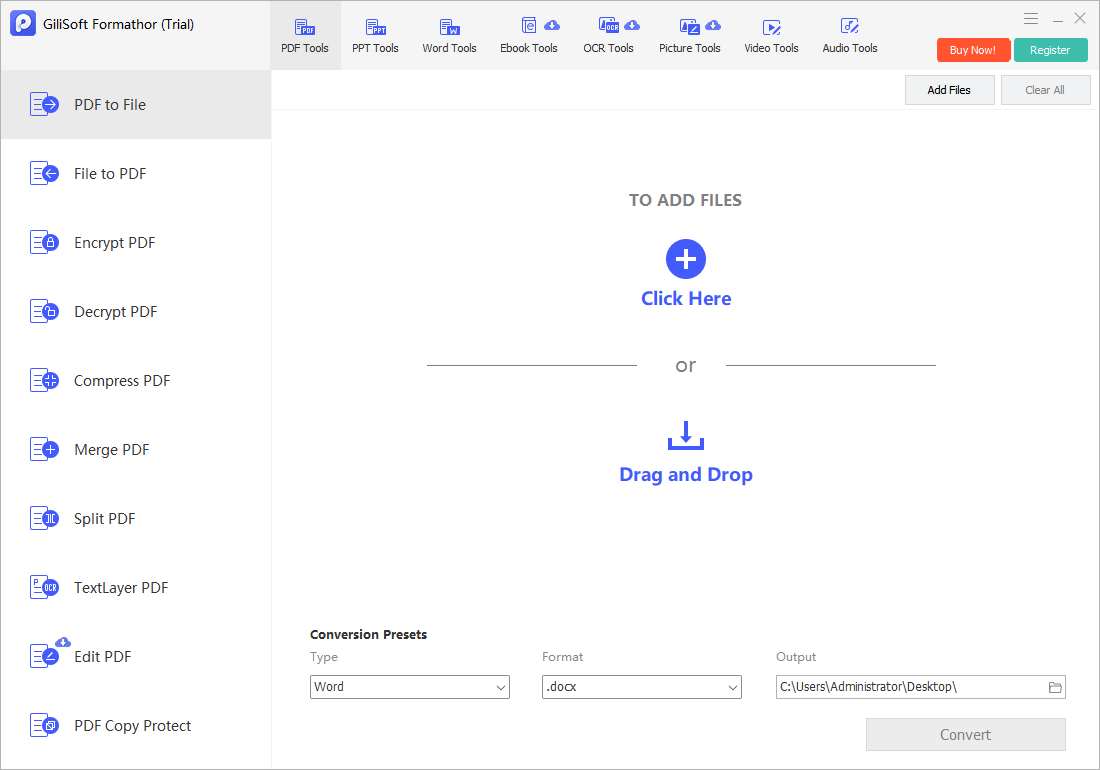
Launch Formathor, open PDF Tools, and select PDF to File. For the reverse direction, use File to PDF.
Use Add Files or drag PDFs into the workspace. Keep the originals for comparing table values and page content.
Set Type to Excel, choose the available XLS or XLSX Format and an Output folder, then run Convert.
Open the result in Excel. Check columns, merged cells, dates, decimal values, leading zeros, and totals before using it in a report.
Explore the two PDF Tools workspaces used for PDF-to-Excel and Excel-to-PDF conversion.
PDF to File provides Add Files, Type, Format, and Output controls. This example shows Word with .docx selected; choose Excel and an available spreadsheet format for PDF-to-Excel conversion.
Choose a guide for reusing PDF tables or preparing a PDF report from Excel.
Convert PDF to Excel Convert Excel to PDF Batch-convert Office files Review converted files Open the User GuideTurn table-based PDF invoices and statements into spreadsheets for reconciliation, then prepare PDF copies of finished financial reports.
Prepare CSV and Excel files for business-system imports, data cleanup, and recurring reporting. Check field formats and record counts before importing.
Exchange ET and Excel files, or create XLS copies for an older application while retaining the original workbooks for continued editing.
Batch-prepare report sets and choose PDF, HTML, ODS, or images according to how the recipients will read, publish, or reuse the content.
GiliSoft Excel Converter is the spreadsheet conversion toolset included in GiliSoft Formathor. The download and purchase links on this page are for Formathor on Windows. PDF to Excel and Excel to PDF are available through PDF Tools, alongside the suite's other document conversion tasks.
A free trial is available through the Formathor download. Paid Formathor licenses are available for the full product. Use the trial to evaluate your own spreadsheets and output formats, and check the selected tool's trial and activation screens for its limits before choosing a license.
In Formathor, open PDF Tools and select PDF to File. Add your PDF files, choose Excel in Type and an available XLS or XLSX Format, set the Output folder, and run Convert. Open the result in Excel to review column alignment, numbers, dates, merged cells, and totals before using the data.
Open PDF Tools and choose File to PDF. Use Add Files to load the supported XLS or XLSX workbook, choose the Output folder and watermark settings, and run Convert. Open the PDF and check page count, wide columns, charts, and page breaks before printing or sending it.
CSV stores table text and values, not a complete workbook with multiple sheets, formatting, charts, and working formulas. CSV to XLS creates a workbook for further editing; it cannot restore features missing from the source. For XLS to CSV, check which sheet was exported, row and column counts, delimiters, character encoding, dates, and leading zeros. Microsoft's CSV format guidance explains these format limitations.
Choose XLS when an older application or reporting system requires the legacy Excel format. Keep the XLSX original for ongoing work. Newer workbook features and larger worksheets may not fit the older format, so open the converted file in the receiving application and check sheets, formulas, charts, and totals.
Yes. Group supported source files by conversion task and target format, choose an output folder, and process the batch. PDF Tools provides Add Files for loading several sources. Review one representative file first, then check the output file count and open several results. Batch conversion does not mean merging multiple workbooks into one.
PDF to Excel reuses the content of PDF pages; it does not recover the original spreadsheet's formulas, macros, or workbook logic. Image-only scans need text recognition before their contents can become reusable text. OCR alone does not recreate missing formulas or guarantee correct table structure. Review recognition errors, merged cells, row breaks, and totals before using the converted data.

Editors highlighted spreadsheet conversion quality and compatibility across common office formats.
Batch tools were noted as useful for Excel migration, reporting, and archival preparation.

Reviewers praised consistency on large spreadsheets and mixed-format input sources.
Coverage emphasized fewer compatibility issues and less manual reformatting across departments.

Independent notes described the suite as dependable for spreadsheet conversion and recurring office tasks.
PDF-table conversion and batch export options were highlighted for repeated business operations.
Get GiliSoft Excel Converter in Formathor to reuse PDF tables, prepare Excel workbooks, and create the reports and data files your team needs.


Enter your email address to get our latest newsletter