Batch Re-creation
Generate fresh versions of existing clips
Load files or a folder, choose Re-creation Settings, and create output files with your selected frame, style, and timing changes.

Create fresh video versions without rebuilding every edit. Combine batch re-creation, visual effects, and timing changes, then finish with captions, music, and branding on Windows.


GiliSoft Video UniReel turns existing footage into fresh video versions for social publishing, marketing campaigns, product demonstrations, and training. Batch re-creation brings together frame processing, visual treatments, framing, and timing changes, so you can refresh a clip library without rebuilding every edit from scratch.
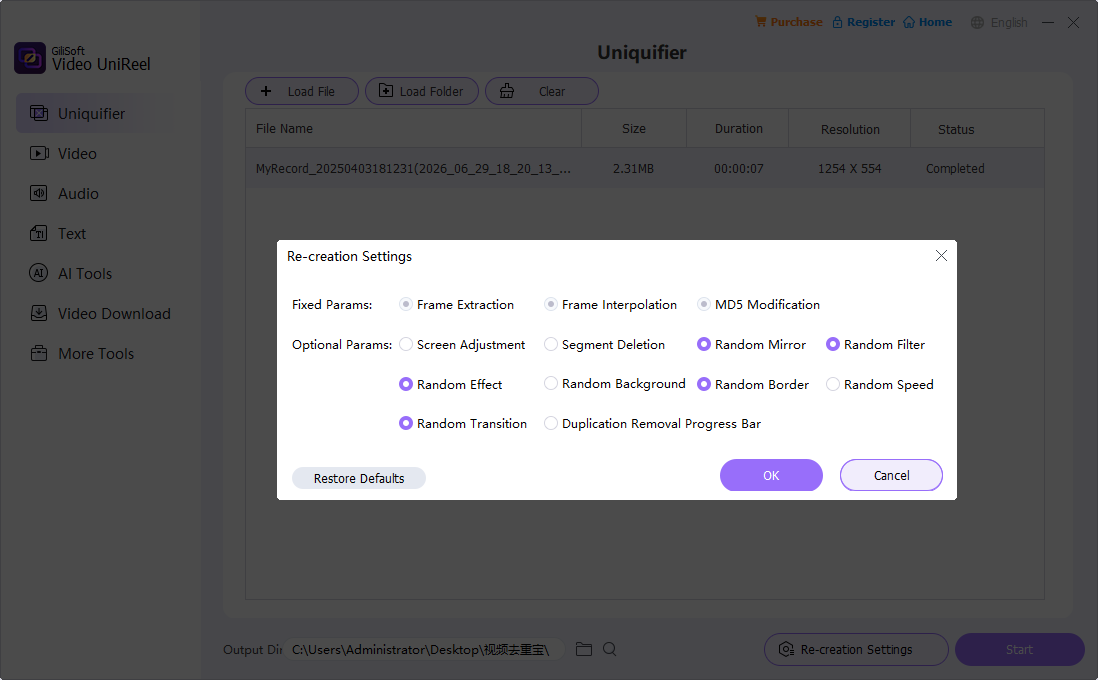
Start in the Uniquifier workspace: load files or a folder and open Re-creation Settings. Review the fixed frame-processing parameters, then choose optional mirror, filter, effect, background, border, speed, transition, screen, or segment changes. Set the output directory and generate new files while keeping your source footage separate.
For a finished release, open the generated video in the built-in cutting, joining, caption, watermark, or audio tools. The additional Text and AI Tools workspaces provide document and text-based creation, subtitle extraction, and other supporting tasks, keeping video variation and finishing within one Windows application.

Use Load File or Load Folder to bring clips into the Uniquifier workspace. Apply your chosen re-creation settings to a batch and follow each file's processing status in the list.
Rework timing and motion with the re-creation workflow and optional Random Speed. Frame Extraction and Frame Interpolation are listed as fixed parameters; the Video workspace provides a separate speed/frame interpolation tool for focused edits.
Combine Random Mirror, Random Filter, and Random Effect to explore new looks for existing footage. Choose a treatment that fits a campaign, clip series, or refreshed video presentation.
Use Random Background, Random Border, Screen Adjustment, and Random Transition options to change the presentation. Give related videos a fresh frame or a different visual treatment.
Use Easy Cutter, Batch Cutter, Advanced Cutter, Joiner, Split, and Crop/Rotate for structural changes. Prepare shorter edits, combine clips, and adjust the picture before delivery.
Finish generated clips with Auto Captions and Add/Remove Watermark tools. Add context and current branding to course lessons, product demonstrations, and campaign videos.
Use Add/Remove Audio to change background music or dubbing. The Audio workspace also provides cutting, joining, reversing, silence removal, and text-to-audio tool entries.
Explore document and text-to-video tools, subtitle extraction, background changes, shot splitting, and other AI-assisted tasks. These workspaces support projects that need more than visual variation alone.

Preparing alternate versions from the same approved footage now takes much less repetitive editing.
We can test a small group of changes, preview the result, and reuse the setup across similar campaign clips.
The built-in subtitle, watermark, and audio tools are useful because each variant can be finished before export.
Use Uniquifier for the main variation job, then open the tools needed to finish each new version.
Generate fresh versions of existing clips
Load files or a folder, choose Re-creation Settings, and create output files with your selected frame, style, and timing changes.
Refine the generated version
Open the result in a cutter, caption, watermark, filter, or audio tool when the next version needs additional editing or branding.
Prepare text, sound, and source material
Use the Audio, Text, Video Download, and AI Tools workspaces for the related tasks needed by your project.
Load the footage, choose a re-creation setup, generate new files, and complete any finishing edits.
Open Uniquifier and use Load File or Load Folder to add the source videos. Check the file list and choose which clips to process.
Open Re-creation Settings. Review the fixed parameters, then choose optional mirror, filter, border, speed, transition, screen, or segment changes.
Choose a separate destination for the generated videos, confirm the settings, and select Start. Check a sample result before running a larger batch.
Use the Video or Audio tools for any extra captions, branding, cuts, or music. Play the finished file and check framing, motion, and sound.
Explore the core re-creation settings and the separate Video, Audio, Text, Video Download, and AI Tools workspaces.
Refresh a clip series with different visual treatments, timing, framing, and captions. Prepare new edits from your existing footage for the next publishing cycle.
Create alternate campaign and product-demo versions with current branding, music, and presentation. Batch re-creation reduces repeated setup across a group of clips.
Update lessons and training videos with new captions, shorter edits, and revised audio. Keep useful source material while refreshing how it is presented.
Prepare multiple client deliverables with a repeatable re-creation workflow and related finishing tools. Keep source files, generated versions, and final edits organized separately.
GiliSoft Video UniReel is Windows video repurposing software for creating fresh versions of existing footage. Its Uniquifier workspace combines frame processing with optional mirror, filter, effect, background, border, speed, transition, screen adjustment, and segment deletion settings. Video, audio, text, and AI workspaces provide related preparation and finishing tools.
Yes. The Uniquifier workspace provides Load File and Load Folder controls, a file list with processing status, an output directory, and a Start button. Add the clips, choose the re-creation settings, and select a separate destination for the generated files. Check a sample before processing a larger folder.
Load the source in Uniquifier and open Re-creation Settings. Review the fixed parameters and choose the optional visual or timing changes you want. Confirm the settings, set Output Dir, and select Start. Open the generated video in the relevant finishing tool if it also needs cuts, captions, a watermark, or a different audio track.
Yes. The Video workspace includes Auto Captions, Add/Remove Watermark, Add/Remove Audio, cutting, joining, and filter tools. Use these tools to finish the generated video with captions, music, and branding. These are separate editing tasks rather than options automatically applied by the Uniquifier settings panel.
MD5 is a fingerprint of file data, not a measure of visual originality. The MD5 Modification setting concerns the generated file's data and is different from an editorial change. Frame, visual, timing, caption, and audio tools are the controls that change how the finished video looks and plays.
Visual effects, changed framing, frame processing, and speed adjustments can alter the picture or motion, so they are not a promise of lossless output. Keep the source unchanged, test a representative clip, and review faces, fine text, scene changes, motion, and audio synchronization before processing a larger job.
Text provides Doc To Video, Text to Video, Subtitle Extraction, and Text to Audio entries. AI Tools includes Auto Captions, Background Changer, Shot Split, Silence Remove, video watermark removal, and face-swap entries. Open the specific tool for its own settings and any processing or activation requirements; these are separate from batch re-creation.
A trial download is available. The $59.95 Buy Now offer on this page is the Lifetime / 1 PC license. The purchase page also lists one-year, three-PC lifetime, and team or OEM options. Choose the license that matches the number of computers and the deployment you need.
Batch re-create your clips, explore a new look, and finish each video with the captions, sound, and branding it needs.


Enter your email address to get our latest newsletter