

Can screen recording be completely prevented?
File encryption protects the video while it is stored or delivered. Anti-capture controls act while the video is visible. Watermarks add accountability, while password and device rules decide who can reach playback.
Understand the recording routes
Different capture routes require different controls. Treating them as one problem leads to weak protection and unrealistic claims.
| Recording route | Most useful control | What remains |
|---|---|---|
| Screenshot tools and desktop recorders | Protected player and anti-capture settings | Coverage depends on the capture method and playback environment |
| Playback on another PC | PC binding and machine-code passwords | Approved devices still require management |
| Copied package on another USB drive | USB binding | The authorized USB drive must be available |
| Recording redistributed online | Viewer-specific dynamic watermark | The copy may exist, but attribution becomes easier |
| Shared or leaked password | Expiration, play-count limits, blacklist revocation | Fixed offline passwords cannot always be recalled |
| External phone or camera | Visible identity watermark and access controls | A physical camera cannot be blocked by software |
Use layered video protection
Configure GiliSoft Video DRM Protection
- Import the videos and supporting content.Add course, training, demo, or premium media files to the protected project.
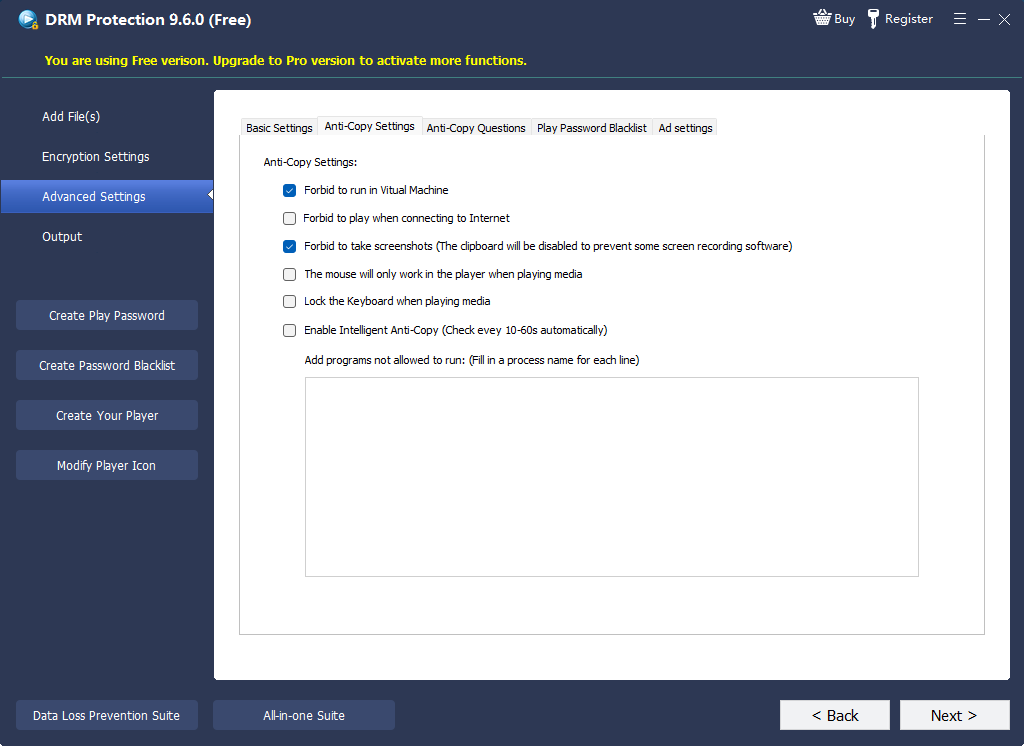
- Open the anti-copy settings.Enable the capture-deterrence controls required for the intended playback environment.
- Add a password and binding rule.Use a simple offline password or generated access tied to an approved PC or USB drive.
- Configure dynamic watermarking.Display traceable viewer information without covering essential content.
- Set expiration and playback limits.Match the validity period and allowed plays to the project.
- Export and test the package.Test on approved and unapproved devices before delivery.
Why dynamic watermarking matters
Capture blocking tries to stop a recording. Dynamic watermarking changes the consequences if recording still occurs. A visible viewer name, account, machine code, or transaction reference discourages casual redistribution and helps trace a leaked copy.
For high-value training, coaching, partner previews, and internal compliance videos, a strong practical combination is device-bound playback, a readable dynamic watermark, a short access period, and a revocable password.
Test the playback environment
- Try Windows screenshot and recording tools
- Try a commonly used desktop recorder
- Test approved and unapproved PCs
- Test the authorized USB binding rule
- Review watermarks in bright and dark scenes
- Verify expiration and play-count behavior
- Confirm blacklist revocation
- Check playback on typical viewer hardware
Where this approach fits
Frequently asked questions
Can any software block every screen recorder?
No. Supported operating-system mechanisms can exclude or blank protected windows in certain capture paths, but Microsoft explicitly notes that this is not a guaranteed DRM boundary. A separate camera remains outside software control.
What does a viewer see when capture is blocked?
Depending on the recorder and system, the protected area may be absent or blank. Test the Windows versions and capture tools used by the audience.
Does a watermark prevent recording?
No. It deters sharing and helps trace a leak. Use it with protected playback, device binding, and access limits.
Is video encryption alone enough?
No. Encryption protects the stored file. Once a viewer sees the picture, playback controls and watermarking address the separate capture risk.
What is the difference between anti-capture and DRM?
Anti-capture focuses on recording routes during playback. DRM also controls passwords, devices, validity, play counts, watermarking, and revocation.
Sources and further reading
- Microsoft: SetWindowDisplayAffinity and Windows capture behavior
- Android Developers: FLAG_SECURE capture restrictions
- Google for Developers: Widevine DRM overview
- Vimeo: password-protected video access
Protect video playback with more than a password
Combine capture deterrence, PC or USB binding, dynamic watermarking, expiration, and blacklist revocation.
View Video DRM Protection