
Plan the PDF Before Combining Images
Image-to-PDF conversion places raster images onto document pages. It is useful for scanned receipts, forms, photographed notes, evidence packets, and screenshots, but the source image quality sets the ceiling for readability.
Decide the page order, orientation, page size, margins, and whether images belong in one PDF or separate files. Rotate camera photos and remove duplicates before conversion.
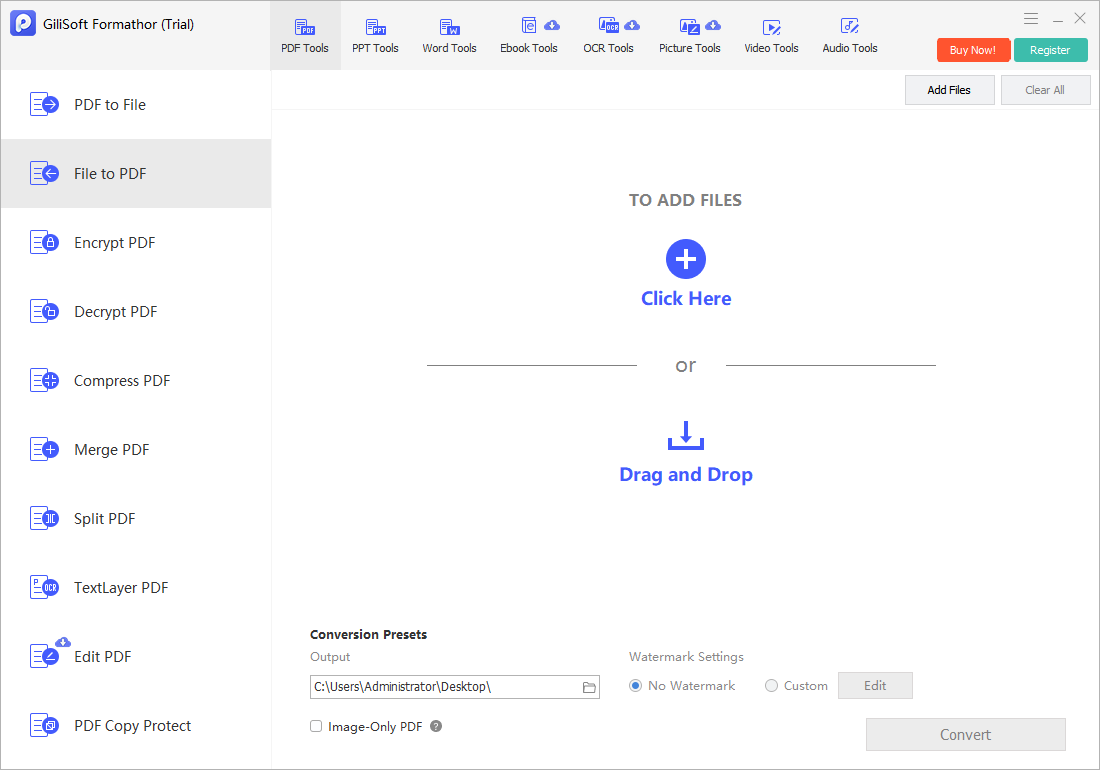
Convert Images to PDF with GiliSoft Formathor
Open File to PDF in GiliSoft Formathor, add supported image files, arrange the intended sequence, and save the PDF locally.
- Prepare source images.
Rotate, crop, and check clarity without overwriting the only original. - Create a dedicated file set.
Rename images in order and remove thumbnails, duplicates, or unrelated screenshots. - Open File to PDF.
Add the images and confirm their sequence before conversion. - Choose the destination.
Use a descriptive PDF filename and a folder with enough free space. - Inspect the finished PDF.
Check page order, orientation, margins, resolution, text clarity, and total file size.
Match Image Sources to PDF Page Settings
| Image source | Preparation | PDF check |
|---|---|---|
| Scanned documents | Deskew, crop borders, and confirm contrast | Text readability and consistent page size |
| Phone photos | Correct rotation and perspective | Shadows, glare, and clipped corners |
| Screenshots | Remove private UI and irrelevant areas | Pixel dimensions and text sharpness |
| Mixed portrait and landscape images | Choose whether to rotate or preserve orientation | Page consistency and viewing comfort |
| High-resolution photos | Keep originals and consider output size | Image detail versus PDF file size |
Common Image to PDF Converter Workflows
Receipt packets
Combine expense images in chronological or account order.
Signed forms
Package authorized scans into a single review file.
Project evidence
Place annotated photos and screenshots into a predictable sequence.
Archive copies
Create a convenient PDF while retaining original image masters separately.
GiliSoft Formathor keeps PDF, Office, image, OCR, and related document conversion tools in one Windows application. Test a representative copy before processing important originals or a large batch.
Fix Common Conversion Problems
| Problem | Likely cause | Practical check |
|---|---|---|
| Pages are in the wrong order | Files were sorted lexically rather than numerically | Rename with zero-padded numbers before adding |
| Some pages are sideways | EXIF orientation was not interpreted consistently | Rotate source copies explicitly |
| Text is hard to read | The photo is blurred, skewed, dark, or compressed | Rescan or rephotograph before conversion |
| The PDF is very large | Many high-resolution images were embedded | Use suitable image dimensions and compression for the destination |
| Search finds no text | The PDF contains page images only | Run OCR and verify recognition when searchable text is required |
Image to PDF Converter FAQ
Can I combine multiple JPG and PNG files into one PDF?
Yes. Add supported images, arrange them in the intended order, convert, and inspect the full PDF before deleting or moving the sources.
Why are PDF pages sideways?
Camera orientation metadata may be interpreted differently. Rotate prepared copies explicitly before conversion and verify portrait and landscape pages.
Will text in the images become searchable?
Not through image placement alone. Use OCR to create recognized text, then proofread names, numbers, and punctuation.
How can I reduce the PDF file size?
Use image dimensions and compression appropriate for the destination. Keep higher-quality originals separately because aggressive compression cannot be reversed.
Should I delete the source images after conversion?
No, not immediately. Keep the original images until the PDF has been reviewed, backed up, and accepted for its intended use.
Related File Conversion Guides
- PDF to image converter
- Word to PDF converter
- Excel to PDF converter
- Batch Office file converter
- Offline PDF converter
- Formathor User Guide
Combine Images into an Ordered PDF
Prepare the source images, arrange the page sequence, convert locally, and verify readability before delivery.