
The Quick Answer
A GFX package is useful for offline training, private previews, classroom libraries, internal demonstrations, event videos, and client delivery where the recipient should watch approved content without receiving the original source file. It is file-level protection: you can copy the protected package to suitable storage while keeping normal playback behind password verification.
What Does It Mean to Package a Video as a GFX File?
Packaging changes the delivery format, not the creative content. GiliSoft Any Video Encryptor reads the selected videos and produces protected output that is opened through its controlled playback workflow. The recipient does not double-click an ordinary MP4 in a general-purpose player; the GFX package must be opened through the supported GiliSoft player and unlocked with the correct password.
What GFX gives you
Password-verified playback, encrypted delivery, support for packages beyond the EXE size limit, and a controlled player that reduces casual screenshot and Save As reuse.
What GFX does not become
It is not a universal MP4 replacement, a streaming platform, or a full licensing server. Generic TV, phone, browser, and media-player compatibility should not be assumed.
When Is GFX Video Packaging the Better Choice?
Choose EXE video packaging when a self-running Windows package is more convenient and the final output remains within the EXE limit. Choose Video DRM Protection when credentials, device rules, dynamic watermarks, and password blacklist management matter after delivery.
GFX vs EXE, ZIP, and Drive Encryption
| Method | Best use | Recipient experience | Main consideration |
|---|---|---|---|
| GFX package | Large protected video or mixed-media delivery | Open with the GiliSoft protected player and enter the password | Requires the supported player |
| Windows EXE package | Convenient self-running delivery below the package limit | Run the EXE and verify access | Windows security policy or SmartScreen may inspect executable files |
| Password ZIP/7z | Secure transport of source files | Extract first, then play the ordinary video | The decrypted MP4 becomes reusable |
| Encrypted USB/drive | Protect everything stored on one removable device | Unlock the drive, then use normal files | Protects the storage device rather than the video playback process |
| Video DRM | Paid training or licensed distribution | Use controlled credentials and playback rules | More administration than simple password packaging |
CISA distinguishes file encryption from drive encryption: file encryption protects selected content, while drive encryption protects removable media as a whole. GFX belongs to the file/package side of that decision. It is appropriate when the video package itself must remain protected even after it is copied away from the original workstation.
Before You Build the GFX Package
- Keep the master files
Retain verified originals in a separate backup location. - Estimate output size
Confirm the destination has enough free space for the complete protected package. - Choose a strong password
Use a long, unique password and send it through a different channel from the package. - Confirm Windows playback
Check that recipients can use the supported protected player on their computers.
How to Package Videos as GFX Files
- 1Open Any Video Encryptor and add the source files.Select one video or a related group of videos, audio files, images, and documents for the protected package.
- 2Review the file list before continuing.Remove accidental files and confirm the project contains only content intended for the recipient.
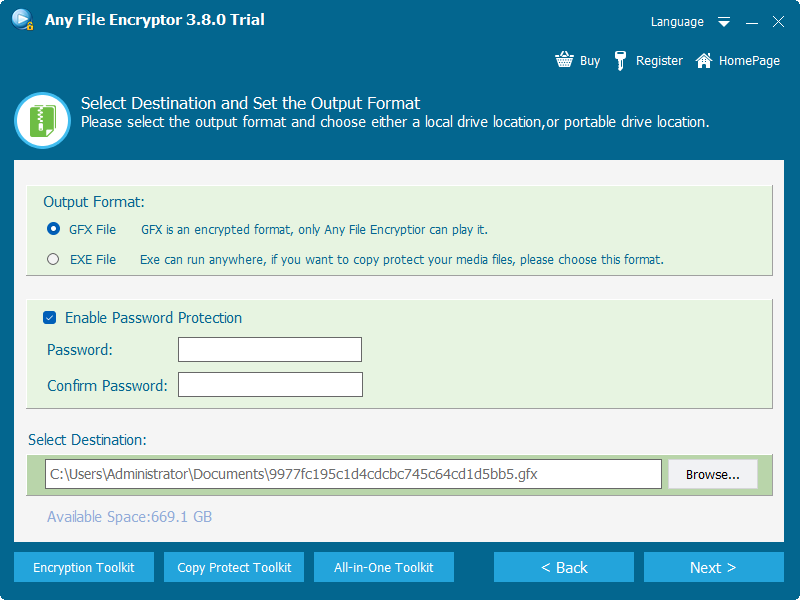
- 3Select GFX as the output format.Use GFX for protected-player delivery, especially when the completed package may be larger than the EXE limit.
- 4Enable password protection.Enter and confirm a unique playback password, then choose the output destination.
- 5Create and test the protected package.Open the result through the protected player, verify the password, and review several points in every important video.
- 6Deliver the GFX package with clear playback instructions.Tell the recipient which official player to use and send the password separately.
Plan the Recipient's GFX Playback Experience
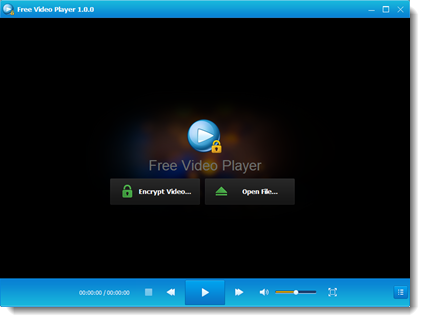
A protected package succeeds only if the recipient understands how to open it. Include the official player source, supported Windows requirement, package name, password-delivery method, and a support contact. Do not rename the GFX extension or tell recipients to open it with Windows Media Player, VLC, a browser, or a mobile video app.
If the audience expects one double-clickable Windows file, compare the EXE package workflow. Microsoft explains that downloaded executable files may be evaluated by SmartScreen using publisher and file-reputation signals, so managed computers can treat EXE delivery differently from a data package opened by an approved player.
Large GFX Files, USB Drives, and File-System Limits
GFX solves the product's EXE package-size constraint, but the destination drive still matters. Microsoft documents a maximum single-file size of 4 GiB for FAT32. A GFX package above that limit cannot be copied to a FAT32 USB drive even when the drive has plenty of free space.
| Destination | Use for large GFX packages? | What to check |
|---|---|---|
| NTFS drive | Yes | Strong Windows compatibility and large-file support; confirm recipient permissions and device compatibility. |
| exFAT USB drive | Yes | Designed for large files and removable storage; confirm every target device supports exFAT. |
| FAT32 USB drive | No for files above 4 GiB | Reformat only after backing up the drive because formatting erases existing contents. |
| Cloud download | Usually, subject to service policy | Check upload limits, recipient download access, transfer time, and whether the service modifies file names. |
For a USB-focused workflow, see How to Encrypt Video for USB Delivery. If the goal is to lock the complete removable drive rather than one video package, compare GiliSoft USB Encryption.
GFX Video Delivery Checklist
- Source verified
The correct final videos were packaged and the masters are backed up. - Password tested
The package opens with the intended password on a second Windows PC. - Player confirmed
The recipient has the official protected playback method. - Storage compatible
NTFS or exFAT is used when one package exceeds FAT32's 4 GiB limit. - Password separated
The password is not sent in the same message as the protected package. - Original not exposed
No unprotected MP4 was accidentally copied beside the GFX file.
Package Videos as GFX FAQ
What is a GFX video file?
It is GiliSoft encrypted output created for password-verified playback through the protected player. It is not an ordinary video format such as MP4, AVI, or WMV.
When should I use GFX instead of EXE?
Use GFX when the final protected package is larger than the EXE workflow's 4 GB limit, when mixed files belong in one delivery, or when using a dedicated protected player is acceptable.
Can VLC or Windows Media Player open GFX?
No. Generic media players do not understand the protected GFX package. Use the supported GiliSoft protected player.
Can a GFX file be copied to USB?
Yes. Use NTFS or exFAT when the file is larger than 4 GiB. FAT32 cannot store one file above that limit.
Does GFX packaging reduce video quality?
The purpose is protection and packaging rather than creative re-editing. Test representative scenes after export to confirm the actual playback result for your source files and settings.
Can I revoke a GFX password after delivery?
Simple GFX password packaging does not provide the same online blacklist workflow as Video DRM Protection. Choose DRM when access may need to be revoked later.
Sources and Further Reading
The following official references support the general storage, encryption, and Windows-delivery guidance used in this article:
- CISA: How to Protect Data Stored on Your Devices - distinctions among file, drive, and device encryption, plus backup and password preparation.
- Microsoft: File System Functionality Comparison - FAT32's 4 GiB maximum file size and large-file support in NTFS/exFAT.
- Microsoft: exFAT File System Specification - exFAT design support for very large files and storage devices.
- Microsoft: SmartScreen Reputation for Windows Apps - how downloaded executable reputation and publisher signals are evaluated.
- NIST SP 800-12 Rev. 1 - cryptography as a means of supporting confidentiality and integrity.