
How to Recover Files After Shift+Delete on Windows
Pressed Shift+Delete and confirmed the deletion? The files bypass the Windows Recycle Bin, so there is no normal Restore option there. A backup may still contain a copy, or a recovery scan may find data that remains on the original storage.
Quick answer
Stop writing to the drive where the files were deleted. Check an existing backup or cloud recycle bin first. If no copy remains, use Deletion Recovery in GiliSoft Data Recovery to scan the original folder or drive. Preview supported results and recover to a different physical drive. Ctrl+Z does not reverse a completed Shift+Delete, and recovery is not guaranteed.
What Happens When You Press Shift+Delete?
In Windows File Explorer, ordinary deletion typically moves an item to the Recycle Bin. Shift+Delete bypasses that intermediate step. The file is removed from the normal folder view and its storage can become available for reuse.
| Action | Recycle Bin | Recovery route |
|---|---|---|
| Ordinary Delete on a supported local location | Usually retains the item | Restore it while it remains in the bin |
| Shift+Delete, confirmed | Bypassed | Existing backup or a scan of the original storage |
| Empty Recycle Bin | Items removed | Existing backup or appropriate recovery scan |
Permanent deletion is not the same as secure erasure. Some content may remain, but new writes or SSD TRIM can make it inaccessible. A recently deleted file is not automatically recoverable, and there is no guaranteed recovery window.
What to Do Immediately After Shift+Delete
- Stop using the affected storage. Do not copy, download, install, or save new files there.
- Write down the original location. Note the drive, folder, file names, and types you remember. The original location is the source to scan, not the Recycle Bin.
- Prepare another physical drive. It needs room for recovered output. A new folder or another partition on the affected device is not the preferred destination.
- Keep the installer off the source. If files were on C:, even running recovery from elsewhere does not stop normal Windows writes. For irreplaceable system-drive data, consider shutting down and getting qualified help to recover from another computer.
Check for a Copy Before Scanning
File History or a backup drive
If File History was already protecting the folder, connect its backup drive and open Control Panel > System and Security > File History > Restore personal files. Find a version from before deletion and restore to a separate destination where available.
You can also inspect the original parent folder's Properties > Previous Versions for available backed-up copies. Enabling backup now cannot recreate a past version that was never saved.
OneDrive or another cloud account
For a synced file, check the service's web recycle bin in the correct account. Shift+Delete on the PC does not mean every retained cloud copy has also disappeared. Conversely, synchronization is not a guarantee that a deleted file remains available.
If the missing item was cloud-only and never downloaded, a scan of the PC cannot recover content that was never stored there. Use another device to check cloud copies when the affected source is the Windows system drive.
Shared copies and previous exports
Check an external backup, an email attachment you sent, or a colleague's authorized project copy. An older version may be more useful than an incomplete recovery result. Verify its date and contents before replacing anything.
How to Recover Shift-Deleted Files with GiliSoft
Use this route when no usable backup remains and the source drive is readable and appears healthy. Prepare a separate drive for output before starting.
Choose the mode that matches the deletion
Open GiliSoft Data Recovery and choose Deletion Recovery for accidental deletion or Shift+Delete. For Shift+Delete, start with the original drive or folder rather than treating the Windows Recycle Bin as the source.
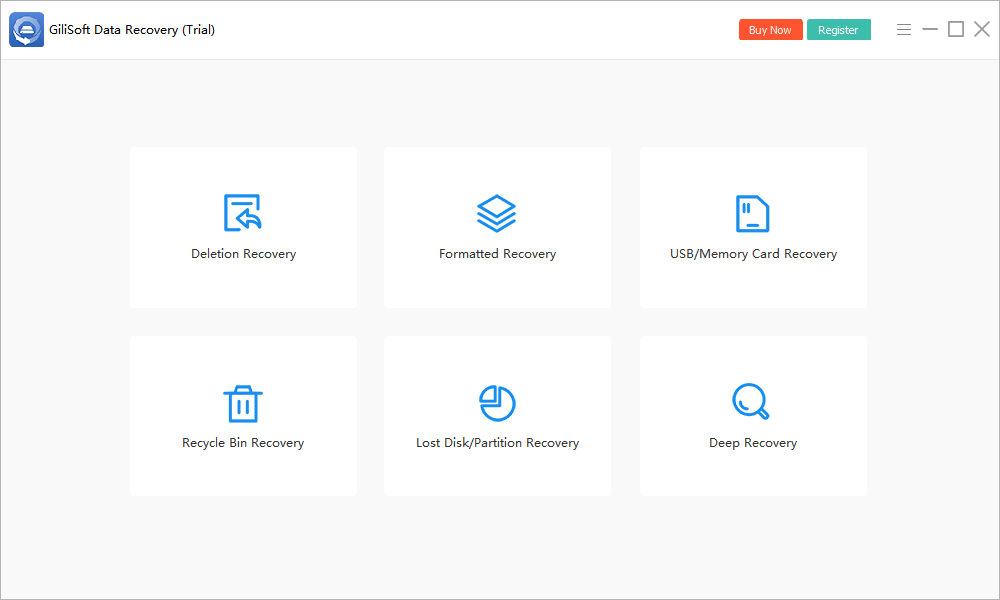
- Select the original location.
Choose the drive or folder where the files existed. The screen includes Desktop, Recycle Bin, Select Folder, and available partitions.
- Start the scan.
Click Scan and allow the search to proceed without saving new data to the source.
- Review recoverable results.
Look for relevant names, paths, and file types where available. Preview supported files and prioritize irreplaceable documents, photos, and projects.
- Recover to a different physical drive.
Select the results you need and use the recovery action. Choose a destination outside the affected device, not another folder on it.
- Open and verify the output.
Check documents, view photos at full size, play videos, and test important archives. A listed filename does not prove the contents are intact.
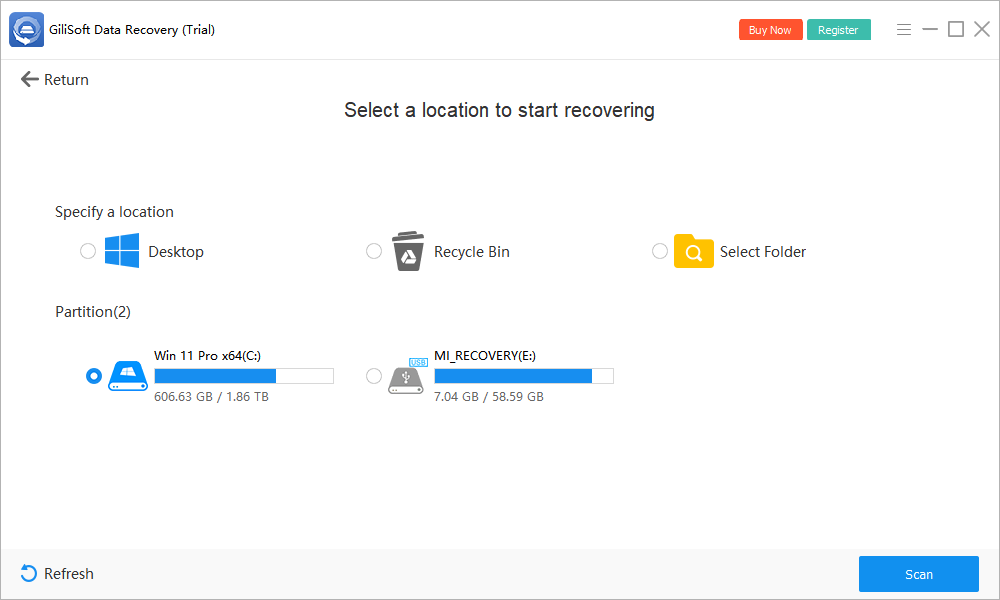
If the initial search finds too little, Deep Recovery is another available mode for healthy storage. It can take longer and may not preserve original names or folders. It cannot recreate overwritten data.
See the GiliSoft Data Recovery User Guide for other loss scenarios. Check the installed trial's current recovery limits before relying on it for a large restore.
Choose the Correct Source and Destination
| Where deletion happened | Source to scan | Destination |
|---|---|---|
| Desktop or Documents on C: | The actual folder or its underlying volume; check whether it was redirected to OneDrive | A separate physical drive, with system-drive precautions |
| A data folder on an internal drive | The drive or folder that contained the deleted items | Another physical device with sufficient space |
| A USB flash drive or memory card | The connected removable device | A healthy internal or external drive, not that device |
| A network share | Check with the server owner or administrator | Restore from server-side backups where available |
For example, if a folder was deleted from an external drive E:, scan E: and save results to a separate drive. Do not create a recovery folder on E: merely because it has free space.
What If the Scan Does Not Recover Your Files?
No matching files appear
Confirm the original location and whether the file was genuinely stored locally. On healthy storage, consider the available Deep Recovery mode. If the data was overwritten or is no longer readable after SSD TRIM, more scanning cannot recreate it.
Names or folder structure are missing
A scan may identify file content without the original directory records. Review file types and supported previews instead of searching only by name. Recover useful candidates to another device and organize them afterward.
The file is found but damaged
A filename or size can survive even when content does not. Open recovered documents, inspect images, play videos, and test archives outside the recovery software. Look for an intact backup or another version if the exported file fails.
The drive becomes unstable
Stop when it clicks, repeatedly disconnects, or disappears. A logical-deletion guide is not a substitute for physical recovery work. Seek specialist advice for valuable data rather than running repeated scans.
Shift+Delete Recovery FAQ
Can I undo Shift+Delete with Ctrl+Z?
Not after a permanent deletion has completed in File Explorer. Ctrl+Z is not a recovery method for Shift-deleted files. Look for a backup or scan the original storage if the data may still be available.
Does Shift+Delete erase every byte immediately?
Shift+Delete bypasses the Recycle Bin; it is not the same as a secure wipe. However, overwriting and SSD TRIM can make the content unavailable. Do not assume the data remains recoverable.
Can I recover Shift-deleted files without a backup?
Possibly. Scan the original location with Deletion Recovery in GiliSoft Data Recovery if the storage is healthy. Success depends on whether usable data remains; no recovery tool can guarantee restoration.
Can I recover an entire Shift-deleted folder?
A scan may find some or all of its files, but original names and folder structure may be missing. Review individual results and verify important files after saving them to another physical drive.
Can Command Prompt or CHKDSK undo Shift+Delete?
No. ATTRIB changes file attributes, and CHKDSK checks or repairs a file system; neither reverses a completed permanent deletion. Avoid source-modifying repair attempts while deleted-file recovery is the priority.
Why does a recovered file have the right name but not open?
The file record can survive even when its contents are incomplete, overwritten, or otherwise unavailable. A matching name and size do not prove successful recovery. Verify the exported file in its normal application.