
Word to File and File to Word Converter
For word to file and file to word converter, select the target according to the next application and verify a representative result before processing the remaining files.
Quick answer
Use File to Word for editable narrative output and Word to File for another delivery format. Conversion may change pagination, fonts, tables, fields, and embedded objects. Preserve the source, test a representative file, and approve the result in its destination application.
Choose the Output for the Next Task
| Next task | Likely output | Verify |
|---|---|---|
| Fixed viewing, printing, or delivery | Pages, margins, fonts, images, links, and file size | |
| Narrative editing | Word | Paragraphs, headings, lists, tables, and page breaks |
| Table and numeric reuse | Excel | Rows, columns, dates, decimals, formulas, and totals |
| Presentation reuse | PowerPoint | Slide order, dimensions, fonts, charts, images, and media |
| Image-only scan | OCR or searchable text layer | Language, names, numbers, columns, and reading order |
| Reader-oriented publication | eBook format | Chapters, navigation, text flow, images, and encoding |
Prepare the Source Files
- Keep untouched originals.
Write every result to a separate output folder with clear names.
- Open each source.
Identify damage, passwords, missing fonts, hidden content, unsupported media, or linked resources.
- Separate source families.
Do not mix scans, editable PDFs, Office files, images, and protected exceptions blindly.
- Select representative tests.
Include common files and the hardest layout before starting a full batch.
- Define acceptance checks.
Decide who will verify layout, text, data, images, links, accessibility, and confidentiality.
Complete the Task with GiliSoft Formathor
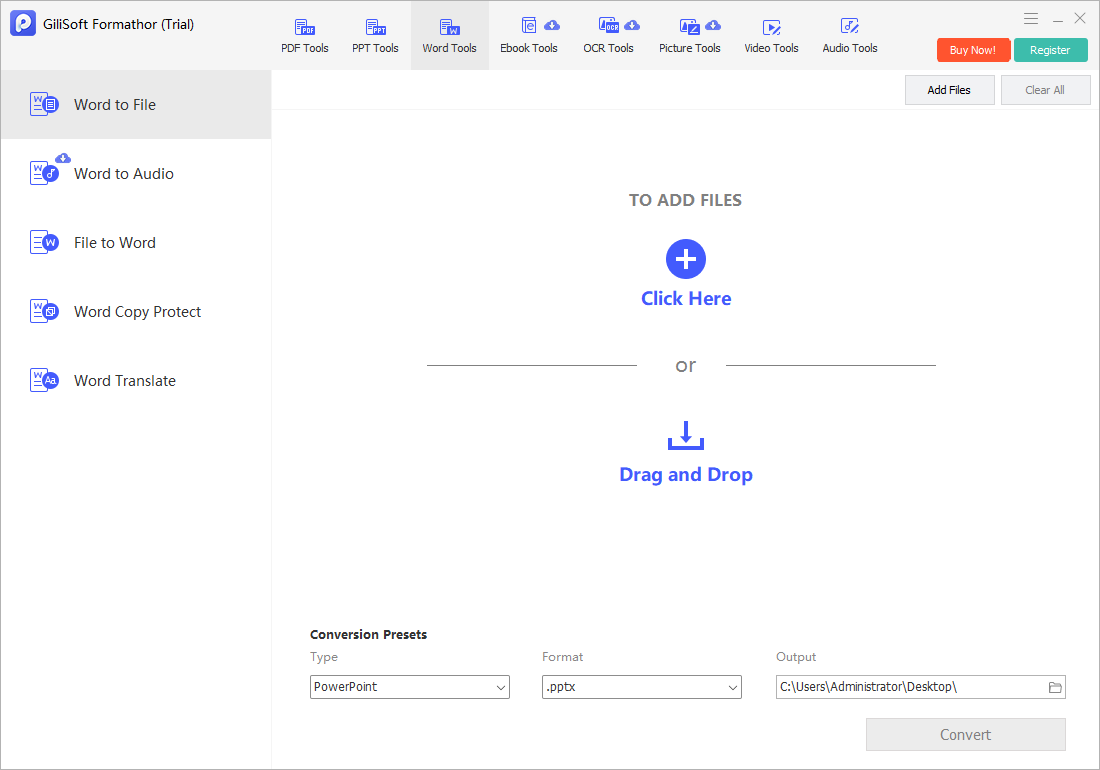
The screenshot below is the real Formathor workspace associated with this type of task.
- Keep the editable original.
Resolve tracked changes, comments, missing fonts, links, and fields before conversion.
- Choose Word to File or File to Word.
Select the direction according to the next editing or delivery task.
- Add a representative document.
Include headings, tables, images, headers, and page breaks in the test.
- Convert to a separate folder.
Use a clear output name and preserve the source.
- Review in Word or the destination app.
Check styles, lists, tables, footnotes, images, and pagination.
Review Output Quality Before Delivery
- Confirm the output count.
Compare created, failed, skipped, and duplicate files with the source list.
- Inspect the whole result.
Review beginning, middle, and end rather than only the first page or slide.
- Check text and structure.
Look for missing characters, wrong reading order, table changes, broken lists, and substituted fonts.
- Check images and navigation.
Verify resolution, crop, color, links, bookmarks, page order, and slide order.
- Approve in the destination application.
Use Word, Excel, PowerPoint, an eBook reader, image viewer, or PDF viewer as appropriate.
Handle Confidential and Batch Documents Carefully
A local conversion workflow can reduce routine uploads, but it does not replace Windows account security, protected storage, backups, access controls, secure deletion policy, or an approved delivery channel. Remove confidential temporary output when it is no longer required.
For batches, process a small group first. Keep protected, scanned, corrupt, macro-enabled, multilingual, oversized, and unusual-layout files in an exception queue rather than allowing them to fail silently inside an ordinary batch.
Word to File and File to Word Converter FAQ
Does document conversion preserve formatting perfectly?
No. PDF, Word, Excel, PowerPoint, image, eBook, and text formats represent pages and structure differently. Complex output needs review and correction.
Should I keep the original files?
Yes. Write converted files to a separate folder and keep restorable originals until the complete result has been approved.
Can Formathor process scanned PDFs?
Use the OCR or text-layer workflow for image-only scanned pages, then proofread recognized text before reuse.
Can I convert confidential files without uploading them?
Formathor provides a local Windows workflow. You still need suitable device security, folder permissions, backups, passwords, and delivery controls.
How should I test a large batch?
Use representative common and difficult files first, check output count and quality, separate exceptions, and only then process the remaining batch.
Why should I open the output in another application?
A completed conversion status confirms processing, not layout, data, OCR, link, media, or accessibility quality. The destination application is the real test.