
Use Conversion to Start a Deck, Not Finish It
File-to-PPT conversion can move supported source content into a slide-based format, but a document page and a presentation slide serve different purposes. Dense pages normally need summarizing and redesign before they work for an audience.
The source may not contain slide masters, speaker notes, animation, editable charts, or logical object groups. Preserve the original and decide whether you need visual fidelity, editable text, or selected assets.
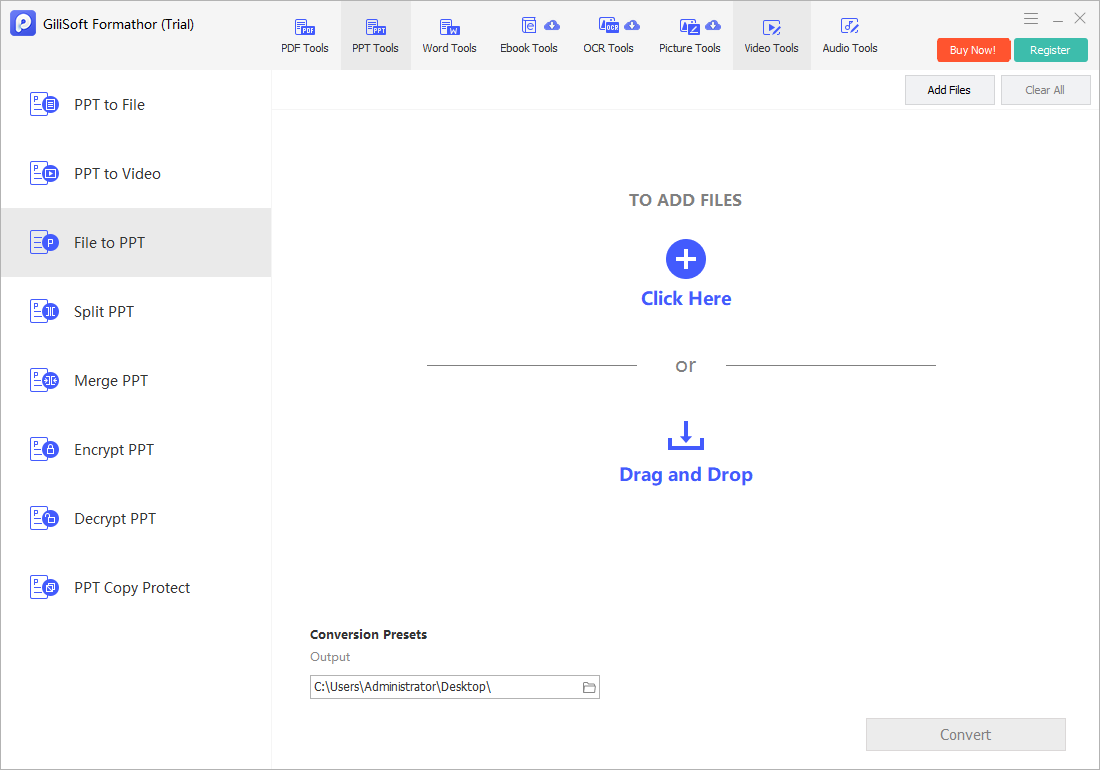
Convert a Supported File to PPT with Formathor
Open PPT Tools and select File to PPT in GiliSoft Formathor. Add the source, choose a destination, convert, and open the result in PowerPoint for review.
- Define the audience and slide ratio.
Choose widescreen or another required size before extensive cleanup. - Prepare a clean source copy.
Remove confidential sections and resolve comments or tracked changes. - Open File to PPT.
Add a supported file and use a dedicated output folder. - Convert the file.
Retain the source because the PPT is a reconstructed presentation draft. - Redesign and verify.
Shorten text, rebuild important charts, add titles, and check fonts, images, contrast, and reading order.
Decide How Source Content Should Become Slides
| Source content | Useful slide treatment | What may need rebuilding |
|---|---|---|
| Short headings and bullets | Convert as editable slide text where supported | Hierarchy, spacing, and slide titles |
| Full report pages | Summarize into multiple slides | Narrative, charts, and supporting detail |
| Tables | Use only the rows needed for the message | Editable structure and readable type size |
| Charts and diagrams | Use as references or rebuild from data | Labels, source values, and accessibility |
| Scanned pages | Use OCR text or visual page images | Recognition, layout, and image quality |
Common File to PPT Converter Workflows
Training decks
Turn approved source material into a lesson draft with simplified slides.
Sales presentations
Reuse selected content while applying current branding and customer context.
Executive summaries
Convert report material, then reduce it to decisions, findings, and evidence.
Classroom presentations
Create slide-based material from structured notes or authorized documents.
GiliSoft Formathor keeps PDF, Office, image, OCR, and related conversion tools in one Windows application. Test the current workflow with a representative copy before processing important originals or a large batch.
Fix Common Conversion Problems
| Problem | Likely cause | Practical check |
|---|---|---|
| Slides are too dense | Document pages were transferred without summarizing | Split ideas and reduce each slide to one purpose |
| Text is not editable | The source became a page image | Use OCR where suitable or recreate the text |
| Objects move after resizing | Source ratio differs from the chosen slide ratio | Set slide size first, then realign content |
| Charts are flat images | The source does not include chart data | Rebuild important charts from verified data |
| Fonts change | The source font is unavailable | Use an authorized substitute and check line wrapping |
File to PPT Converter FAQ
What files can be converted to PPT?
Use source types offered by the current File to PPT workspace. Confirm support with a representative file before planning a large conversion.
Will the output be ready to present?
Usually it should be treated as a draft. Review slide ratio, content density, titles, text editability, charts, images, fonts, and accessibility.
Can conversion recover animations and speaker notes?
Not when those elements are absent from the source. Add presentation-specific behavior manually after conversion.
Why did a report become crowded slides?
Document pages carry more detail than presentation slides. Summarize the content and distribute it across slides for the audience.
Can scanned content become editable PowerPoint text?
OCR may recognize printed text, but reading order, layout, and graphics still require manual review and reconstruction.
Related File Conversion Guides
- PDF to PPT converter
- Office file converter
- Batch Office file converter
- PDF to image converter
- Word to audio converter
- Formathor User Guide
Turn Supported Files into a PowerPoint Draft
Convert locally, then redesign the result for the audience instead of presenting a dense document page unchanged.