
What PDF to PowerPoint Conversion Produces
A PDF freezes a page; PowerPoint organizes content on editable slides. Conversion can create a useful deck starting point, but it cannot guarantee recovery of the original slide masters, animations, transitions, speaker notes, or object hierarchy.
A PDF created from presentation slides normally maps more naturally than a report page or scanned handout. Decide whether you need editable content, a visual page-per-slide reference, or selected assets for a new deck.
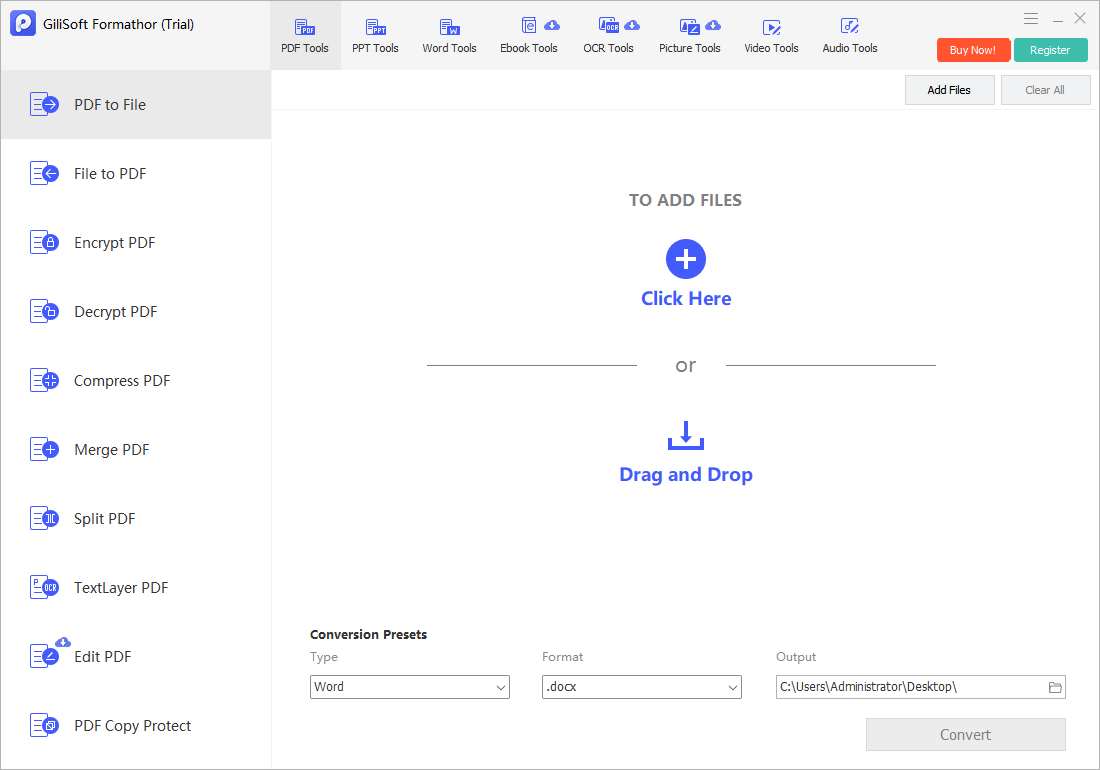
Convert PDF to PPT with GiliSoft Formathor
Use PDF to File in GiliSoft Formathor and select PowerPoint output for supported PDF pages that need slide-based reuse.
- Inspect page size and orientation.
Confirm whether the PDF originated as widescreen slides, standard slides, portrait pages, or mixed content. - Add the PDF.
Open PDF to File and choose only the source document you are authorized to reuse. - Choose PPT output.
Set a clear output folder and convert the required pages. - Open the new presentation.
Check whether content is editable or represented as page images and resize only after confirming the intended slide ratio. - Rebuild and proof the deck.
Verify text, charts, fonts, images, reading order, slide titles, and accessibility.
Match the PDF Source to the Presentation Goal
| PDF source | Practical use | Expected cleanup |
|---|---|---|
| PDF exported from slides | Recreate a presentation draft | Slide master, notes, animations, and some objects may be absent |
| Portrait report pages | Build a summary deck | Redesign rather than squeezing full pages onto slides |
| Scanned handout | Use page images or OCR text | Recognition and manual layout work |
| Charts and diagrams | Reuse visual references | Rebuild charts when data editing is required |
| Selected pages only | Create an appendix or evidence deck | Confirm page order and labels |
Common PDF to PPT Converter Workflows
Training updates
Reuse approved visual material as the basis for a refreshed lesson deck.
Sales enablement
Move selected PDF pages into a presentation for controlled redesign.
Classroom material
Convert handouts into slide references, then simplify dense pages.
Internal reporting
Turn fixed reports into a summary deck with rebuilt charts and conclusions.
GiliSoft Formathor keeps PDF, Office, image, OCR, and related document conversion tools in one Windows application. Test a representative copy before processing important originals or a large batch.
Fix Common Conversion Problems
| Problem | Likely cause | Practical check |
|---|---|---|
| Slides look stretched | PDF page ratio differs from the PowerPoint slide size | Set the intended slide size before final layout work |
| Text is not editable | The page was converted as an image or contains outlined text | Use OCR where suitable or rebuild the text box |
| Animations are missing | PDF does not preserve PowerPoint animation logic | Recreate animations only when they add meaning |
| Charts cannot be updated | The PDF contains a visual chart, not its source data | Rebuild the chart from verified data |
| Fonts and spacing change | Fonts are missing or text boundaries were estimated | Install authorized fonts or choose substitutes and reflow text |
PDF to PPT Converter FAQ
Can PDF to PPT restore the original PowerPoint file?
No. It creates a new presentation from the PDF. Masters, notes, animations, transitions, and original editable objects may not be recoverable.
Will every PDF page become one slide?
That is a common result, but behavior can depend on the source and output settings. Check page order, orientation, and slide size after conversion.
Can scanned PDF pages become editable slides?
OCR may recover printed text, but layout, graphics, and reading order still need manual reconstruction. A page-image slide may be more faithful visually.
Should I convert a report PDF directly to PPT?
Use conversion as a source or appendix. For a strong presentation, summarize the report and redesign dense pages for the audience.
What should I verify before presenting?
Check slide dimensions, text editability, fonts, chart accuracy, image quality, page order, contrast, and any missing notes or links.
Related File Conversion Guides
- File to PPT converter
- PDF to Word converter
- PDF to image converter
- Office file converter
- Batch Office conversion
- Formathor User Guide
Create PowerPoint Output from PDF Pages
Convert locally, then rebuild important slide elements and verify the deck before presenting.