
What Is PDF to Excel Conversion?
PDF to Excel conversion turns static table data into a workbook that can be sorted, filtered, calculated, and checked. It is most useful for invoices, account statements, price lists, schedules, inventory reports, survey results, and exported business data.
A PDF preserves how a page looks; Excel stores values in rows and columns. That difference is why a converted workbook should be reviewed before it becomes a report, a calculation source, or a customer record.
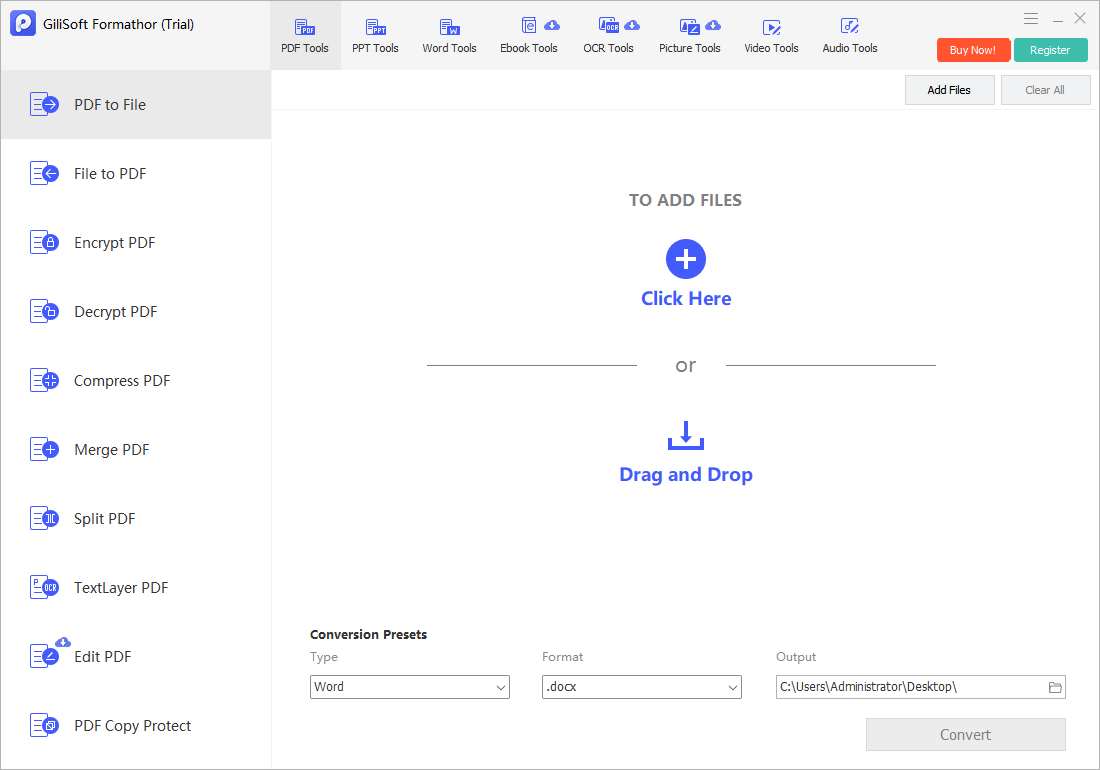
Convert PDF to Excel with GiliSoft Formathor
GiliSoft Formathor combines PDF-to-file conversion with PDF editing, merging, splitting, compression, encryption, and OCR-oriented work in one Windows application. It is a useful local workflow when reports or client documents should not be uploaded to a browser tool.
- Open the PDF conversion workspace.
Add the report, invoice, statement, or table-heavy document that needs spreadsheet reuse. - Decide whether OCR is needed.
Use OCR for scanned or image-based pages so text can be recognized before you convert it. - Choose Excel-compatible output.
Convert the pages and content required for the current worksheet or report. - Review the workbook before analysis.
Check table columns, merged cells, headers, dates, numbers, formulas, and page-break rows.
Choose the Right Source Workflow
| PDF source | Recommended starting path | What to verify |
|---|---|---|
| Native PDF report | Direct PDF-to-Excel conversion | Headers, merged cells, repeated table titles, page-break rows. |
| Scanned invoice or statement | OCR before conversion | Character recognition, decimal points, dates, account numbers, and totals. |
| Mixed text and images | Convert the table pages needed | Whether non-table page content should remain outside the worksheet. |
| Confidential internal file | Local desktop conversion | File handling, output location, and who can access the workbook. |
Common PDF to Excel Jobs
Invoices and purchase records
Move line items into a worksheet for reconciliation, sorting, expense review, or a follow-up import.
Bank and account statements
Prepare statement rows for review, but verify account numbers, dates, signs, and decimal separators before calculations.
Price and inventory lists
Reuse supplier tables, product lists, SKUs, and stock figures without retyping every row manually.
Recurring business reports
Convert repeatable PDF tables into a workable Excel base for monthly updates, comparisons, and charts.
For broader document work, GiliSoft Formathor also handles PDF to Word, file to PDF, PDF compression, merging, splitting, and authorized PDF protection tasks. Download the trial and test it with a representative copy of your source document.
Fix Common PDF to Excel Problems
| Problem | Likely cause | Practical check |
|---|---|---|
| Columns run together | Weak table structure or a scanned source | Use OCR for scan-based pages and inspect the converted table layout. |
| Numbers are treated as text | Currency symbols, spaces, or regional separators | Check number format, decimals, thousands separators, and negative values. |
| Headers repeat in the data | PDF page headers are included on every page | Remove or filter repeated headers before using formulas or a PivotTable. |
| Dates change format | Excel interprets regional date formats differently | Confirm day-month-year order before calculations or sorting. |
| OCR reads a character incorrectly | Blurred, skewed, or low-resolution scan | Compare important values to the original PDF before reporting them. |
PDF to Excel Converter FAQ
Will the Excel file look exactly like the PDF?
The goal is editable data rather than a page-perfect PDF replica. Review page breaks, merged cells, table headers, and columns after conversion.
Can I convert a scanned PDF to Excel?
Yes, start with OCR for a scanned or image-based PDF, then check recognized text and numbers carefully before using the sheet.
Is an offline PDF to Excel converter useful?
It is useful for confidential invoices, customer records, financial reports, and internal documents that should remain on the local Windows PC.
Should I use PDF to Word or PDF to Excel?
Use Excel for tables, rows, columns, calculations, and filtering. Use Word when the source is mainly paragraph text that needs document editing.
Related PDF and Excel Guides
- How to convert PDF to Word and Excel
- Free PDF to Excel converter options
- Offline PDF converter for Windows
- PDF to Word converter
- Excel to PDF converter
Convert PDF Tables on Windows with GiliSoft Formathor
Convert PDF content into reusable office-file output, recognize scanned text with OCR, and keep PDF compression, editing, merging, splitting, and encryption tools available in the same Windows application.