
Turn Text into a Voiceover Draft
Use this workflow to create a listenable draft from a reviewed script before final production. Good synthetic narration starts with a script written for listening.
Quick answer
Prepare clean text, choose a suitable voice, generate a short sample, and listen for pronunciation, stress, pacing, pauses, and numbers. Revise the script rather than relying only on punctuation tricks, then generate and review the complete draft.
Choose the Right AI Workflow
| Input or situation | Recommended approach | Review requirement |
|---|---|---|
| Short sample | Test voice, pace, and pronunciation first | Names, acronyms, dates, and numbers |
| Instructional narration | Use clear sections and deliberate pauses | Every instruction matches the visual or policy |
| Product narration | Time one spoken idea to one visual action | Claims and interface states are current |
| Published synthetic voice | Review disclosure and rights | No impersonation or misleading attribution |
Step-by-Step Workflow
- Confirm rights and audience
Use a script you own or may adapt, define who will hear it, and decide whether generated narration should be disclosed.
- Rewrite for listening
Remove visual-only clutter, shorten dense sentences, expand ambiguous abbreviations, and add pronunciation guidance.
- Generate a short sample
Open Text to Speech, choose a suitable voice, and test the most difficult names, numbers, and sentence patterns first.
- Revise script and delivery
Listen for stress, pace, pauses, tone, and meaning. Fix the source script instead of accepting an awkward first render.
- Review the complete draft
Listen from start to finish, compare it with visuals or instructions, and obtain subject-matter approval before publishing.
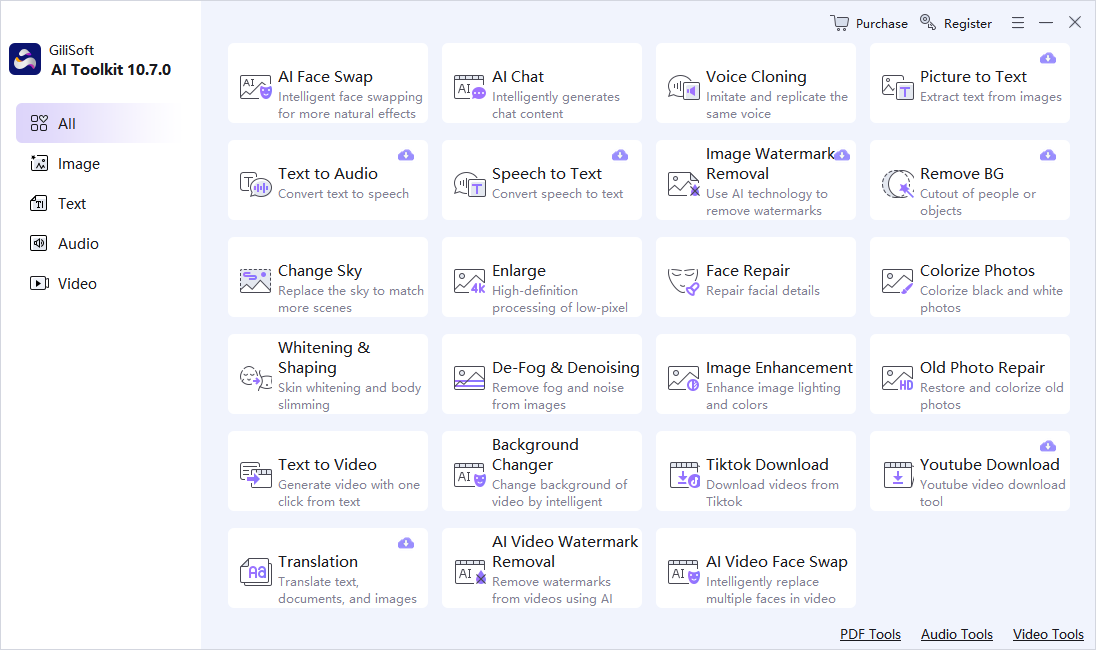
Use the GiliSoft AI Toolkit Workspace
These screenshots show the real dashboard and task workspace. Interface details can change by release, so verify the current controls and processing behavior before using sensitive or important material.

Review Before You Reuse the Result
| Pronunciation and pacing | Compare the complete result with the source instead of reviewing only the easiest section. |
|---|---|
| Names and numbers | Check proper names, dates, quantities, abbreviations, identifiers, and claims manually. |
| Privacy and rights | Confirm permission, remove unnecessary personal data, and understand the current module’s processing path before sensitive use. |
Frequently Asked Questions
Why does text sound unnatural when spoken?
Writing for reading often contains long sentences, visual references, abbreviations, and punctuation that do not guide spoken delivery well. Revise the script for listening.
Should I generate the full script immediately?
Start with a short sample containing difficult names, numbers, and sentence patterns, then choose and adjust the voice before a full render.
Can synthetic speech copy a real person?
Do not impersonate someone or clone a voice without authorization. Use a suitable voice and disclose generated narration when the context could mislead listeners.
Should I keep the source file?
Yes. AI output should be a separate derivative so errors can be checked and the task can be repeated.
Can generated output be used without review?
No. Review requirements depend on risk, but important names, numbers, claims, instructions, and visual details should always be checked.