
Duplicate File Cleaner for Windows: Find and Remove Copies Safely
Duplicate cleanup is useful only when the matches are trustworthy and the keeper is obvious. Limit the scan, compare content and location, and remove one reviewed group at a time.
Quick answer
Scan folders you understand, then verify each duplicate group by content, size, date, and location. Do not delete a file merely because the name is similar. GiliSoft Total Repair provides Duplicate File Clean for locating supported duplicate groups, while you remain responsible for choosing which copy to keep.
Separate True Duplicates from Similar Files
| Match | Meaning | Decision |
|---|---|---|
| Same content and size | Likely byte-for-byte copies | Confirm paths and keep the required copy |
| Same name, different content | Versions or unrelated files | Do not treat as duplicates |
| Same photo at different resolution | Derivative, thumbnail, or export | Keep based on intended use |
| Backup and working copy | Deliberate redundancy | Preserve the backup strategy |
| Cloud placeholder and local file | Sync state, not necessarily duplication | Check the cloud provider first |
Prepare a Safer Duplicate Scan
- Back up irreplaceable folders.
Protect current projects, family media, business records, and application data before bulk deletion.
- Choose a narrow location.
Start with a known media, download, or archive folder instead of scanning the entire system drive.
- Exclude system and application folders.
Windows and programs may intentionally store repeated resources in different locations.
- Pause sync during review.
If appropriate for your environment, avoid creating a deletion wave across synchronized devices before confirming the result.
Find Duplicates with GiliSoft Total Repair
Open System Clean > Duplicate File Clean, choose the scan scope, and let the comparison finish. Treat the result as a set of decisions, not as one automatic Delete All command.
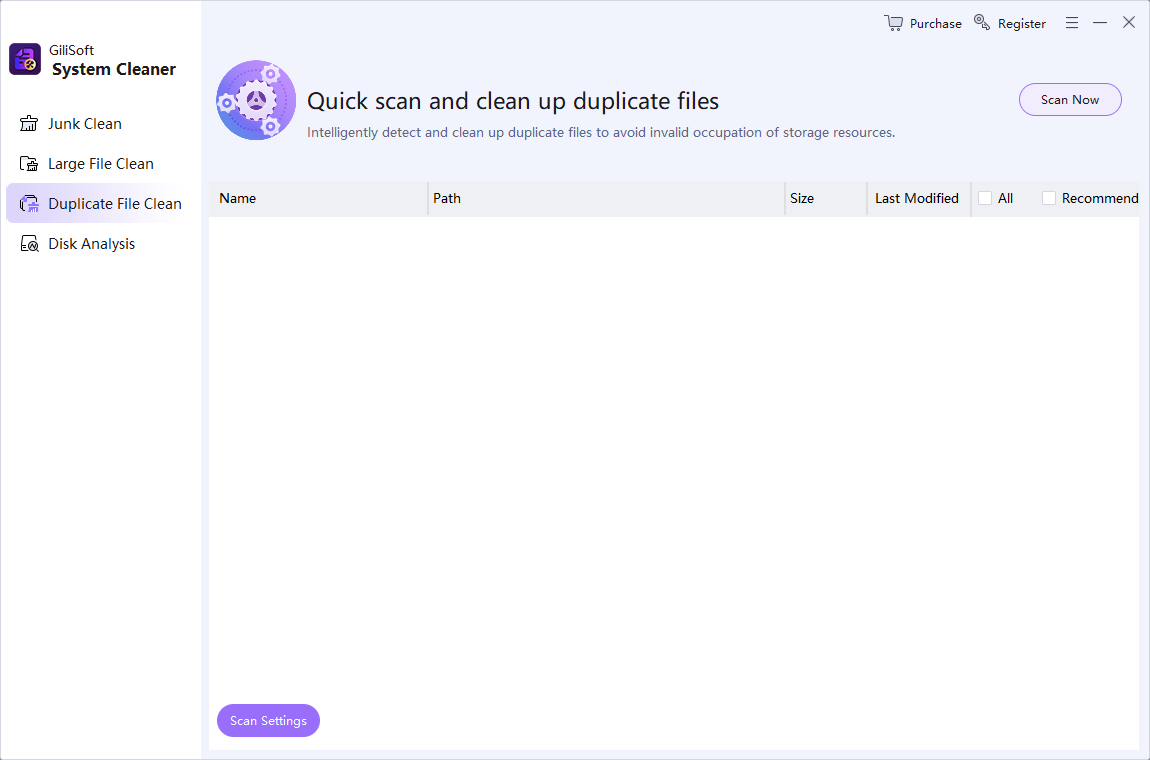
- Select drives or folders.
Include only locations whose purpose you understand.
- Run the duplicate scan.
Wait for comparison to finish before sorting or selecting groups.
- Open representative files.
Preview images, documents, audio, or video when the correct version is not obvious.
- Keep one authoritative copy.
Prefer the working location, best quality, useful metadata, and current project references.
- Delete in small batches.
Check dependent projects and synchronized devices before emptying any recovery location.
Use Location and Purpose to Choose the Keeper
The newest file is not automatically the best file, and the shortest path is not automatically the original. Consider resolution, metadata, edit history, project links, backup policy, and whether another person or application expects the file at its current path.
Avoid Broad Deletion in Sensitive Folders
Do not bulk-remove matches from Windows, Program Files, application data, source-control repositories, virtual machines, email stores, photo catalogs, or managed cloud folders unless you understand the owning software. Repeated support files can be required in multiple locations.
Duplicate File Cleaner FAQ
How does a duplicate file cleaner find copies?
Reliable duplicate detection compares file content and size rather than relying only on names. Review the tool settings and inspect results because similar media, exported versions, and backups can still require different treatment.
Is it safe to delete all duplicate files automatically?
No. System files, application resources, backups, synchronized folders, and project assets can be intentionally duplicated. Limit the scan and approve groups individually.
Which duplicate copy should I keep?
Keep the copy in the authoritative working location with the needed quality, metadata, version history, and project references. Modification date alone is not enough.
Are photos with different resolutions duplicates?
They may show the same scene but serve different purposes. A full-resolution original, edited export, thumbnail, and web version should not be removed as interchangeable copies without review.
Should I scan Windows and Program Files?
Usually no. Applications and Windows can keep identical resources in separate required locations. Focus first on user-controlled folders such as Downloads, media archives, and known project exports.
Can GiliSoft Total Repair undo duplicate deletion?
Do not assume every deletion can be undone. Back up important folders, use a reversible deletion option when available, and verify projects and sync status before permanently emptying recovery locations.