

Windows Repair Tool: Diagnose and Fix Common PC Problems
Windows repair is not one universal scan. A reliable workflow identifies the failing layer, protects data, uses the least disruptive fix first, and escalates to recovery only when ordinary repairs do not restore stability.
Quick answer
Record the symptom, recent change, and scope before running a repair. Use app Repair or reinstall for one application, Windows Update and troubleshooters for supported system issues, DISM followed by SFC for damaged Windows components, and recovery tools for startup failure. GiliSoft Total Repair organizes supported application, DLL, runtime, error-code, cleanup, and optimization checks in one interface.
Match the Symptom to the Repair Layer
| Symptom | Start with | Escalate when |
|---|---|---|
| One app will not open | Update, Repair, Reset, or reinstall the app | Other apps or Windows features also fail |
| DLL or runtime message | Identify the owner and required package | Protected Windows files are damaged |
| Recurring error code | Record code, context, and recent changes | The documented fix fails or data is at risk |
| Slow startup | Startup apps, updates, storage, and drivers | Windows cannot reach the sign-in screen |
| Freezes or disk warnings | Back up data and check hardware health | The drive reports failure or files become unreadable |
Prepare Before Changing Windows
- Back up important files.
Copy irreplaceable work to a separate destination before repair or recovery.
- Record the exact symptom.
Save error codes, screenshots, Reliability Monitor events, and the action that triggers the fault.
- Note recent changes.
Updates, drivers, security tools, new applications, and hardware can narrow the cause.
- Create a restore point when available.
Understand that System Restore is not a replacement for a file backup.
- Check storage and hardware warnings.
Software repair is the wrong first move when a drive may be failing.
Use the Narrowest Windows Tool First
Install pending Windows updates and restart. Use Settings troubleshooters for the affected component, app Repair for a single supported application, and Startup Repair or System Restore when the failure matches those recovery paths. For suspected protected system-file corruption, run DISM before SFC from an Administrator Command Prompt.
DISM.exe /Online /Cleanup-image /Restorehealth
sfc /scannow
Run Focused Checks with GiliSoft Total Repair
Total Repair groups cleanup, application errors, system DLL, C++ runtime, .NET, error-code, startup, and optimization tools. Select a category because it matches the evidence, not because a one-click repair count looks large.
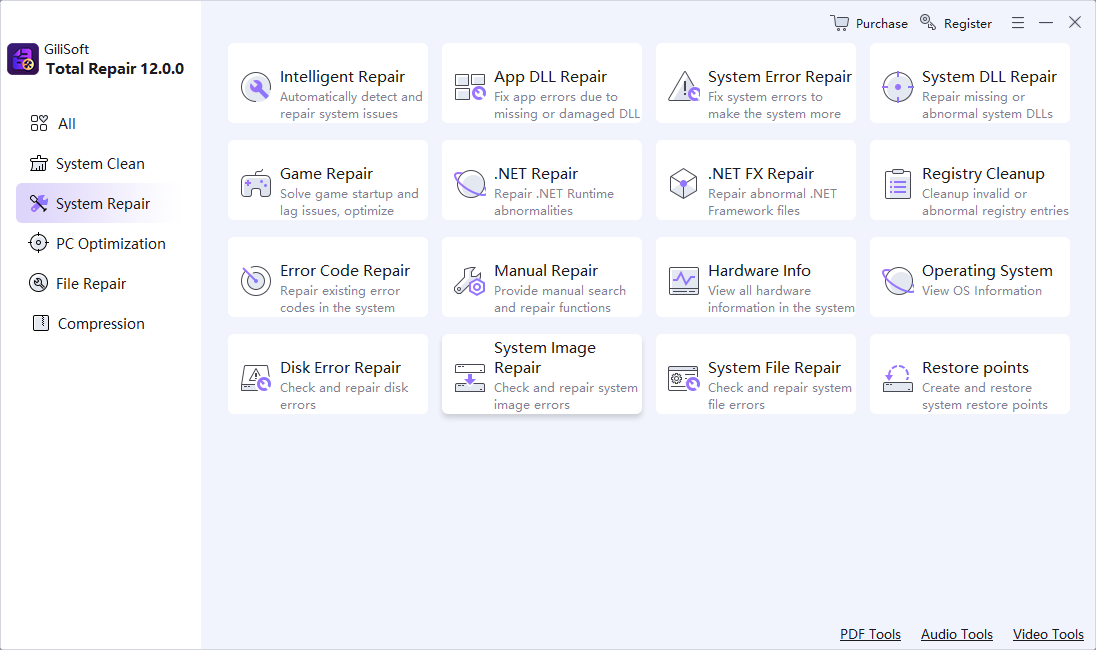
- Choose System Repair or the relevant workspace.
Begin with the category closest to the recorded symptom.
- Run one focused scan.
Avoid changing cleanup, registry, startup, and repair settings at the same time.
- Review detected items.
Confirm that they relate to the failure and preserve a restore path.
- Apply selected changes.
Restart if requested and repeat the exact test that previously failed.
- Stop if evidence changes.
Hardware warnings, malware alerts, or worsening file access need specialist handling.
Know When Repair Should Become Recovery
If Windows cannot start, use the Windows Recovery Environment and the recovery option that matches the problem. If the system is slow, crashing, or unstable after a known change, review System Restore or update rollback. Reset or reinstall is a last-stage decision because applications and settings can be removed. Preserve data first.
Windows Repair Tool FAQ
What does a Windows repair tool fix?
It may address supported application errors, missing or damaged system components, runtimes, startup entries, and configuration problems. Coverage depends on the tool and the actual cause.
Should I run every repair option at once?
No. Diagnose the symptom and use the narrowest relevant repair. Multiple simultaneous changes make it harder to know what worked and can introduce unrelated effects.
Can DISM and SFC repair all Windows problems?
No. They repair supported Windows component-store and protected system-file issues. They do not fix every app, account, network, driver, malware, storage, or hardware problem.
Is System Restore the same as a backup?
No. System Restore targets system settings, drivers, registry state, and installed software changes. Keep a separate backup of personal files.
Can GiliSoft Total Repair fix a failing hard drive?
No software utility can make failing hardware reliable. Back up readable data immediately and use hardware diagnostics or professional service when a drive reports errors or disappears.
When should I reset or reinstall Windows?
Consider it after backups and focused repairs fail, or when Microsoft recovery guidance points there. Review which files, apps, accounts, drivers, and settings the selected option will remove.