
For a recipient who should enter a password and watch the video without receiving the ordinary source file, use GiliSoft Any Video Encryptor. For storage or one-time transfer, an AES-encrypted 7z archive is practical. Use EFS only for files that stay under your Windows account, and use BitLocker or VeraCrypt when the entire drive or container should be encrypted.
What Does It Mean to Password Protect a Video?
There are two different jobs hidden behind this search:
The file should remain unreadable until a password or encryption key unlocks it.
The recipient should watch through a protected viewer rather than receive an open MP4.
A website, course platform, or DRM service controls account access, devices, or revocation.
This page focuses on the first two jobs. Renaming .mp4, hiding the file, or putting it in an ordinary ZIP without encryption does not create meaningful password protection.
Compare Five Ways to Encrypt Video Files
| Method | Best for | How the recipient opens it | Main consideration |
|---|---|---|---|
| Any Video Encryptor Recommended | Password playback and offline delivery | Protected GFX player or EXE package | Designed for Windows media delivery |
| 7-Zip AES archive | Storage and one-time file transfer | Extract with the archive password | Video becomes an ordinary file after extraction |
| Windows EFS | Keeping a video private under one Windows account | Opens transparently for the authorized account | Not available in Windows Home and not a shared password |
| BitLocker | Encrypting the full drive that stores videos | Unlock the drive first | Protects the volume rather than one video |
| VeraCrypt container | A reusable encrypted library or vault | Mount the container with a password | More setup and recipient coordination |
Encrypt Videos for Password-Protected Playback
Use this route when the recipient should open a protected media package instead of receiving the original video as an ordinary file.
GiliSoft Any Video Encryptor accepts video, audio, image, document, and ebook files, then creates protected GFX or EXE output. GFX is opened through the protected player. EXE output is useful for self-contained Windows delivery and can be bound to a USB drive so the package cannot open after it is moved away from that drive.
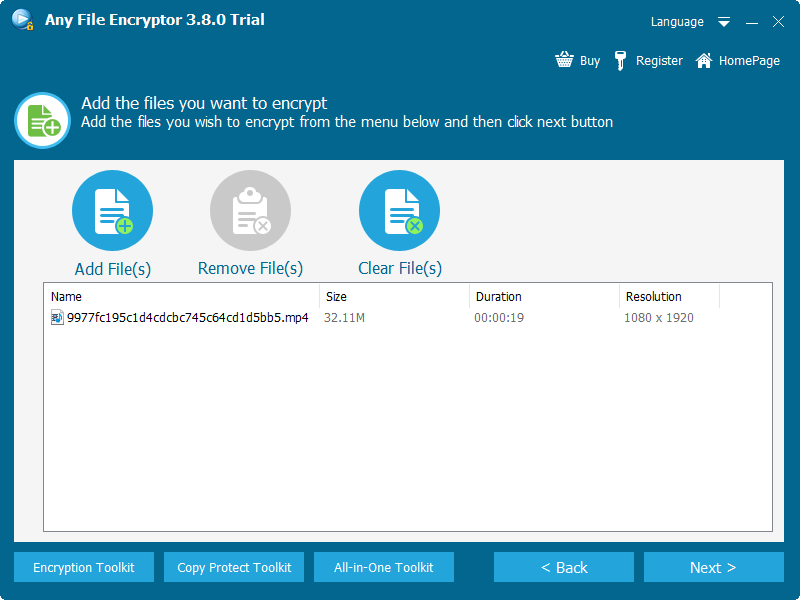
Add the source videos. Open Any Video Encryptor, choose the files you want to protect, and confirm the batch list before continuing.
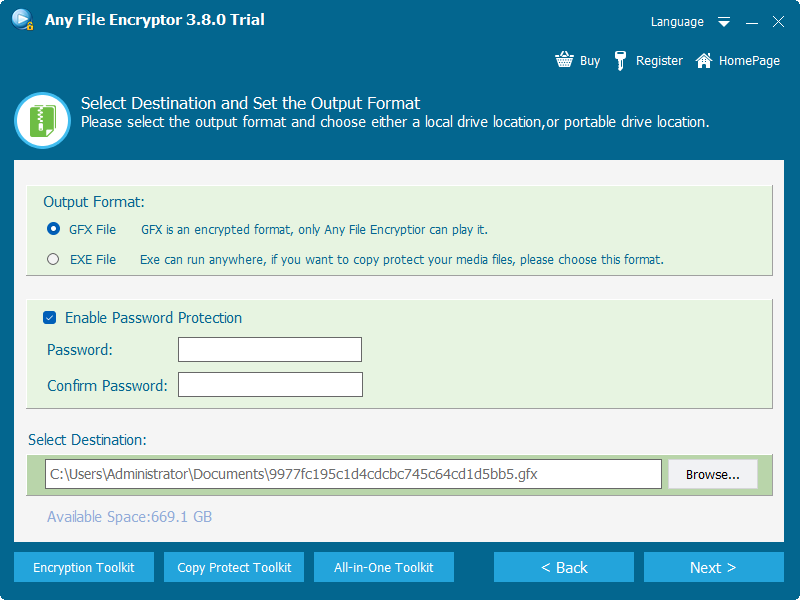
Choose the protected output. Select GFX for the encrypted player workflow or EXE for a self-contained Windows package.
Enable password protection. Enter and confirm a strong playback password, then choose the destination folder.
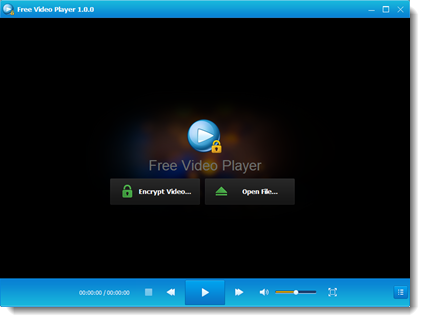
Create and test the package. Export the encrypted file, open it on a test PC, verify the password prompt, and review playback before delivery.
Send the password separately. Deliver the package and password through different channels, and keep the original source in a verified backup.
Create an AES-Encrypted Video Archive with 7-Zip
Use an encrypted archive when the recipient needs the original MP4 after entering a password and extracting it.
Install 7-Zip, right-click the video or its folder, and choose 7-Zip > Add to archive.
Choose the 7z format, enter and confirm a strong password, and select AES-256 encryption.
Enable file-name encryption when filenames themselves reveal private information.
Create the archive, extract a test copy, and verify the password before deleting or moving any source file.
The official 7-Zip format documentation lists AES-256 encryption for 7z archives. This method is widely portable between computers that can open the archive, but the extracted video is once again a normal media file.
Encrypt a Video with Windows EFS
Use EFS when the video stays on an NTFS drive and should open only for your Windows account.
Right-click the video file or its containing folder and select Properties.
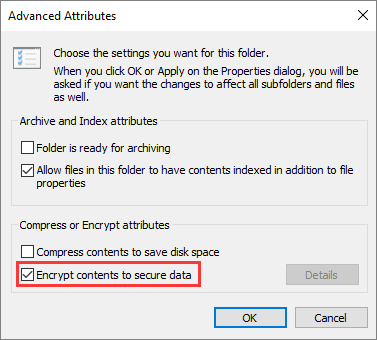
Choose Advanced, select Encrypt contents to secure data, and apply the change.
Back up the EFS certificate and private key when Windows prompts you. Store the backup separately from the encrypted video.
Encrypt the Drive That Stores the Videos
Use BitLocker when an external or internal drive containing many videos should be protected as one volume.
BitLocker protects the drive before Windows exposes its files. It is a better fit for an archive disk, removable drive, or work volume than for sending one video attachment. Save the recovery key away from the encrypted drive, then test the unlock process before relying on it.
Build a Reusable Encrypted Video Container
Use VeraCrypt when you want a mounted encrypted vault that can hold a changing collection of video files.
Create an encrypted file container and choose its capacity based on the video library.
Mount the container with the password, copy videos into the mounted drive, then dismount it after use.
Keep the VeraCrypt installer or portable setup available on computers that need to open the container.
Which Method Should You Choose?
Choose Any Video Encryptor so the recipient gets protected playback instead of a plain MP4.
Choose an AES-encrypted 7z archive when extraction is acceptable.
Choose EFS on a supported Windows edition and back up the certificate.
Choose BitLocker for a whole drive or VeraCrypt for a mounted container.
Before You Encrypt an Important Video
Do not let the encrypted package become the only copy of an irreplaceable recording.
Prefer a long password that is not reused for email, cloud storage, or Windows sign-in.
Confirm the package, player, archive tool, and Windows architecture work before final delivery.
Send the encrypted package and its password through different communication channels.
Video Encryption FAQ
Can I put a password directly on an MP4?
No universal MP4 password field works across ordinary media players. The video must be wrapped in an encrypted package, archive, encrypted folder, drive, or container.
Will encryption reduce video quality?
File encryption does not need to re-encode the video. If the workflow encrypts the existing file or packages it for playback, its encoded picture and audio data remain unchanged.
Can I encrypt several videos at once?
Yes. Any Video Encryptor supports a batch file list, while archives and encrypted containers can hold multiple videos and folders.
When should I choose Video DRM Protection?
Choose DRM when distribution needs device binding, managed playback passwords, dynamic watermarking, blacklist revocation, or broader control after delivery.
Sources and Further Reading
- Microsoft Support: How to encrypt a file or folder
- Microsoft Learn: Configure BitLocker
- 7-Zip: 7z format and AES-256 encryption
- VeraCrypt: Beginner's tutorial
- Apple Support: Create an encrypted disk image on Mac