
An ordinary MP4 has no universal password field that works in every media player. To add meaningful password protection, place the video inside a protected playback package, an encrypted archive, an encrypted drive, or an encrypted container. For controlled Windows playback, GiliSoft Any Video Encryptor keeps the video behind its protected player rather than handing over an open MP4.
What Does Password Protecting a Video Actually Mean?
The phrase sounds simple, but it covers four different outcomes. Choosing the wrong one often creates either weak protection or needless friction for the viewer.
Use a protected playback package with a password-aware player.
Use an AES-encrypted archive. The recipient extracts the original MP4.
Encrypt the removable drive or create a password-protected secure area.
Use EFS, a VeraCrypt container, or an encrypted disk image on Mac.
Use video DRM when you need licensing, revocation, device rules, or traceable watermarks.
Use the cloud service's access controls, expiration, and account permissions rather than relying only on the filename.
Compare the Main Video Password Protection Methods
| Method | Best for | What the recipient gets | Main tradeoff |
|---|---|---|---|
| Protected GFX or EXE package Best for controlled playback | Client previews, training, demos, private offline delivery | A password-protected player or package | Designed primarily for Windows playback |
| AES-encrypted archive | Email, download, or storage when extraction is acceptable | The original video after entering the archive password | The video becomes an ordinary file after extraction |
| Encrypted USB or external drive | Physical handoff of many videos | An unlocked drive or secure area | Protects storage access, not later copies |
| EFS or encrypted container | Private local libraries and account-based access | Normal files after the vault is unlocked | Requires recovery planning and compatible software |
| Video DRM | Courses, premium media, managed distribution | Licensed playback under policy | More administration than a simple password |
Create a Password-Protected Video Playback Package
Choose this when viewers should watch the content without receiving an ordinary MP4 that can be opened in any media player.
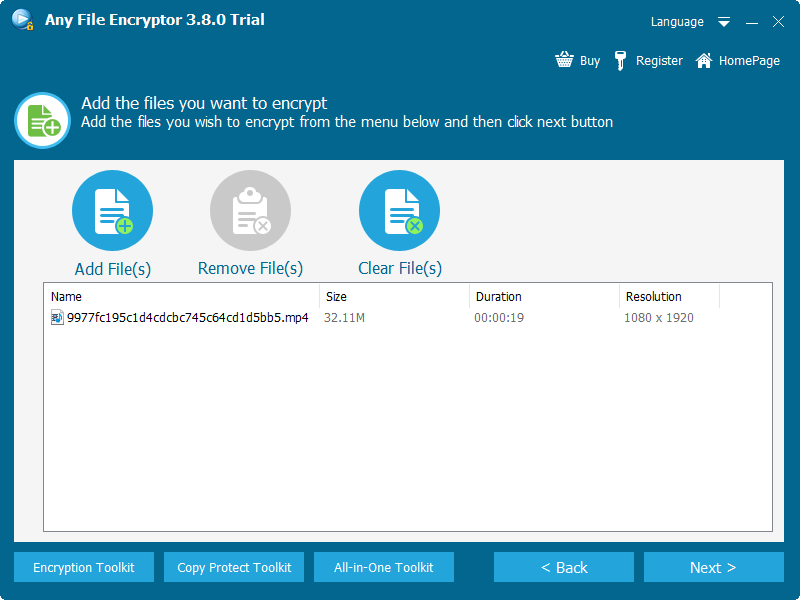
GiliSoft Any Video Encryptor imports common video, audio, image, and document files, then produces protected GFX or EXE output. GFX uses the GiliSoft player workflow. EXE output can provide a self-contained Windows package and can optionally be bound to an authorized USB drive. Playback settings can also deter screenshots and Save As actions.
Open Any Video Encryptor and add one or more video files. Keep an unprotected backup outside the delivery folder.
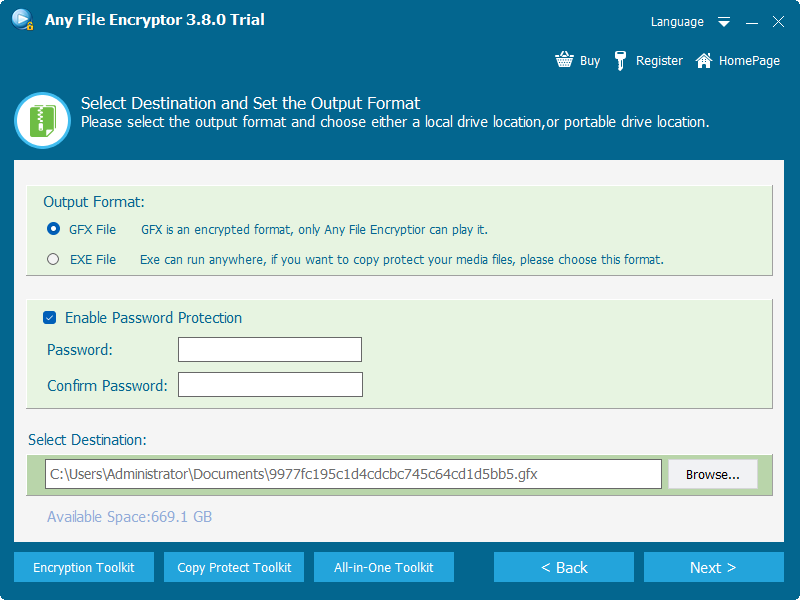
Choose GFX for protected player output or EXE when a self-contained Windows package is preferable.
Enable password protection, enter a strong passphrase, and choose the output location.
Review playback restrictions. For portable delivery, bind the EXE package to the intended USB drive when that rule is required.
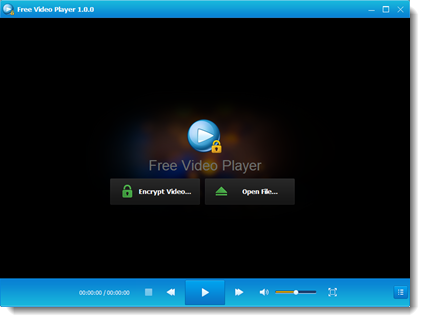
Test the exported package on a separate Windows PC before sending it to the viewer.
Put Video Files in an AES-Encrypted Archive
Choose this when the recipient is allowed to receive the original file and can extract an archive before watching.
The 7z format supports AES-256 encryption according to the official 7-Zip documentation. This is practical for one-time transfers and mixed folders, but the protection ends when the recipient extracts the video into an ordinary directory.
Place the videos in a clearly named folder and verify that every file plays correctly.
Add the folder to a 7z archive, select AES-256 encryption, and enter a unique passphrase.
Enable filename encryption when the archive tool supports it so filenames are not visible before authentication.
Open the finished archive on another computer, verify the password, then send the archive and password through separate channels.
This method is simple and broadly understood, but it is not a controlled playback system. Once extracted, the MP4 can be copied, renamed, edited, or uploaded like any other file.
Password Protect Videos Delivered on a USB Drive
Choose drive protection when a collection of videos, supporting documents, and folders will travel together on removable media.
BitLocker To Go can password-protect a removable drive on supported Windows editions. GiliSoft USB Encryption provides a private secure area and a public area on the same drive, which is useful when open instructions and protected videos must travel together.
Copy the source videos to a verified backup before changing the USB drive.
Create the protected volume or secure area and choose a password that is not stored on the same drive.
Move the private videos into the protected area and keep only non-sensitive instructions in the public area.
Eject, reconnect, unlock, and play several videos to test the complete recipient experience.
BitLocker To Go
Good for organizations already managing Windows encryption and recovery keys.
GiliSoft USB Encryption
Good for a portable private/public layout and straightforward password opening. See the USB Encryption product page.
Protect a Private Video Library on Your Own Computer
Choose account or container encryption when the videos are primarily for your own storage rather than external delivery.
Windows EFS
EFS can encrypt files and folders on supported Windows editions. Microsoft notes that file encryption is not available on Windows Home. Back up the EFS certificate before depending on it.
VeraCrypt container
A VeraCrypt file container mounts as a virtual encrypted disk. It is suitable for a changing private library, but every viewing computer needs compatible software.
Apple encrypted disk image
Disk Utility can create an encrypted disk image on macOS. The image is mounted with a password and works as a local protected container.
Whole-drive encryption
BitLocker is stronger for an entire Windows volume or archive drive than for emailing a single protected video.
Plan the Recipient Experience Before You Protect the Video
A protected file is only useful when the intended viewer can open it. Test the exact delivery route, not just the encryption step.
GFX or EXE protected playback can keep the raw video behind a password-aware Windows workflow.
Prefer a compatible encrypted archive, a platform-supported encrypted container, or a controlled web/DRM delivery system.
Confirm upload limits, archive splitting, available disk space, and extraction space before delivery.
Provide the required player or unlock tool in advance and test without internet access.
Does Password Protection Reduce Video Quality?
File-level encryption or protected packaging does not inherently require video re-encoding. When the existing encoded video stream is wrapped or encrypted, picture and audio quality can remain unchanged. Quality changes only if the workflow also converts, compresses, resizes, or re-encodes the source.
Security and Recovery Checklist
Do not let the protected package, archive, or drive become the only copy of an irreplaceable video.
Prefer a long password that is not reused for email, cloud storage, or Windows sign-in.
Send the video package and its password through different communication channels.
Store BitLocker recovery keys, EFS certificates, and product recovery details away from the protected media.
Confirm opening, playback, audio, seeking, and closing before the final handoff.
Explain whether extraction, copying, editing, offline playback, and expiration are allowed.
Video Password Protection FAQ
Can I put a password directly on an MP4 file?
No universal MP4 password field works across ordinary media players. The password must be enforced by a protected player package, archive, drive, account, or encrypted container.
What is the best method for emailing a video?
Use an AES-encrypted archive when the recipient may extract the original file. Use protected playback when the goal is viewing without sending an open MP4.
Can I password protect several videos together?
Yes. A protected package, encrypted archive, encrypted USB area, or mounted container can hold multiple videos and supporting files.
Can the viewer play a protected video on a phone?
Windows GFX and EXE packages are not general mobile formats. For mixed-device viewing, use a compatible delivery platform or a DRM workflow designed for those clients.
Is a password enough to stop redistribution?
A password controls initial opening. Stronger distribution control may require device binding, watermarking, revocation, licensing, and recipient-specific access.
Should I use password protection or DRM?
Use password protection for straightforward local or offline access. Use DRM when access must remain manageable after distribution.
Sources and Further Reading
- Microsoft Support: How to encrypt a file or folder
- Microsoft Learn: Configure BitLocker
- Microsoft Learn: BitLocker recovery overview
- 7-Zip: 7z format and AES-256 encryption
- VeraCrypt: Beginner's tutorial
- Apple Support: Create an encrypted disk image on Mac