Block unapproved USB storage and phone data transfer on Windows PCs while keeping approved company drives, keyboards, mice, printers, and other required peripherals available.
Block USB disk reading, writing, or both
Allow only approved company storage devices
Reuse trusted-device lists and review access events
Do not disable every USB controller just because removable storage is a risk. The practical target is the data channel: unknown flash drives, portable hard disks, memory cards, and phones used for file transfer. Keep required input devices and approved company storage available.
Quick answer
Use deny write to stop employees copying company files to USB, deny read to stop files entering from unknown media, or deny read and write on high-risk PCs. Add approved company drives to a whitelist before wider deployment.
Unmanaged file copying
Personal drives can move customer records, source files, financial documents, designs, and internal reports outside approved storage.
Malware introduction
Unknown removable media can introduce malicious files to shared workstations, service desks, production PCs, or isolated systems.
Inconsistent exceptions
Blanket blocking can interrupt legitimate work. Trusted-device rules give approved company drives a documented path to remain usable.
Choose the USB Policy by Business Need
Device or action
Recommended company treatment
Stop files being copied out
Deny write access to unknown removable storage while retaining read access where the job requires it.
Stop files entering from USB
Deny read access on kiosks, front-desk PCs, production stations, or other computers that should not import unreviewed files.
Unknown USB storage
Deny read and write access when the workstation should not exchange files with personal media.
Approved company drives
Add reviewed devices to the trusted-device whitelist and retest them after policy changes.
Phones and portable storage
Restrict data-transfer channels where personal devices are not permitted.
Keyboard, mouse, printer
Keep necessary peripherals available by applying storage-focused rules instead of disabling every USB controller.
Block USB Storage with GiliSoft USB Lock
Use GiliSoft USB Lock when company PCs need direct read and write restrictions, an approved-device whitelist, phone-transfer controls, and local records of blocked or allowed access.
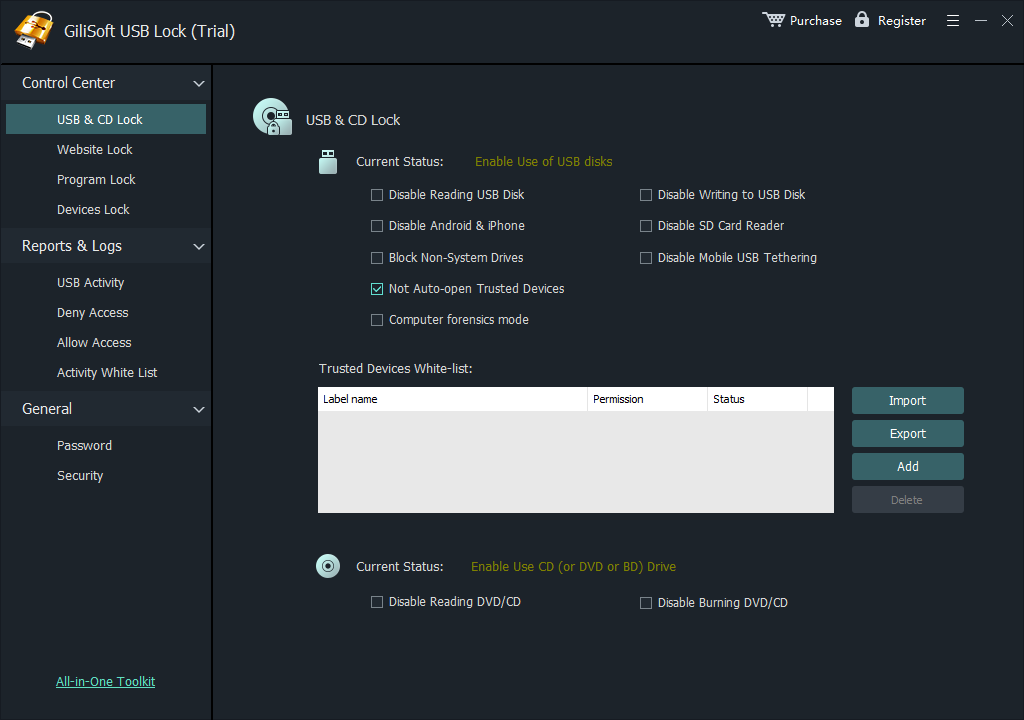
USB & CD Lock separates USB disk read and write restrictions from controls for other device categories.
Install USB Lock. Open the application on the company computer and enter the administrator password.
Open USB & CD Lock. Review the available storage and device categories before applying a restriction.
Choose the policy. Enable USB disk reading restrictions, writing restrictions, or both for unknown storage devices.
Apply and test. Reconnect a test drive and confirm that the expected read and write behavior is enforced.
Company rollout tip: test the rule on one representative PC first, including the keyboard, mouse, printer, dock, approved USB drive, and any phone-transfer workflow used by that department.
Allow Only Approved Company USB Drives
A whitelist avoids the operational cost of opening every USB device while still permitting reviewed company drives. USB Lock can export the trusted-device list and import it on another managed computer, making repeat deployment more consistent.
Add an inserted device, then export the trusted list for reuse on other company computers.
Insert a reviewed company USB drive into the policy computer.
Open the whitelist and choose Add to register the trusted device.
Repeat for the approved drives used by that department or site.
Choose Export, then use Import on other managed PCs.
Document the owner, purpose, and approval date for every trusted drive. A whitelist is strongest when old or lost devices are removed promptly.
Roll Out USB Restrictions Without Interrupting Work
A company-wide USB rule should start with the devices and jobs that must continue working. Pilot the policy, register approved storage, test both blocked and allowed devices, and only then expand it to more PCs.
STEP 1
Inventory real USB needs
List approved drives, card readers, phones, printers, scanners, and specialty devices used by each team.
STEP 2
Pilot on selected PCs
Start with a small group that represents the actual hardware and day-to-day file-transfer tasks.
STEP 3
Create an exception process
Define who can approve a new device, how long the exception lasts, and how the device is recorded.
STEP 4
Verify and expand
Test blocked and approved devices, review access events, then export the trusted list or contact GiliSoft for larger custom deployments.
Verify the Policy and Review USB Events
Use the log to review blocked and allowed activity after the policy is applied.
Unknown drive test
Connect an unapproved flash drive and confirm the intended read and write restrictions.
Trusted drive test
Connect each approved company drive and confirm it receives only the expected permissions.
Peripheral test
Check keyboards, mice, printers, docks, phones, and specialty hardware used by the department.
Log review
Confirm that access events provide enough context for support and policy follow-up.
Windows Management Options for Larger Environments
Organizations already using Group Policy, Intune, or Microsoft Defender for Endpoint can enforce removable-storage rules centrally. These controls require policy ownership, device grouping, testing, and event review; they are not simply an on/off switch for every USB peripheral.
Removable Storage Access policy
Use Group Policy to deny read access, write access, or all access for removable storage classes.
Create allow, deny, and audit rules for removable media. Rules can vary by device group, user group, and access type, including read-only access.
Use device groups, policy groups, and Allow / Deny / Audit actions
Device installation restrictions
Control whether matching hardware can be installed by hardware ID, device instance ID, or setup class. Installation policy and storage-access policy solve different problems.
Computer Configuration > Administrative Templates > System > Device Installation
Verification: after changing Group Policy, run gpupdate /force and create a result report with gpresult /h gp-report.html. Confirm the effective removable-storage rule instead of editing USBSTOR registry values across company computers.
Company USB Port Blocking FAQ
Can a company block USB storage without disabling keyboards and mice?
Yes. Apply storage and data-transfer restrictions instead of disabling every USB controller or hub.
Can approved company USB drives remain usable?
Yes. Add reviewed drives to the whitelist, then export and import the trusted list for other managed PCs.
Can the company block writing but still allow reading?
Yes. Separate read and write restrictions let the policy target copy-out activity while retaining approved read access.
Should the policy start on every computer at once?
A pilot is safer. Test representative devices and workflows first, then expand after the exception and recovery process is clear.
Does blocking USB storage encrypt files already on a drive?
No. Use GiliSoft USB Encryption when the files stored on the removable drive need password protection.
Where can administrators review blocked attempts?
USB Lock provides an access log that helps review removable-device events on the managed Windows computer.
Sources and Further Reading
Use these references when a larger Windows environment needs centrally managed device rules, more detailed auditing, or formal portable-media policy guidance.
Microsoft Learn
Device control in Microsoft Defender for Endpoint explains that removable-media access rules target devices that create disks in Windows, while device-installation restrictions are managed separately.
Microsoft Learn
Device control policies documents read, write, and execute access, default enforcement, approved-device groups, and audit actions.
Microsoft Support
Troubleshoot USB write protection shows how to inspect the effective removable-storage policy with Group Policy Result and refresh policy safely.