
Which USB video protection method should you use?
| Method | What it protects | Best use | Important limitation |
|---|---|---|---|
| GiliSoft USB Copy Protection | Protected playback, copy restrictions, passwords, device binding, watermarks, expiration, and common capture controls | Paid, training, client, and course videos delivered on USB | The recipient opens GCP or EXE protected output instead of the original source video |
| BitLocker To Go | The complete removable drive while it is locked | Lost or stolen USB drives | After the drive is unlocked, ordinary video files can still be copied |
| Any Video Encryptor | Password-protected GFX or EXE playback with anti-capture and optional USB binding | Simple private video sharing and offline playback | Use GFX for larger packages; EXE output has a size limit |
| Video DRM Protection | Playback licensing, device binding, dynamic watermarking, expiration, and blacklist revocation | Commercial video access that may need control after delivery | Requires a more managed licensing setup than simple USB packaging |
Recommended: protect USB videos with GiliSoft USB Copy Protection
This method is designed for the moment a video leaves your computer. Instead of placing an ordinary source file on the flash drive, you create a protected package that viewers can open under the rules you define.
- Prepare the final videos and any PDFs, subtitles, images, documents, or supporting files that belong in the delivery.
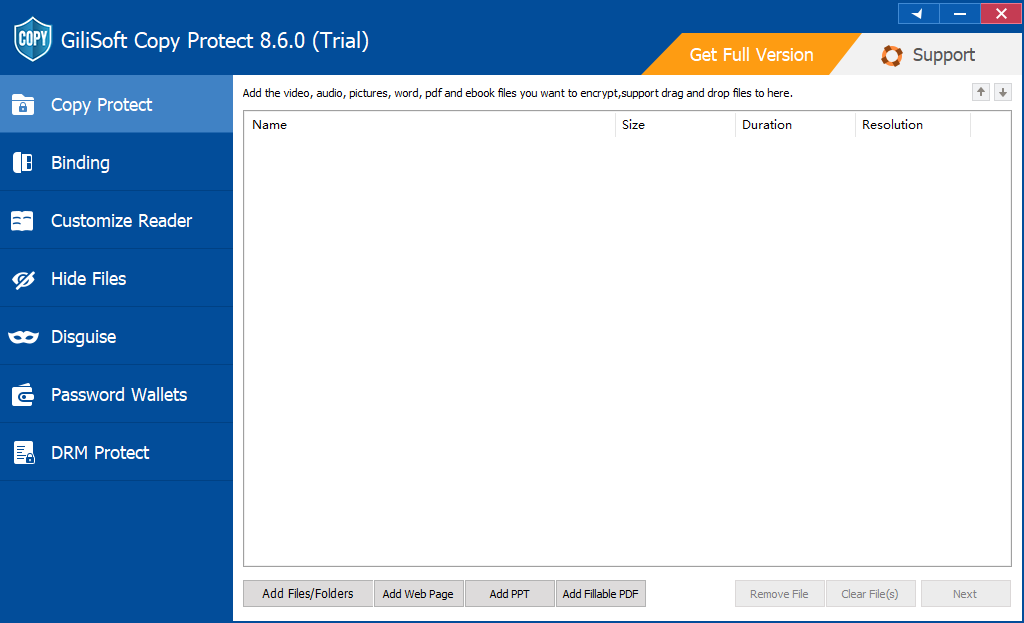
- Open GiliSoft Copy Protect and add the videos or complete project folder.
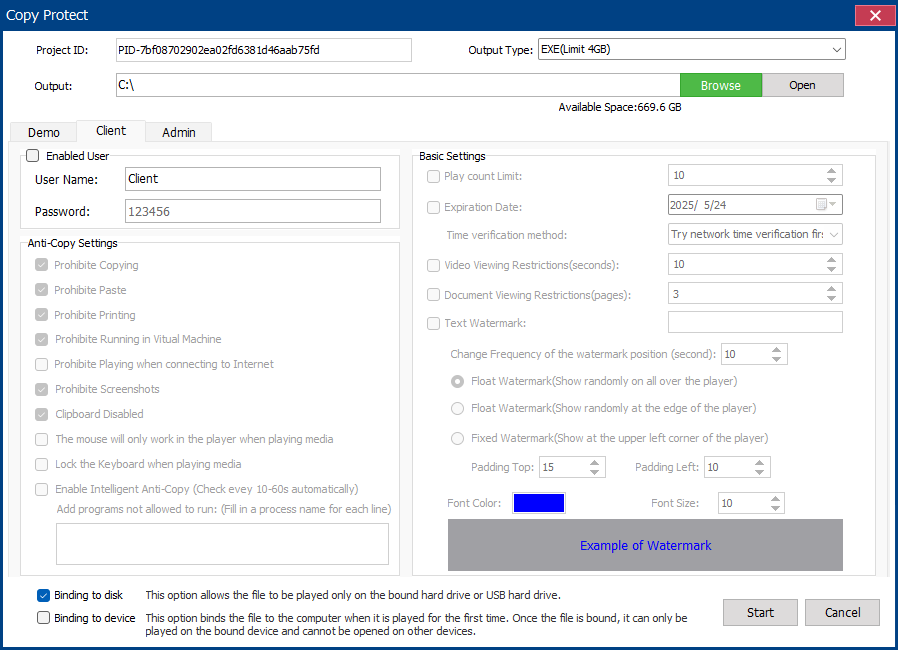
- Choose GCP for a protected-reader package or EXE for a self-running Windows package within the output limit.
- Set the opening password, copy and screenshot permissions, watermark, expiration, viewing limits, and client access rules.
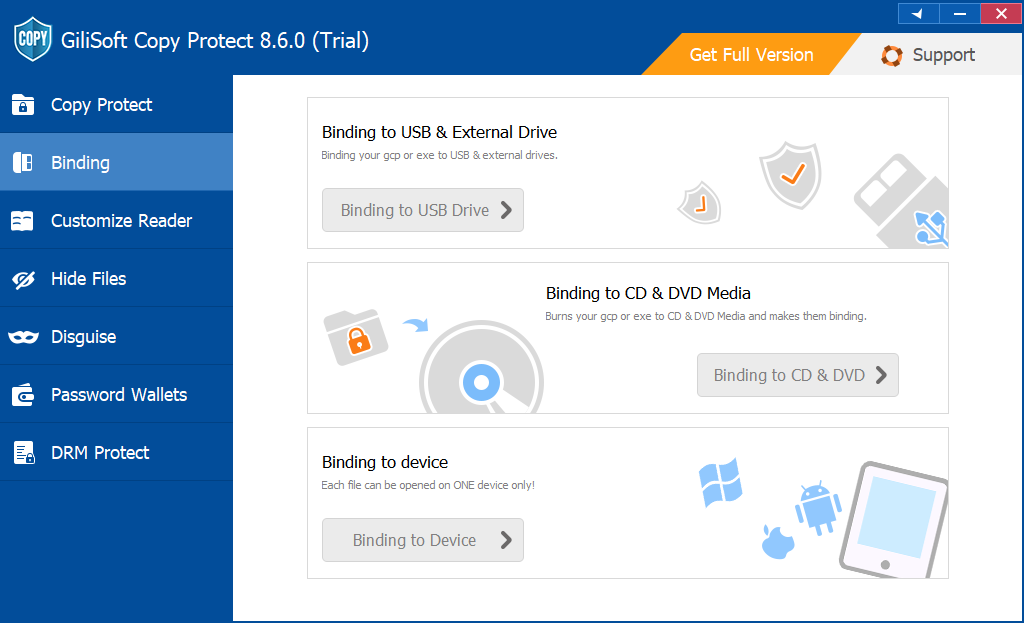
- Bind the project to the USB drive or approved computer when the package must not run after being moved elsewhere.
- Build the protected output and test video playback, audio, subtitles, permissions, and device binding on a separate computer.
Let recipients watch the video without receiving the source file
Use USB Copy Protection for training libraries, paid lessons, client previews, sales demonstrations, offline kiosks, and other deliveries where videos must remain viewable but ordinary file reuse should be restricted.
Use BitLocker To Go when the main risk is a lost USB drive
Microsoft BitLocker To Go encrypts removable storage such as USB flash drives, SD cards, and external disks. It is appropriate when the drive itself may be lost or stolen and nobody should read its contents without the unlock password or recovery key.
- Connect the USB drive, right-click it in File Explorer, and choose Turn on BitLocker.
- Select password unlock, create a strong password, and save the recovery key away from the USB drive.
- Choose the encryption scope and compatible mode, then allow Windows to finish encryption before ejecting the drive.
- Test the password and recovery key on another authorized Windows computer.
Use Any Video Encryptor for straightforward password-protected playback
GiliSoft Any Video Encryptor creates password-protected GFX or EXE output for local playback. It can restrict screenshots and Save As during protected viewing, and an EXE package can be bound to an authorized USB drive so it cannot open after being copied away.
Choose GFX for larger video packages and the dedicated player. Choose EXE when a self-running Windows package is more convenient and the complete output stays within the EXE size limit.
Use Video DRM Protection when access may change after delivery
GiliSoft Video DRM Protection is the stronger choice for paid courses, membership libraries, corporate training, premium media, and licensed video distribution. Authoring is performed on Windows, while protected playback can be prepared for supported desktop and mobile platforms.
Choose DRM when you need playback passwords, PC or USB binding, dynamic watermarks, expiration, online password blacklists, and the ability to revoke compromised access after delivery.
USB video delivery checklist
- Keep the original unprotected videos off the customer USB drive.
- Use a separate password or device rule for each customer, class, or delivery batch.
- Test the complete drive on a clean recipient-style computer, including subtitles and audio.
- Verify copy, screenshot, expiration, watermark, and device-binding behavior before shipment.
- Keep a verified backup of the source videos, project settings, passwords, and recovery information.
- Eject the flash drive safely and use trusted media with enough free space for the final package.
Related USB video protection guides
USB video protection FAQ
Can BitLocker stop recipients from copying videos?
No. BitLocker controls access to the encrypted drive while it is locked. After authorized unlock, ordinary files can be copied normally. A protected viewing package is needed when post-opening reuse matters.
Should I choose GCP or EXE output?
Choose GCP for the standard protected reader and larger projects. Choose EXE for a self-running Windows package when the full protected output is within the 4 GB EXE limit.
Can protected video software stop every recording?
It can restrict common software capture and reuse paths, but no software can prevent someone from filming a visible screen with an external camera. Watermarking and device binding add accountability when that risk matters.
When is Video DRM better than USB Copy Protection?
Choose Video DRM when you need managed licensing, dynamic watermarking, expiration, device-bound passwords, blacklist revocation, or playback across supported desktop and mobile platforms.
Official references
- Microsoft Learn: BitLocker FAQ and removable-drive support
- NIST SP 800-111: Guide to Storage Encryption Technologies
- NIST SP 1334: Reducing the Cybersecurity Risks of Portable Storage Media
- CISA: Data backup and removable-media security guidance
Protect videos before copying them to the USB drive
Create a controlled GCP or EXE delivery, define who can open it, and restrict common copying and capture paths without distributing the original source files.
View GiliSoft USB Copy Protection