
What Is a USB Allow List?
The term allow list describes more than a one-time technical exception. It is a maintained record of which physical drives are authorized, who owns them, why they are needed, what access they receive, and when that approval should be reviewed or removed.
This is more precise than disabling every USB port. Support drives, print-transfer media, camera cards, deployment disks, and controlled backup devices can remain available without accepting every personal flash drive connected to the computer.
What Belongs in an Approved USB Device Record?
Register the actual drive and give it a recognizable name such as an asset number, department, or assigned user.
Record who holds the device and whether it is used for support, printing, backup, field collection, or another approved task.
Choose read-only for reference or delivery media; grant write access only when the job requires files to be added or changed.
Document when access was approved and when the exception should be reviewed instead of letting old entries remain indefinitely.
Treat a replacement drive as a new device. Remove the old entry and register the new hardware after verification.
Revoke the missing drive promptly, review recent connection events, and preserve the incident record for follow-up.
Compare Ways to Maintain a USB Allow List on Windows
| Method | Good fit | What administrators must manage |
|---|---|---|
| GiliSoft USB Lock Direct Windows control | Businesses, schools, labs, service counters, kiosks, and shared Windows PCs | Approved devices, read/write permission, labels, exported lists, protected settings, and access events |
| Microsoft Defender Device Control | Organizations already operating the supported Microsoft endpoint stack | Reusable device groups, policy deployment, auditing, licensing, exclusions, and ongoing rule administration |
| Windows Group Policy | Domain environments with staff experienced in device installation restrictions | Hardware identifiers, parent and child device nodes, retroactive policy behavior, exceptions, and testing |
| Manual inventory only | Very small teams with a few issued drives | Asset labels, sign-out records, storage, return, and replacement; inventory alone does not stop an unknown drive from connecting |
Microsoft documents reusable device groups and device-control policies for managed environments. It also notes that USB devices can expose several identifiers and logical functions, so every approved and unknown-device test should be performed on the Windows versions and hardware used in production.
Create the Allow List with GiliSoft USB Lock
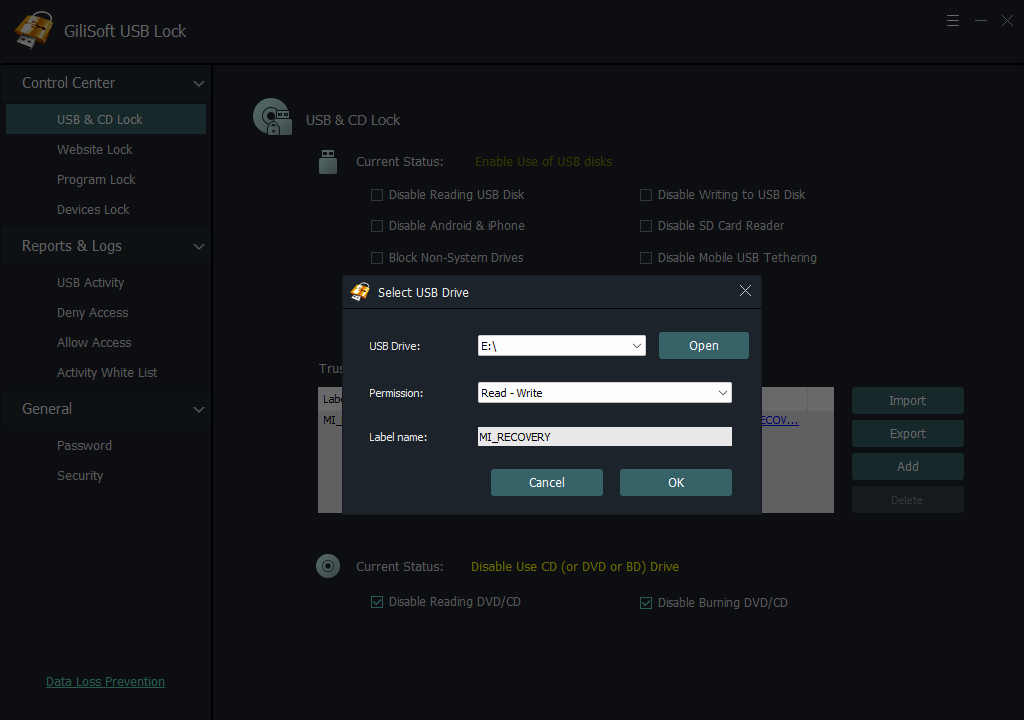
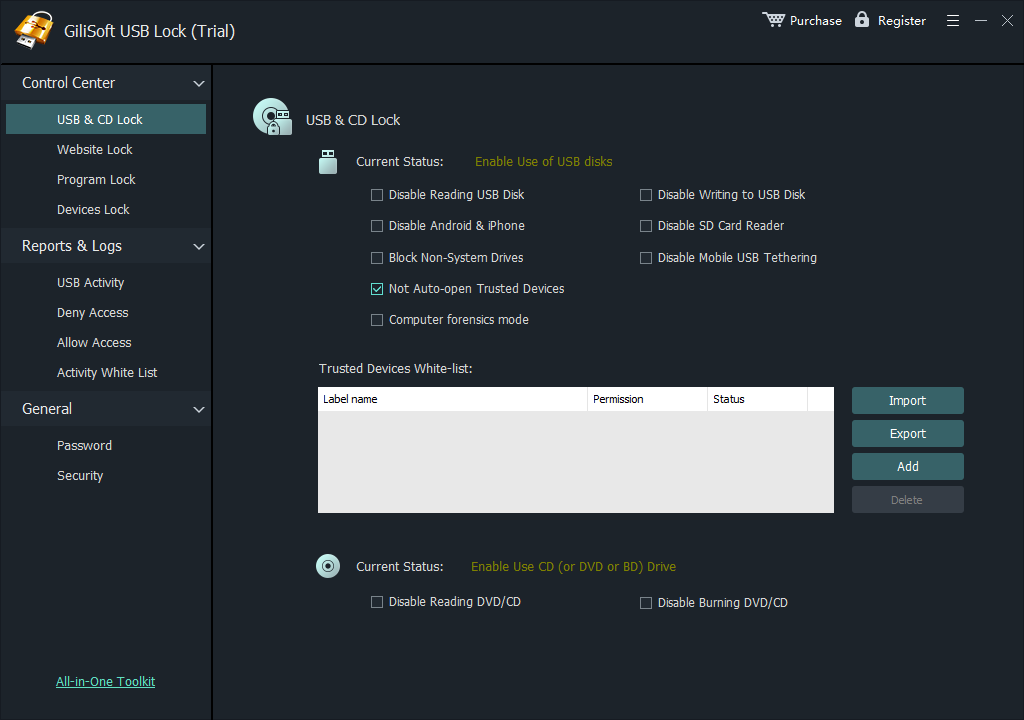
GiliSoft USB Lock turns the approved-device register into a direct Windows control. Insert the verified company drive, add it to the trusted list, choose read-only or read-write access, and label the entry. Unknown storage continues to follow the USB restriction policy.

Keep approved business drives working
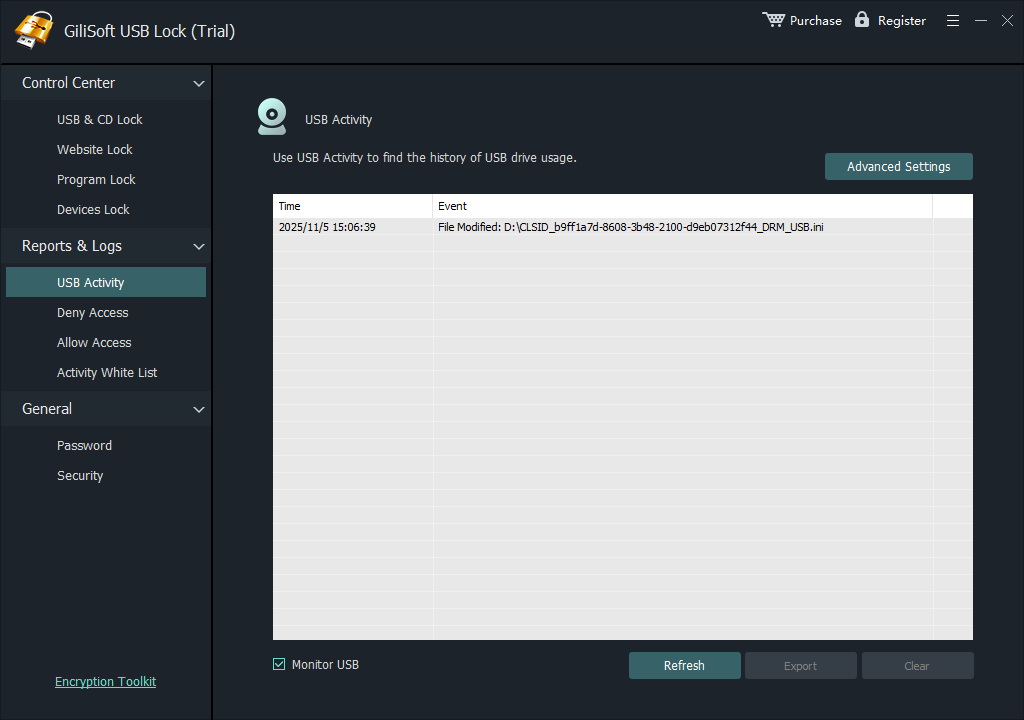
Maintain the device list, assign permission, protect administrative changes, export a tested configuration to other PCs, and review connection events. USB Lock also provides separate controls for USB and SD storage, phones, optical media, tethering, and related transfer channels.
- Register individually approved company drives
- Assign read-only or read-write permission
- Keep unknown removable storage restricted
- Label entries by owner, asset, or purpose
- Export and import a tested device list
- Protect settings and review access events
How to Build and Test the USB Allow List
- Inventory company drives with a legitimate purpose. Record the owner, asset label, task, required permission, and review date.
- On a pilot PC, set the USB storage restriction in GiliSoft USB Lock and protect administrative settings.
- Insert the first verified drive, click Add, choose read-only or read-write access, enter a recognizable label, and save it.
- Repeat for every issued drive. Test each approved device, then connect an unknown drive and confirm that it remains restricted.
- Export the tested list, import it on another protected PC, and repeat the approved and unknown-device checks.
- Record the list revision and keep the export under administrative control for future deployment and recovery.
For screen-by-screen Add, Export, and Import instructions, use the USB Lock whitelisting guide. For a shorter procedural article, see how to allow only approved USB devices.
Deploy the List Without Losing Control
Start with one representative PC and the real devices used by that department. Validate read and write behavior, reconnect the drives after restart, test an unknown device, and record the approved-list revision before expanding deployment.
Test every approved drive and at least one unknown drive on the Windows versions used in production.
Date exported lists and record which departments or computers received each revision.
Delete lost, damaged, replaced, returned, or reassigned drives instead of letting exceptions accumulate.
Inspect logs after rollout and investigate unknown devices or approvals used outside their expected location.
Need volume licensing or custom USB control?
For a larger Windows deployment, GiliSoft can evaluate volume licensing, OEM requirements, and custom development. Send the endpoint count, Windows versions, approved-device inventory, permission rules, administration needs, and rollout method.
Discuss an allow-list deploymentDo Not Treat an Allow List as Permanent
An approved list is useful only while its entries remain accurate. Review it after staff changes, device loss, hardware replacement, department moves, or changes to transfer procedures. A drive that was valid last year may no longer have a current owner or business purpose.
- Review the list on a defined schedule
- Remove lost and retired devices promptly
- Register replacement hardware as a new device
- Recheck permissions when the job changes
- Investigate repeated unknown-device events
- Keep exported lists under administrator control
Where USB Allow Lists Work Well
Service, recovery, and deployment drives
Keep named diagnostic, firmware, installation, and recovery media available to support staff while unregistered storage remains restricted.
Reception and file-transfer stations
Allow one issued business drive for approved transfer instead of accepting every flash drive brought to a shared workstation.
Schools, labs, and production PCs
Give reference media read-only access or controlled write access for collection jobs, then review events when an unknown device appears.
Departments with separate approved inventories
Finance, HR, design, operations, and service teams can maintain their own issued-drive records and permission levels instead of sharing one broad exception.
Related USB Control Guides
Compare software approaches for trusted USB device control.
Follow a focused setup and validation procedure.
Use the GiliSoft USB Lock interface step by step.
Review storage, phone, optical-media, and other channel controls.
Plan company rules around approved business exceptions.
Coordinate USB, SD card, phone, and related transfer policies.
USB Allow-List Software FAQ
What is the difference between a USB allow list and a block list?
An allow list names devices that may connect. A block list names known devices that may not connect. On tightly controlled PCs, approving verified devices and restricting unknown storage is usually easier to audit.
Does USB approval follow a port or drive letter?
No. USB ports and Windows drive letters can change. Approval should be associated with the verified physical device rather than the connector position or temporary letter.
Can an approved USB drive be read-only?
Yes. GiliSoft USB Lock supports read-only and read-write permission. Choose the smallest access level that still completes the assigned task.
Can I copy the USB allow list to another PC?
Yes. Export the tested list and import it on another protected PC, then reconnect approved and unknown drives to verify the result.
What should I do when an approved drive is lost or replaced?
Remove the missing device from the list, review recent events, and register the replacement as new hardware. Do not leave the old approval active.
Can allow-list rules cover phones and SD cards?
GiliSoft USB Lock provides separate controls for USB and SD storage, phone data transfer, optical media, tethering, and related channels. Configure and test each required channel separately.
Research Sources
- Microsoft Learn: Device Control policies
- Microsoft Learn: Deploy and manage Device Control with Group Policy
- CISA: Cross-Sector Cybersecurity Performance Goals
Build a USB allow list that stays maintainable
Register approved devices with GiliSoft USB Lock, keep unknown storage restricted, and review or revoke access as the inventory changes.