
Windows Startup Takes Forever? Find and Fix the Cause
A slow startup can happen before Windows loads, during the spinning-dots phase, at sign-in, or after the desktop appears. Identify the stage first because startup apps cannot explain every boot delay.
Quick answer
Time the startup and note where Windows pauses. If the desktop appears quickly but remains busy, review Settings > Apps > Startup or Task Manager Startup apps and disable only nonessential items. If the delay occurs before sign-in, check updates, storage health, drivers, firmware, and Windows recovery diagnostics. GiliSoft Total Repair adds a focused Startup Manage view for supported entries.
Identify Which Startup Stage Is Slow
| Slow stage | What you see | Investigate first |
|---|---|---|
| Before Windows logo | Long firmware or manufacturer screen | External devices, firmware, boot order, hardware |
| Windows loading | Extended spinning dots | Updates, drivers, disk health, Windows components |
| Sign-in | Long wait after password or PIN | Profile, network, policy, sign-in tasks |
| After desktop appears | High disk or CPU; apps keep opening | Startup apps, sync tools, updates, background tasks |
Measure from power-on to a usable desktop on two or three comparable starts. A single slow boot after an update is not enough evidence for broad optimization.
Review Startup Apps in Windows
- Open the startup list.
Use Settings > Apps > Startup, or right-click Start and open Task Manager > Startup apps.
- Sort by startup impact.
Prioritize high-impact entries you recognize instead of disabling everything.
- Keep essential tools enabled.
Preserve security, accessibility, backup, synchronization, hardware, and required business software unless you understand the consequence.
- Disable one small group.
Disabling startup does not uninstall the application; it normally remains available manually.
- Restart and measure again.
Re-enable an item if a required function is missing or startup does not improve.
Manage Startup Entries with GiliSoft Total Repair
Startup Manage provides another view of supported automatic launch entries. Use it to organize the review, not to classify every unfamiliar item as unnecessary.
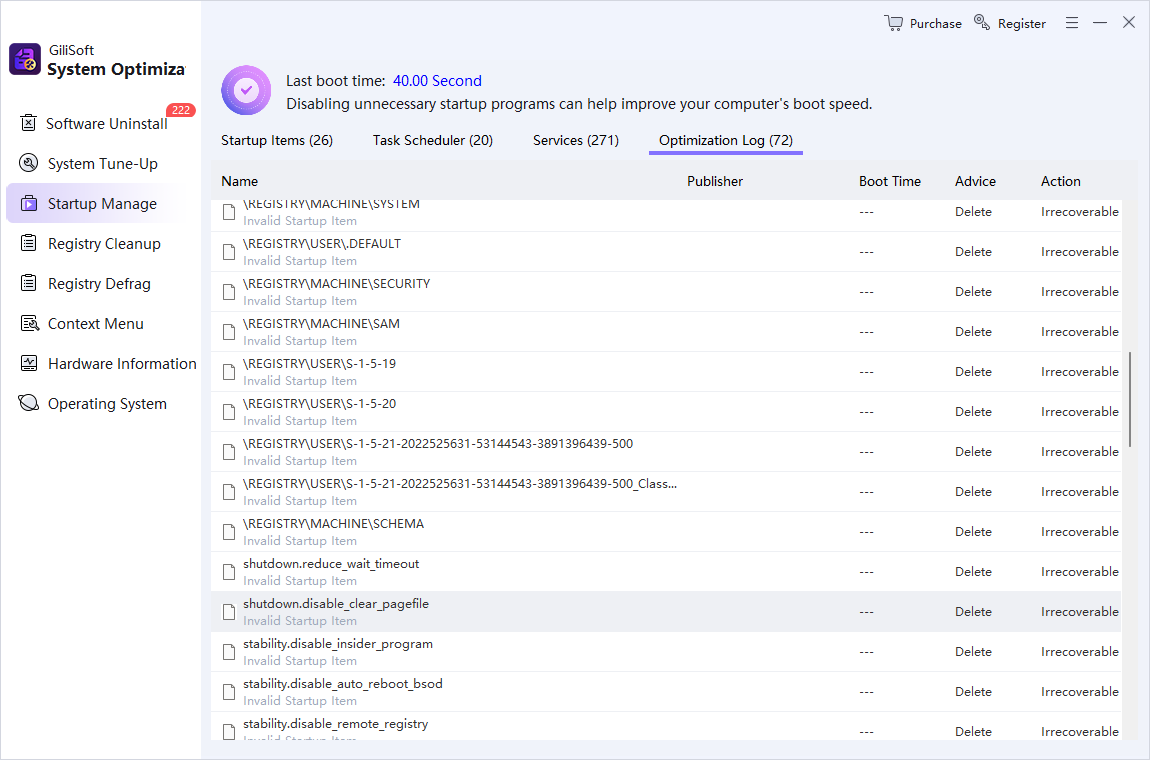
- Open Startup Manage.
Let the list populate before selecting entries.
- Identify each publisher and purpose.
Search the installed application or file path when the label is unclear.
- Disable nonessential user apps first.
Start with launchers or helpers you can open manually later.
- Restart and compare.
Measure both boot time and time until the desktop becomes usable.
Check Causes Beyond Startup Apps
Persistent slow boot can come from low free space, a failing disk, incomplete updates, driver timeouts, malware, network policies, user-profile problems, firmware, or aging hardware. Check Windows Update, Task Manager resource use, storage health, Reliability Monitor, and security scan results before making registry or service changes.
Use a Clean Boot Only as a Controlled Test
A clean boot starts Windows with essential drivers and selected startup software so you can isolate a conflict. Record every disabled item, hide Microsoft services before testing third-party services, and restore Normal Startup when troubleshooting is complete. If Windows cannot boot normally, use Windows Recovery Environment rather than attempting these desktop steps.
Slow Windows Startup FAQ
Why does Windows take so long to start?
Common causes include high-impact startup apps, pending updates, slow or failing storage, driver delays, malware, profile or network tasks, low free space, and hardware limitations. Identify the slow stage before changing settings.
Where are startup apps in Windows 11?
Open Settings, choose Apps, and then Startup. Task Manager also has a Startup apps page and can show measured startup impact when data is available.
Is it safe to disable all startup programs?
No. Security, accessibility, backup, sync, hardware, and required business software may need to start automatically. Disable only entries you recognize and test in small groups.
Does disabling a startup app uninstall it?
No. It normally prevents automatic launch at sign-in while leaving the application installed and available to open manually.
Will cleaning junk files fix slow startup?
Only when low storage or excessive temporary work contributes to the delay. Firmware, drivers, updates, startup apps, services, malware, disk health, and hardware may be more important.
When should I use a clean boot?
Use it as a documented troubleshooting test when a third-party app or service conflict is suspected. Record disabled items and restore normal startup afterward.