
How to Disable USB Storage Access on Windows
Block USB flash drives and removable disks without turning off keyboards, mice, printers, or other required USB peripherals. Choose whether Windows should deny reading, deny writing, block all storage access, or allow only approved drives.
Disable the Storage Class, Not the Entire USB Controller
“Disable USB” is often too broad. A USB port can carry storage, input devices, printers, phones, cameras, network adapters, and charging. Before changing Windows, identify the operation you need to stop: opening files from a drive, copying files to it, using any unknown storage, or all removable-media access.
Choose the USB Storage Access Level
- Deny write access: stop PC-to-USB copying while allowing users to read approved files from the drive.
- Deny read access: stop opening, importing, or running files from removable storage.
- Deny all access: block reading and writing when no USB storage task is permitted.
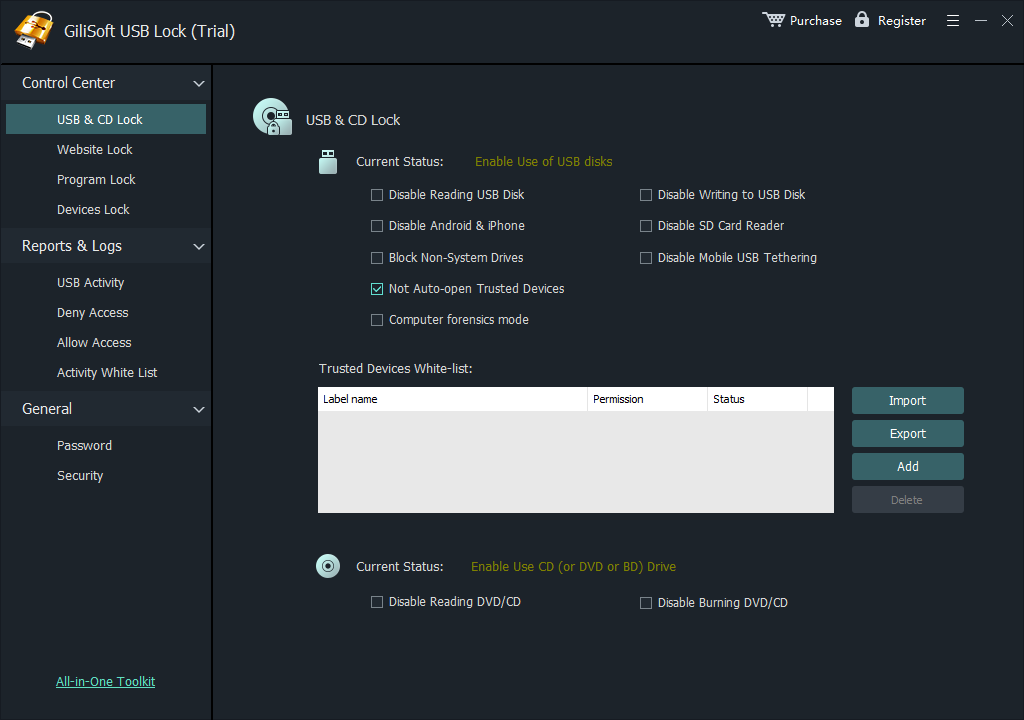
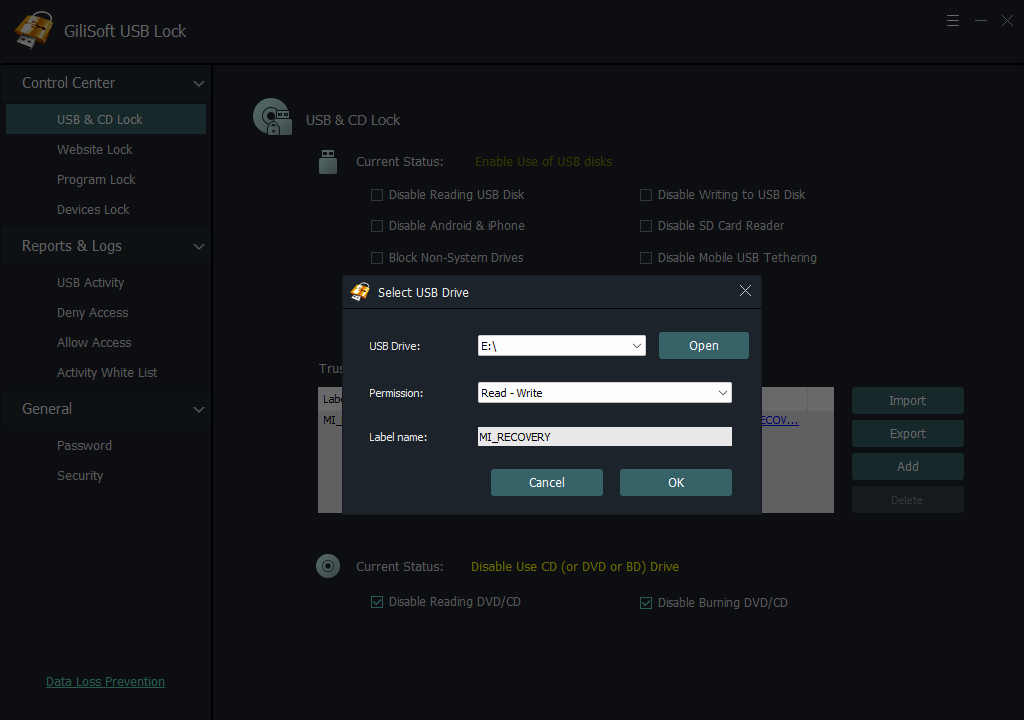
- Allow approved drives only: register trusted company media and reject unknown storage.
- Control related channels: set separate rules for SD cards, Android and iPhone transfer, tethering, and optical media.
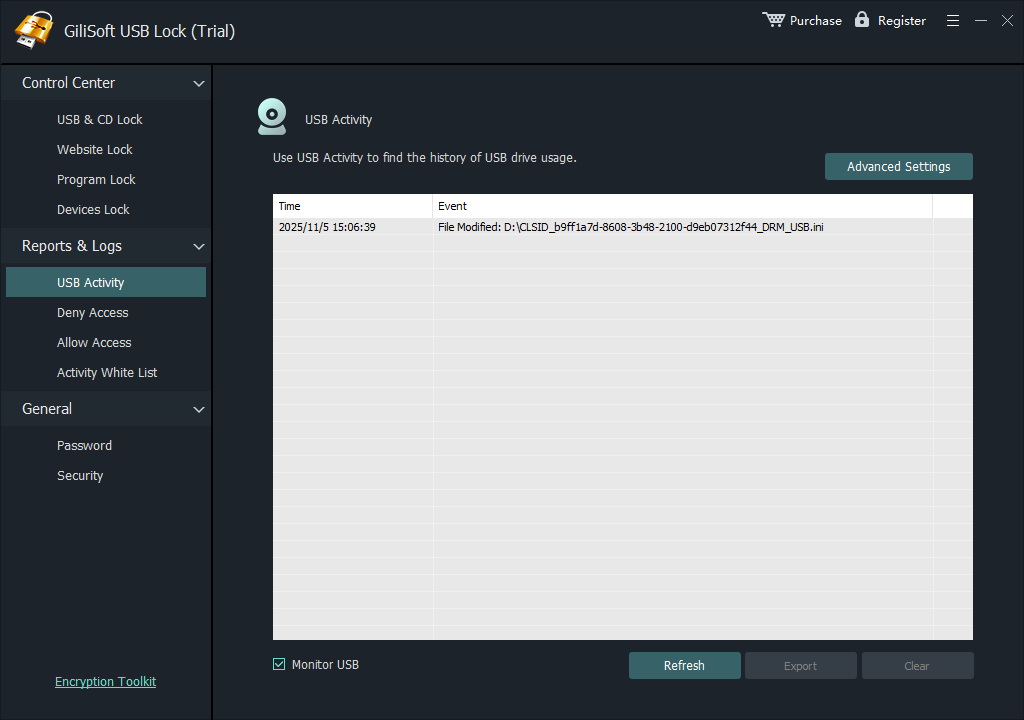
- Record access attempts: verify that the restriction is working and investigate exceptions.
Compare Ways to Disable USB Storage Access
| Option | Good for | User experience | Important consideration |
|---|---|---|---|
| GiliSoft USB Lock Recommended | Direct storage control, trusted-drive whitelist, phone and media rules, and access logs | Unknown storage is restricted while approved devices remain usable | Password-protected settings; volume, OEM, and custom-development options available |
| Windows Group Policy or MDM | Managed read, write, or all-access restrictions | Windows rejects the configured removable-storage operation | Local Group Policy is normally unavailable on Windows Home |
| Microsoft Defender Device Control | Enterprise device groups, user conditions, granular permissions, and reporting | Access can vary by device, user, and machine | Requires eligible Microsoft licensing and experienced administration |
| Device Manager or USBSTOR | A simple local block on one PC | The storage device or driver is disabled | No approved-drive workflow or useful access history |
Block USB Storage and Keep Approved Drives Working
- List every USB peripheral and removable drive that must continue working on the test PC.
- Install GiliSoft USB Lock, create the administrator password, and configure recovery information.
- Open the USB and CD/DVD controls, then select the USB/SD storage and related channels to restrict.
- If approved storage is required, insert each verified drive and add it to the trusted-device whitelist.
- Reconnect an unknown drive and confirm that Windows blocks the intended read or write operation.
- Reconnect an approved drive, test normal access, and review the access log for both attempts.
- Export the tested whitelist before applying the same configuration to additional PCs.
Disable Removable Storage with Group Policy
On supported Windows editions, open the Local Group Policy Editor and go to Computer Configuration > Administrative Templates > System > Removable Storage Access. Choose the narrowest policy that matches the requirement:
- Removable Disks: Deny write access stops copying files from the PC to removable disks.
- Removable Disks: Deny read access stops users opening or importing files from removable disks.
- All Removable Storage classes: Deny all access applies a broader block across removable-media classes.
- Managed deployment: use domain Group Policy or MDM instead of configuring each PC manually.
- Open gpedit.msc with administrator rights.
- Navigate to the Removable Storage Access policy folder.
- Enable the required deny-read, deny-write, or deny-all setting.
- Run gpupdate /force, reconnect the drive, and test both copy directions.
Use Device Manager or the USB Storage Driver Carefully
Device Manager can disable a specific USB storage device, while the USBSTOR service controls the Windows USB mass-storage driver. These methods can be useful on a single PC, but they are blunt controls: they do not provide a trusted-drive list, phone-transfer rules, exception handling, or a readable access history.
Use GiliSoft USB Lock When a Simple On/Off Switch Is Not Enough
GiliSoft USB Lock brings USB and SD storage control, trusted-device whitelisting, Android and iPhone transfer rules, tethering restrictions, CD/DVD controls, password-protected settings, and activity records into one Windows interface. It is the practical choice when unknown storage must be blocked but approved media and normal USB peripherals still have a job to do.

GiliSoft USB Lock
Download the trial and test an unknown drive, an approved drive, required peripherals, and every related transfer channel covered by your policy.
Need deployment support?
GiliSoft offers volume licensing, OEM options, and custom development for organizations with specific device-control or rollout requirements.
Contact sales@gilisoft.comVerify the USB Storage Restriction
- An unknown drive cannot perform the prohibited read or write action.
- An approved drive still works when a trusted-device list is used.
- Keyboard, mouse, printer, scanner, and security key behavior is unchanged.
- The rule still applies after reconnecting the drive and restarting Windows.
- Phone transfer, tethering, SD card, and CD/DVD rules are tested separately.
- A normal user cannot change password-protected settings.
- Allowed and blocked attempts appear in the access log.
- The whitelist, recovery details, and exception record are backed up.
Related USB Storage Control Guides
- Disable USB access for employees
- Disable USB ports on Windows 11
- Block files from being copied to USB
- Allow only approved USB devices
- Export and import an approved USB whitelist
- Block phone and USB data transfer
- Encrypt approved USB drives that carry sensitive files
- USB Lock help by topic
Disable USB Storage Access FAQ
Can I disable USB storage without disabling keyboards and mice?
Yes. Apply removable-storage controls instead of disabling the USB host controller, then test every required peripheral.
What is the difference between deny read, deny write, and deny all?
Deny read prevents users opening or importing files from removable storage. Deny write prevents copying files from the PC to the drive. Deny all blocks both directions.
Can approved USB drives still work when unknown storage is blocked?
Yes. Add verified company drives to the trusted-device whitelist while unknown removable storage remains restricted.
Can USB storage and phone transfer be controlled separately?
Yes. USB Lock provides separate controls for USB and SD storage, Android and iPhone data access, USB tethering, and CD/DVD media.
Is Group Policy available on every Windows edition?
The Local Group Policy Editor is normally available on Pro, Enterprise, and Education editions, not Windows Home. Managed organizations may also use MDM or Microsoft Defender Device Control where licensed.
Why can a blocked USB drive still appear in File Explorer?
Some policies deny reading or writing without removing the drive letter. The device may remain visible, but the restricted operation should fail. Test the exact action rather than checking visibility alone.
Official Windows References
- Microsoft Learn: removable-storage access policies
- Microsoft Learn: Defender for Endpoint device-control policies
- Microsoft Learn: deploy Defender Device Control with Group Policy
- NIST SP 800-82 Rev. 3: restrict removable-media use according to policy
Disable USB storage without disabling everyday peripherals
Test an unknown drive, an approved drive, both copy directions, and every USB peripheral the Windows PC still needs.