

Which Thumb Drive Encryption Method Should You Use?
Choose the method by deciding where the drive must open and whether the whole device or only a private area needs protection.
| Method | Best for | What it protects | Main consideration |
|---|---|---|---|
| GiliSoft USB Encryption Recommended Windows route | Private and public storage on one ordinary thumb drive | A password-protected secure area | Secure-area access uses the GiliSoft Windows component |
| BitLocker To Go | Windows Pro, Enterprise, or Education | The removable drive as a BitLocker volume | Save the recovery key separately |
| macOS Disk Utility | Mac-centered storage that can be erased first | The newly formatted encrypted volume | The workflow erases and reformats the device |
| Hardware-encrypted USB | Regulated or high-assurance use | Data through encryption handled inside the drive | Higher cost and standards must match policy |
Before You Encrypt the Thumb Drive
Copy important files elsewhere and open several before changing the drive.
Match the drive letter, name, and capacity before selecting it.
Store recovery keys or product recovery details away from the thumb drive.
Compatibility differs across Windows, Mac, TVs, printers, and cameras.
Encrypt a Thumb Drive with GiliSoft USB Encryption
Use this route when a Windows thumb drive should contain a normal public area and a private area that opens only with its password.
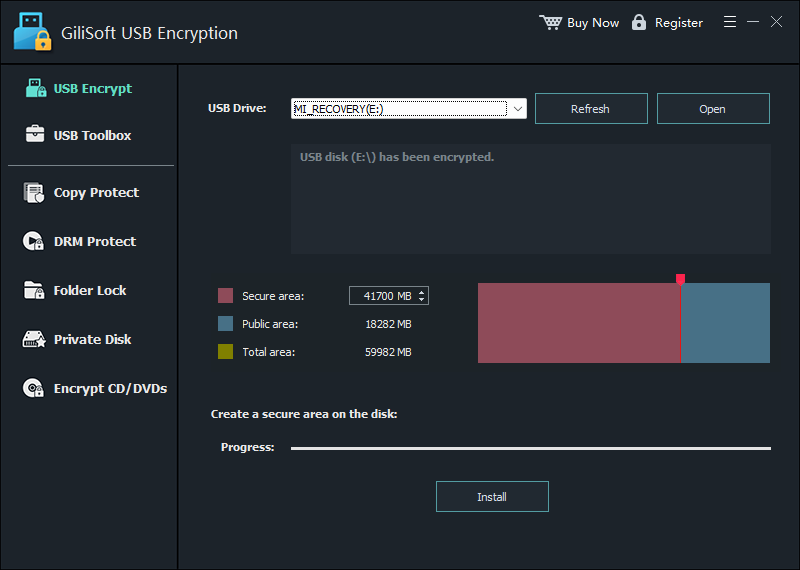
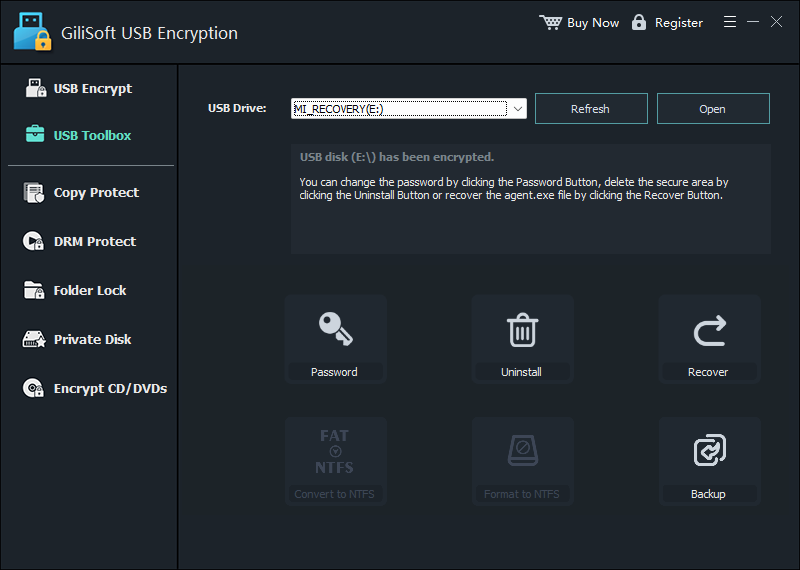
Insert the thumb drive, back up its files, and open GiliSoft USB Encryption.
Select the correct USB drive and refresh the list if it was connected after the program opened.
Set the size of the Secure area. The remaining capacity stays available as the Public area.
Choose Install, create a strong password, and wait until the protected area is ready.
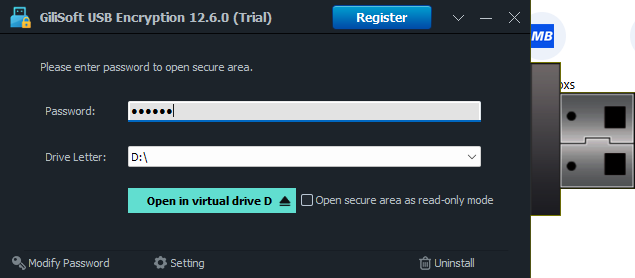
Open the secure area, mount it with a drive letter, and move confidential files into it.
Close the secure area and safely eject the drive. Files left in the public area are not encrypted.
Encrypt the Entire Thumb Drive with BitLocker To Go
BitLocker To Go is Microsoft's built-in route for removable drives on supported Windows editions.
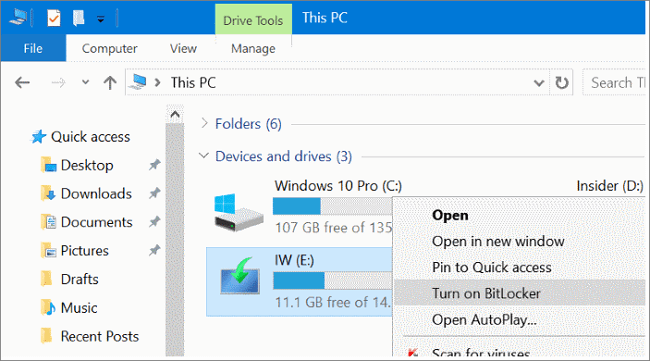
Connect the drive, open Manage BitLocker, locate the removable data drive, and select Turn on BitLocker.
Choose password unlocking, enter a strong password twice, and continue.
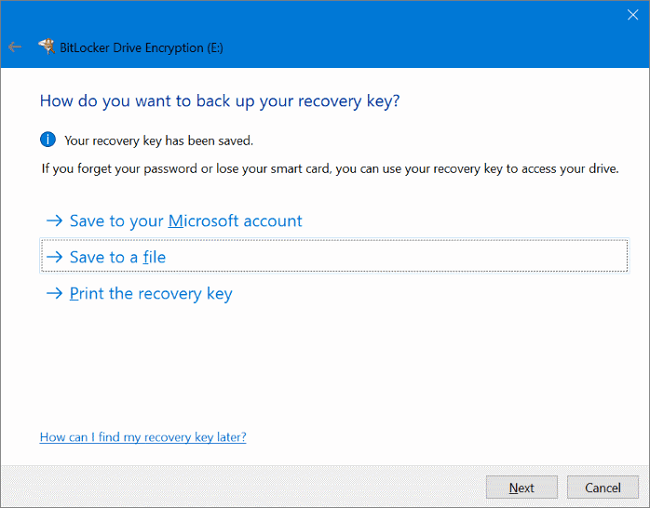
Back up the 48-digit recovery key somewhere other than the thumb drive.
Choose how much of the drive to encrypt and select the compatibility mode appropriate for removable drives.
Start encryption, keep the drive connected, then eject and reconnect it to test access.
Encrypt a Thumb Drive on Mac with Disk Utility
Use this for a Mac-centered device when you can erase the thumb drive and create a new encrypted file system.
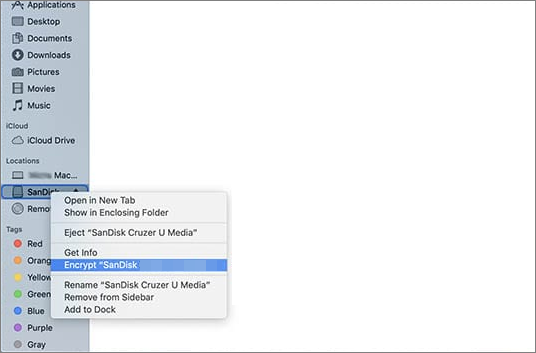
Connect the thumb drive, open Disk Utility, and choose View > Show All Devices.
Select the physical USB device, choose Erase, and provide a volume name.
Select GUID Partition Map and an encrypted APFS or Mac OS Extended format suitable for the Macs that will use it.
Create and verify the password, complete the erase process, then copy files back.
Eject and reconnect the drive to confirm that macOS requests the password and the files open.
Use a Hardware-Encrypted Thumb Drive for Higher-Assurance Work
Hardware-encrypted drives perform encryption within the device rather than relying only on host software.
This category is worth considering for legal, healthcare, financial, government, or managed business use where approved devices, centralized policy, tamper resistance, brute-force controls, or recognized standards may be required. Match the certification and management features to the actual policy instead of assuming every password-protected USB has the same security properties.
For ordinary Windows users who already own standard thumb drives, software encryption is usually the more accessible starting point. For regulated deployments, involve the team responsible for security and compliance.
Choose the Right Layout for Sharing and Compatibility
- Private and public files on one drive: use a secure-area layout so shareable files remain outside the protected area.
- Entire drive used on managed Windows PCs: BitLocker To Go may fit an existing Windows policy.
- Mac-only transfer and archive: an encrypted Mac file system fits when the device can be erased first.
- Windows and Mac access: test both systems; encryption software and file systems may not be portable.
- TVs, printers, cars, cameras, and kiosks: many appliances cannot unlock encrypted volumes. Keep intended public files in a compatible public area.
Thumb Drive Encryption Troubleshooting
| Problem | Likely cause | What to check |
|---|---|---|
| The thumb drive is not listed | Port, reader, driver, or detection issue | Reconnect it, try another port, refresh the tool, and confirm it in Disk Management or Disk Utility |
| BitLocker is missing | Windows Home or policy restriction | Confirm the Windows edition and use GiliSoft USB Encryption when BitLocker management is unavailable |
| The password is rejected | Keyboard layout, Caps Lock, or wrong password | Check input settings and use the separately stored recovery route rather than repeated guessing |
| The drive opens on Mac but not Windows | Encrypted Mac file system or software incompatibility | Use the intended platform or restore from backup to a mutually supported format |
| Files are visible without a password | They remain in the public area | Move confidential files into the mounted secure area |
| The drive is write-protected | Physical switch, policy, read-only mode, or storage fault | Inspect the device, attributes, and organization policy before encryption |
Security Checklist After Encryption
Avoid names, dates, repeated passwords, and short predictable combinations.
Do not store the only recovery key on the drive it unlocks.
Protection is most useful after the secure area is closed and the drive is removed safely.
Encryption protects confidentiality; it does not recover a failed or lost drive.
Frequently Asked Questions
Can I encrypt a thumb drive without formatting it?
GiliSoft USB Encryption can create a secure area while retaining a public area. BitLocker To Go can encrypt an existing removable volume, but make a verified backup first. Disk Utility on Mac erases and reformats the device.
Can Windows 11 Home use BitLocker To Go?
The full BitLocker management interface is available on Pro, Enterprise, and Education. GiliSoft USB Encryption provides a Windows alternative for an ordinary thumb drive.
Will the encrypted drive work on Windows and Mac?
Not automatically. GiliSoft USB Encryption is for Windows, BitLocker is Windows-centered, and APFS encryption is Mac-centered. Test every required platform.
Does encryption protect a lost thumb drive?
It helps prevent normal access when the encrypted area is closed and the password or key is not exposed. Public-area files remain readable, and encryption does not replace backup.
Should a company use software or hardware encryption?
That depends on policy, risk, management, and regulatory requirements. Hardware-encrypted drives can offer always-on protection and certifications; software encryption is more accessible for standard drives.
Research Sources
- Microsoft Support: BitLocker Drive Encryption
- Microsoft Support: BitLocker overview and recovery key
- Apple Support: Encrypt a storage device in Disk Utility
- CISA: Protect data stored on your devices
- Kingston: Hardware and software-encrypted USB drives
Platform procedures were checked against Microsoft and Apple documentation. CISA and Kingston material informed backup, recovery, removable-media, and hardware-encryption guidance. GiliSoft steps and screenshots were checked against the current USB Encryption interface.