

Which Removable Drive Encryption Method Should You Use?
| Method | Best for | Protection layout | Main consideration |
|---|---|---|---|
| GiliSoft USB Encryption Recommended Windows route | An ordinary removable drive that needs public and private storage | Password-protected secure area beside a public area | Secure-area access is Windows-centered |
| BitLocker To Go | Windows Pro, Enterprise, or Education and managed organizations | Encrypts the removable volume | Recovery key and Windows edition must be planned |
| VeraCrypt | Advanced users needing an open-source container or encrypted device | File-hosted container or device-hosted volume | More setup, mounting, and destination-PC requirements |
| macOS Disk Utility | Mac-centered external storage that can be erased first | Encrypted APFS volume | Formatting erases the selected device and limits compatibility |
| Hardware-encrypted drive | Approved enterprise, regulated, or OS-independent use | Encryption handled by the storage device | Higher cost and device-specific recovery |
What Counts as a Removable Drive?
Windows may present many portable devices as removable or external storage, but they are not interchangeable in practice:
- USB flash drive or thumb drive: small, easy to lose, and commonly moved between computers.
- External SSD: fast and often used for active projects, media, or portable workspaces.
- Portable hard drive: larger capacity, usually used for archives and backups.
- SD or microSD card: often used in cameras, recorders, handheld devices, or card readers.
Before encrypting, confirm whether the device must also work in a camera, TV, printer, car system, game console, or embedded device. Many non-computer devices cannot unlock software-encrypted storage.
Before Encrypting Any Removable Drive
Copy all important files elsewhere and open several files before changing partitions, file systems, or encryption.
Match its drive letter, label, capacity, and model so another disk is not selected accidentally.
Check Windows edition, Mac compatibility, administrator rights, and whether third-party software is permitted.
Store passwords, recovery keys, product recovery details, and ownership records somewhere separate.
Do not begin a long encryption job on storage that disconnects, reports errors, or has an unstable cable.
Practice creation, unlock, recovery, and removal on disposable media before protecting the only copy.
Encrypt a Removable Drive with GiliSoft USB Encryption
Use this method when a Windows removable drive should keep public files normally accessible while sensitive files remain inside a password-protected secure area.
Connect the removable drive, copy its existing files to a verified backup, and open GiliSoft USB Encryption.
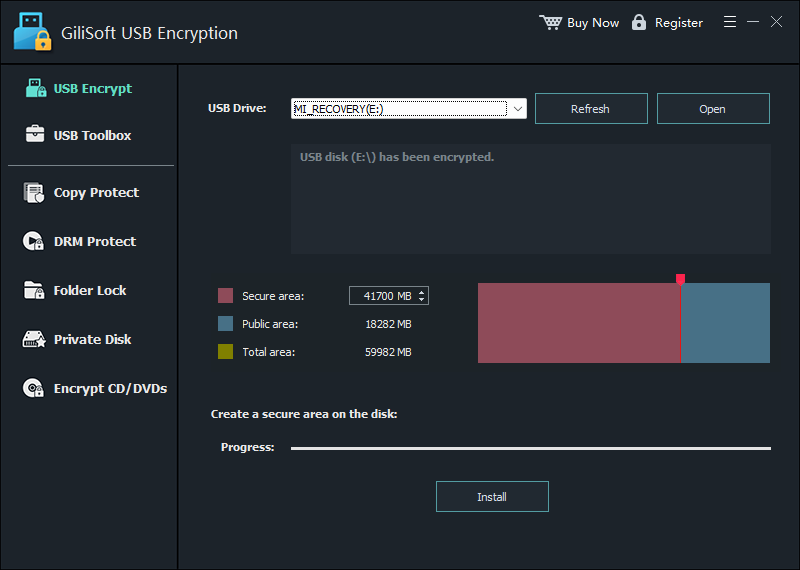
Select the correct drive. If it was connected after the software opened, choose Refresh and confirm the drive letter and capacity again.
Set the size of the Secure area. The rest of the capacity remains the Public area.
Select Install, create a strong password, and keep the drive connected while the secure area is prepared.
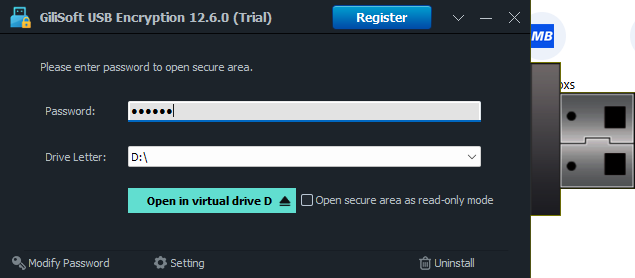
Open the secure area, enter the password, and assign a virtual drive letter. Move confidential files into that mounted drive.
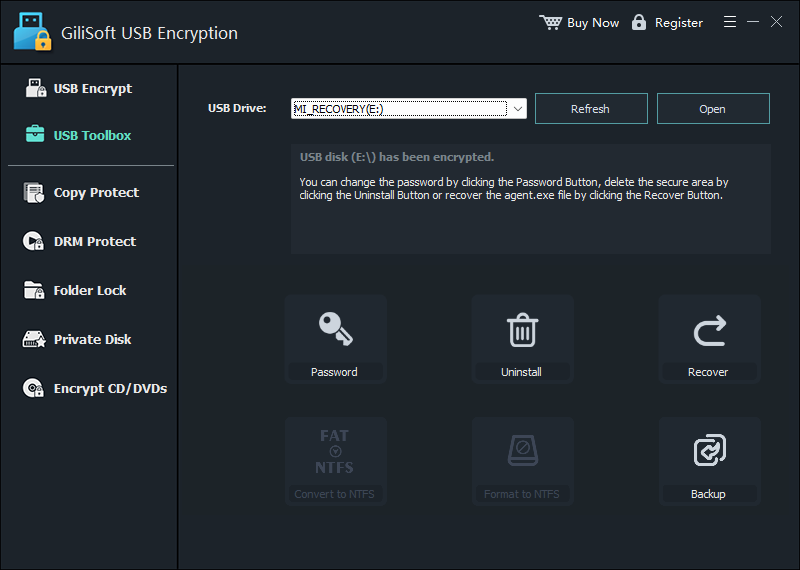
Close the secure area, safely eject the physical device, reconnect it, and verify that public files remain visible while private files require the password.
Encrypt a Removable Drive with BitLocker To Go
Microsoft calls its removable-drive implementation BitLocker To Go. It is a strong operational fit when the PCs already use supported Windows editions and recovery-key management.
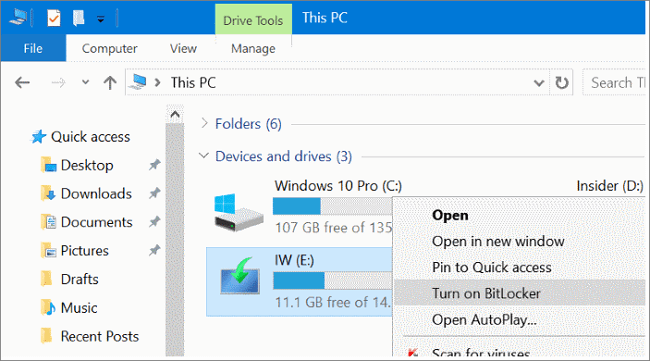
Open Manage BitLocker, locate the device under Removable data drives - BitLocker To Go, and choose Turn on BitLocker.
Choose an available unlock method. For password access, create a strong unique password and confirm it.
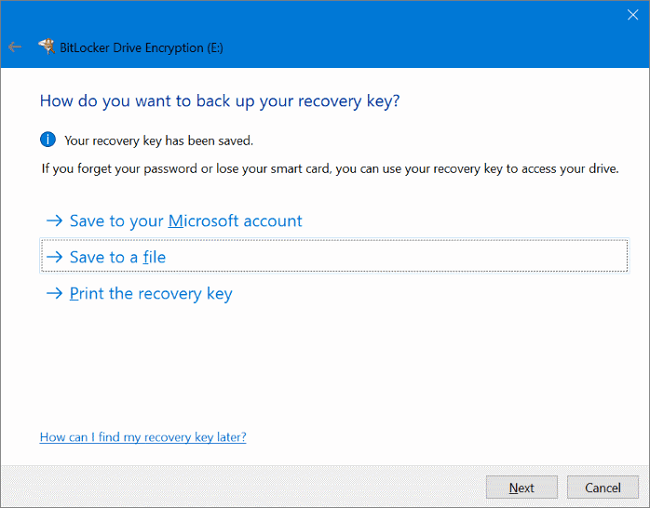
Back up the recovery key to an approved location other than the removable drive.
Choose used-space-only encryption for a new drive or full-drive encryption when old deleted data may have existed on it.
Select the encryption mode appropriate for removable-drive compatibility, start encryption, and do not disconnect the device.
After completion, eject and reconnect the drive. Test the password and confirm that recovery information can be located.
Use VeraCrypt for an Encrypted Container or Device Volume
VeraCrypt is suitable when open-source encryption and control over container or device-hosted volumes matter more than a short setup path.
A file-hosted container is an encrypted virtual disk stored as a normal file on the removable drive. A device-hosted volume encrypts a partition or device. After the volume is mounted, files can be used through an assigned drive letter and are encrypted or decrypted on the fly.
Back up the removable drive and install VeraCrypt from the official project site.
Choose Create Volume, then decide between an encrypted file container and a non-system partition or device.
Select the correct location or device, choose the volume size and file system, and create a strong password.
Create the volume, mount it to an available drive letter, and move protected files into the mounted volume.
Dismount the volume before ejecting the physical drive, then test the complete mount and recovery process on a destination PC.
Encrypt a Removable Drive on Mac with Disk Utility
Apple's Disk Utility can erase and reformat a storage device with an encrypted file-system format. This is best for a Mac-centered drive rather than a device that must work broadly across Windows and consumer electronics.
Back up every file from the removable drive. This workflow erases the selected device.
Open Disk Utility, choose View > Show All Devices, and select the physical removable device carefully.
Choose Erase, enter a name, and select an encrypted file-system format such as APFS (Encrypted) when appropriate.
Create and confirm the password, finish formatting, and copy the files back only after the new volume mounts successfully.
Eject and reconnect the drive, test password access, and verify compatibility with every Mac that must use it.
Compatibility: The Decision Most Guides Skip
| Destination | Practical concern | Safer planning choice |
|---|---|---|
| Windows Home PC | Manage BitLocker may be unavailable | Use GiliSoft or a tested third-party method |
| Managed office PC | Software installation and removable-media policy may be restricted | Ask IT whether BitLocker To Go or an approved hardware drive is required |
| Windows and Mac | BitLocker and APFS are centered on different platforms | Use a tested cross-platform tool or approved hardware-encrypted storage |
| Camera, TV, printer, or car system | Device cannot display an unlock dialog or mount a virtual drive | Keep compatible public media separate from encrypted private storage |
| External backup drive | Encryption and recovery failure can make the backup unusable | Keep another verified backup and recovery material separately |
When a Hardware-Encrypted Removable Drive Is Better
A hardware-encrypted USB or external drive performs protection inside the device rather than depending only on an application installed on the host. It may be the better purchase when an organization requires approved secure devices, centralized management, operating-system independence, a physical keypad, or a specific security validation.
The tradeoffs are higher cost, dependence on one physical device, and vendor-specific recovery or replacement procedures. For individuals and small teams reusing ordinary Windows removable drives, software is usually more flexible.
Common Removable Drive Encryption Mistakes
Media failure during or after setup can still destroy access. Back up first.
A recovery key is useless if it is available only after unlocking the same device.
A perfectly encrypted drive is still impractical if the receiving computer cannot unlock it.
Encryption protects closed storage, not files already available in an unlocked session.
Files outside a secure area or vault remain ordinary readable files.
Save work, dismount or close the protected area, and safely eject the physical device.
Removable Drive Encryption FAQ
What counts as a removable drive?
USB flash drives, external SSDs, portable hard drives, and memory cards through readers can all be removable or portable storage. The device type, connection, file system, and destination computer determine which encryption route works.
Can I encrypt a removable drive without erasing it?
GiliSoft creates a secure area while retaining public storage, and BitLocker To Go can encrypt an existing supported volume. Disk Utility formatting erases the selected Mac drive, and some VeraCrypt device workflows are destructive. A verified backup is required regardless of method.
Can Windows 11 Home use BitLocker To Go?
Microsoft documents manual BitLocker management for Pro, Enterprise, and Education. Home does not offer the same Manage BitLocker setup interface.
Will a Windows-encrypted drive open on Mac?
Not automatically. GiliSoft and BitLocker are Windows-centered, while encrypted APFS is Mac-centered. Test a cross-platform tool or approved hardware-encrypted drive when both operating systems must open protected data.
Can I encrypt an SD card used in a camera?
You can encrypt the card when it is connected to a computer, but the camera will usually be unable to unlock the encrypted storage. For camera use, move private files to encrypted storage after import or keep separate media for capture and protected archive.
Does encryption prevent malware on removable media?
No. Encryption protects confidentiality. It does not scan files, block malicious devices, or prevent malware from running after an encrypted area is unlocked. Use endpoint protection and approved removable-media policy as separate controls.
What if I forget the password?
Use the recovery method prepared during setup. Without the required password, key, or supported recovery information, properly encrypted data may be unrecoverable.
Research Sources
- Microsoft Support: BitLocker Drive Encryption and BitLocker To Go
- Microsoft Learn: BitLocker FAQ and recovery
- Apple Support: Encrypt a storage device in Disk Utility
- Apple Support: Protect removable media with encryption
- VeraCrypt: Beginner's Tutorial
- VeraCrypt: File-hosted and device-hosted volumes
- CISA: Protect data stored on devices and removable media
- Kingston: Hardware vs software encryption
Official documentation was used for operating-system requirements, encryption layout, recovery behavior, destructive formatting warnings, and removable-media guidance. GiliSoft steps and screenshots were checked against the current USB Encryption interface.