

EFS encrypts files transparently for your Windows account on NTFS volumes, with no password prompt at all. File lock software such as GiliSoft File Lock Pro adds an independent password that works on any filesystem and any Windows edition. Choose EFS for account separation on a Pro PC, and file lock software when you want a real folder password.
How EFS Actually Works (and What It Cannot Do)
According to Microsoft, EFS "provides cryptographic protection of individual files on NTFS file system volumes using a public-key system." When you enable it on a folder, Windows generates an encryption certificate tied to your user account and silently encrypts new files as they are written.
The critical word is transparently. Once you are signed in, Windows decrypts EFS files on the fly - there is no password prompt, no lock screen, nothing to stop anyone else using your session. EFS was designed for one scenario: protecting data at rest from someone who gains offline access to the disk, and separating files between different Windows accounts on the same PC.
What EFS can encrypt
Individual files and folders on NTFS volumes, including sparse files. New files added to an encrypted folder inherit encryption automatically.
What EFS cannot encrypt
Microsoft explicitly excludes compressed files, system files, system directories, and root directories. FAT32 and exFAT drives are not supported at all.
Where the keys live
Your EFS certificate and private key are stored on the PC, protected by your account credentials. Reinstalling Windows or losing the account without a certificate backup means permanent data loss.
Where encryption silently drops
Copy an EFS file to FAT32, exFAT, or most network shares and it is decrypted on the way out - no warning, no password, no trace of protection.
How File Lock Software Works Differently
A dedicated file lock tool protects folders with its own password system, completely independent of your Windows account. Anyone who double-clicks the folder - including you - gets a password prompt. The protection travels with the folder instead of evaporating when the filesystem or account changes.
File lock software also covers jobs EFS was never designed for: hiding folders from view, blocking deletion or modification, locking USB drives and network shares, logging access attempts, and locking the program itself against tampering.
EFS vs File Lock Software: Side-by-Side
| Criteria | Windows EFS | File Lock Software |
|---|---|---|
| Protection model | Account-based encryption, transparent after sign-in | Independent password prompt on every access |
| Password behavior | No prompt - unlocks with your Windows login | Separate master password, asked every time |
| Windows editions | Pro, Enterprise, Education only (greyed out on Home) | All editions including Windows Home |
| Filesystem support | NTFS only | NTFS, FAT32, exFAT |
| USB / external drives | Only if NTFS-formatted; tied to the original PC's account | Locks folders on any removable drive with a portable password |
| Hide folders | Not possible - files stay visible to everyone | Complete hiding from Explorer, search, even Safe Mode |
| Block delete / modify | No - anyone in your session can change or delete files | Write-protection blocks modify, rename, move, and Shift+Delete |
| LAN shared folders | Not designed for network shares | Password-protects folders shared over the network |
| Wrong-password lockout | Not applicable (no prompt) | Auto-locks after five failed attempts |
| Monitoring / logs | None | Folder Monitor records changes and access attempts |
| Recovery path | Certificate export - forgotten by most users until too late | Password recovery via predefined email |
| Cost | Free, built into Windows Pro | Paid (one-time license with free trial) |
Where EFS Is Still the Right Choice
Several accounts, one Pro PC
Each family member or colleague has their own Windows account, and files should stay private between accounts. EFS does this for free with zero extra software.
Theft protection for a laptop
Your concern is someone pulling the drive or booting another OS to read data offline. EFS keeps files encrypted at rest.
Set-and-forget background encryption
You want new files in a folder encrypted automatically with no daily password prompts for yourself.
Layering with BitLocker
Microsoft confirms EFS works on BitLocker-protected drives: BitLocker guards the whole disk offline, EFS adds per-user file separation on top.
Where File Lock Software Wins: GiliSoft File Lock Pro
For the most common request - "put a password on this folder" - file lock software is simply the correct tool.
A real password on any folder
Works on Windows Home and Pro alike, on NTFS, FAT32, and exFAT. See how folder locking works.
Hide folders completely
Make sensitive folders invisible in Explorer and search, even in Safe Mode. Learn about hiding files.
Lock USB and external drives
The same password protects folders on flash drives and external disks, with master and client passwords. Lock a USB folder.
Lock LAN shared folders
Password-protect folders shared over the office network - a job EFS was never designed for. Protect a shared folder.
Block deletion and modification
Let others read a file while blocking modify, rename, move, and Shift+Delete operations.
Monitor folder activity
Folder Monitor logs every change and access attempt with a reviewable program log. Set up monitoring.
Try Both: Enable EFS and Lock a Folder in Minutes
Enable EFS on a folder (Windows Pro)
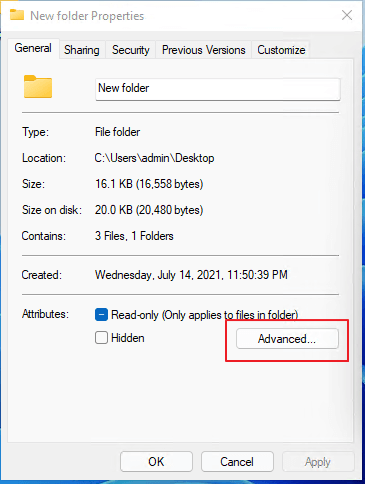
Right-click the folder and choose Properties.
On the General tab, click Advanced.
Check Encrypt contents to secure data, click OK, then Apply.
Back up the EFS certificate when Windows prompts you - this step is not optional if you value the files.
Lock the same folder with File Lock Pro
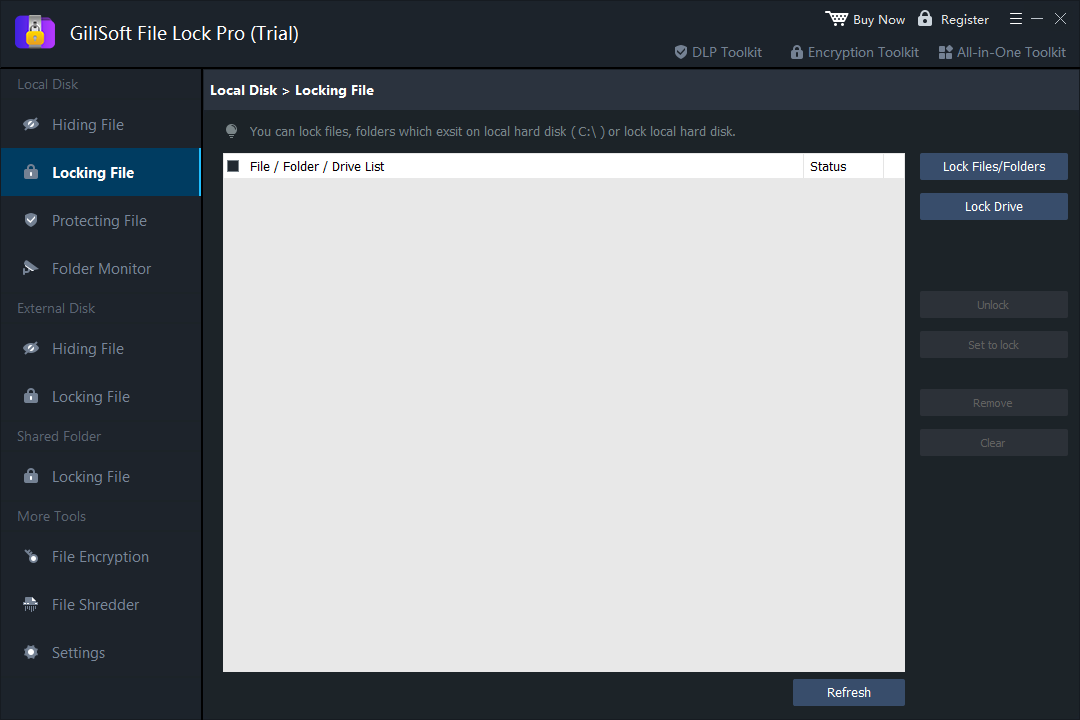
Install and open GiliSoft File Lock Pro, set your master password and recovery email.
Under Local Disk, choose Locking File, then Lock Files/Folders and add the folder.
Double-click the folder in Explorer and confirm the password prompt appears for any account.
Common EFS Mistakes That Cost People Their Files
Never backing up the certificate
Reinstall Windows or delete the account without the exported certificate and the encrypted files are gone forever - no recovery tool can help.
Assuming EFS hides files
EFS changes nothing about visibility. Filenames, sizes, and dates remain visible to every account on the PC.
Expecting a password prompt
Anyone using your logged-in session - a colleague, a child, malware running as you - reads EFS files like plain files.
Trusting it on USB drives
EFS only works on NTFS, and the encryption keys stay on the original PC. Move the drive and the files are either unreadable or silently decrypted on copy.
Whichever You Choose: Protection Checklist
Run the backup wizard or use cipher /x to save your certificate and private key to a safe, separate location.
File Lock Pro can send your master password to a predefined email - set it up before you need it.
Verify the lock prompt, the recovery path, and what happens on another PC before protecting the only copy.
Encryption and locks protect against people, not against drive failure. A tested backup is still the last line of defense.
Frequently Asked Questions
Is EFS the same as putting a password on a folder?
No. EFS encrypts files transparently for your Windows account. There is no password prompt when opening the folder - anyone logged into your account can read the files as if they were unencrypted.
Does EFS work on Windows 10/11 Home?
No. EFS is only included in Windows Pro, Enterprise, and Education editions. On Home the option is greyed out - see why and the alternatives.
What happens to EFS files if I reinstall Windows?
Without a backup of your EFS certificate and private key, the encrypted files become permanently unreadable after a reinstall or account change. Always export the certificate.
Can I use EFS and file lock software together?
Yes. Microsoft confirms EFS can be combined with drive encryption for layered protection, and the same logic applies to file lock software: EFS protects at the account level while the file lock adds an independent password.
Does EFS protect files on a USB drive?
Only if the USB drive is formatted as NTFS. EFS does not work on FAT32 or exFAT, and encryption is silently dropped when files are copied to a non-NTFS location.
Which is better for a shared family or office PC?
File lock software. EFS only separates Windows accounts, so anyone using your logged-in session sees everything. A folder lock asks for a separate password no matter who is signed in.
Sources and Further Reading
- Microsoft Learn: File Encryption (EFS) - what can and cannot be encrypted
- Microsoft Learn: BitLocker FAQ - including "Can I use EFS with BitLocker?"
- Microsoft Learn: cipher command - back up EFS certificates with cipher /x
EFS behavior, supported content, and edition availability follow Microsoft's documentation above. Product steps refer to GiliSoft File Lock Pro 13.5 on Windows 11/10/8/7.