How to Use GiliSoft PDF DOC Password Protect
Create a protected document delivery from PDFs, Office files, and supporting materials. Follow the Windows workflow for file selection, password setup, GFX or EXE creation, and recipient access checks.
How do I password-protect PDF and Office documents?
Add the documents in the shared Any File Encryptor workspace, choose GFX File or EXE File, and select Enable Password Protection. Enter matching passwords, choose the destination, and create the package. The recipient opens this protected output with the matching GiliSoft application or Windows EXE workflow and enters the package password.
Understand the document package you are creating
PDF DOC Password Protect creates a GFX encrypted file or Windows EXE package. It keeps the selected documents inside password-protected output rather than adding a native PDF or Office password to the original file.
GFX encrypted file
Use the matching GiliSoft player or application to open the collection and enter its password. Provide the recipient with the correct opening instructions along with the package.
Windows EXE package
Use a self-contained executable when the recipient will open the delivery on Windows. The shared EXE workflow has a 4GB package limit; consider GFX for a larger collection.
If the delivery must remain an ordinary .pdf, .docx, or .xlsx file that opens in its usual application, a native document-password workflow is a different task. Renaming .gfx or .exe to a document extension does not change how this protected package opens.
Prepare PDF and Office materials in one workflow
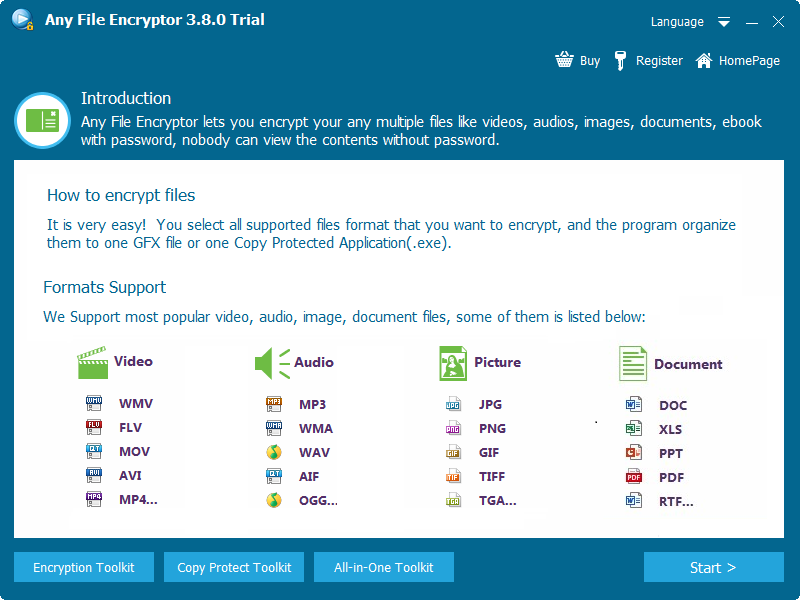
The PDF DOC Password Protect product covers PDF, Word, Excel, PowerPoint, WPS, images, and MP4 for mixed document deliveries. The shared welcome screen lists document examples alongside image and media formats.
| Material | Example delivery |
|---|---|
| Contracts, reports, invoices, forms, or training handouts | |
| Word and WPS | Draft agreements, proposals, procedures, or partner documents |
| Excel | Budgets, pricing sheets, financial summaries, or approval materials |
| PowerPoint | Confidential presentations, lesson slides, or client briefings |
| Supporting files | Scanned images or short MP4 clips that belong with the documents |
The installer opens the shared Any File Encryptor workspace. Its media-oriented filename and screen name do not change the document-focused steps below. Review each intended document in the finished output before sending the complete collection.
Before protecting important documents
- Keep the originals
- Work from final source copies and keep an independent backup. A protected delivery is not your only editable master.
- Separate recipient sets
- Include only the files each recipient should receive. Use different packages if customers or teams need different documents or passwords.
- Prepare the destination
- Choose a clear output filename and a location with enough free space. Keep plain source copies outside the recipient's delivery folder.
- Plan password sharing
- Use a strong password and store it securely. Decide how to send it separately from the protected file and opening instructions.
1Add the documents you want to protect
Open the shared Any File Encryptor workspace, select Start, and use Add File(s) to choose the documents. Review the list, remove unwanted items, and select Next when the intended delivery is complete.
- Select the source documents
Use Add File(s) for the final PDF and Office materials. A mixed set can also include the supporting images or media required by the recipient.
- Review every filename
Check Name and Size in the list. Use Remove File(s) for unwanted entries or Clear File(s) if you need to rebuild the collection.
- Continue with the correct collection
Select Next after reviewing the delivery list. For example, a contract delivery might contain the agreement PDF, its spreadsheet schedule, and reference images.
2Choose GFX or EXE and set the password
Under Output Format, select GFX File or EXE File for the recipient's Windows workflow. Keep Enable Password Protection selected, enter the password and matching Confirm Password, and use Browse to set the destination.
- Output Format
- Select GFX File for the matching GiliSoft opening application or EXE File for the Windows executable route.
- Password protection
- Keep Enable Password Protection selected. Enter the intended value in Password and repeat it exactly in Confirm Password.
- Output destination
- Use Browse below Select Destination. Choose a filename that identifies the recipient set or version without including the password.
- Available space
- Confirm that the target drive has enough free space, especially when the documents are grouped with images or video.
Record the package name and its password in the publisher's secure records. Do not put the password into an unprotected readme beside the output.
3Create the protected document package
Check the included files, output format, password protection, and destination. Select Next and complete the encryption workflow, then wait for the finished GFX or EXE output. Keep the unprotected source documents separate.
- Review the format and destination
Confirm the intended GFX or EXE route, output filename, and enabled password protection before continuing.
- Complete the encryption workflow
Continue through the remaining creation screens and wait for completion. Keep a removable destination connected while the package is being written.
- Identify the finished output
Locate the generated protected file and keep it separate from the original documents. Use this output for verification and recipient handover.
If the documents or password change later, create and verify a replacement output. Treat an already-created GFX or EXE as a separate delivery file rather than a live link to your editable sources.
4Open and verify the protected documents
Open GFX through the matching GiliSoft player or application, or run the protected EXE on Windows. Enter the package password and inspect the intended documents. Check one incorrect password and then the correct password before preparing the recipient copy.
The supplied player screenshot shows the shared startup screen, not an opened PDF or spreadsheet. Use the application's protected-file opening workflow for your GFX package, then inspect the actual documents after entering the password.
- Test password-gated opening
Check that an incorrect password does not expose the documents, then enter the correct password for this output.
- Inspect the intended materials
Open the expected PDFs, reports, sheets, and presentations in the package. Review document pages, tables, images, and other material the recipient needs to use.
- Check the recipient PC
Repeat the opening workflow on the intended Windows environment. Confirm that the recipient knows whether to open a GFX in the matching application or run the protected EXE.
Do not delete your source documents after a single successful launch. Keep them and the package password so you can prepare a revised delivery if needed.
Prepare the recipient handover
- Correct protected file
- Identify the intended GFX or EXE and its version. Send the checked package rather than the ordinary source PDF or Office files.
- Complete contents
- Verify that every intended document is present and that private drafts or unrelated supporting materials were not included.
- Opening instructions
- Explain the required GiliSoft application for GFX, or the Windows EXE route, before sending the file.
- Separate password
- Send the password separately where practical. Keep a publisher record of which package and password belong together.
For email or other transfer services, check whether the recipient's organization accepts executable attachments. Agree the delivery route instead of disguising an EXE as a PDF or asking the recipient to bypass security policies.
Troubleshoot protected documents that will not open
| Problem | What to check next |
|---|---|
| GFX does not open in the usual PDF or Office app | Use the matching GiliSoft application. A GFX is an encrypted package, not a native PDF or DOCX with an added password. |
| Wrong or forgotten password | Match the password to the intended package, including capitalization and keyboard layout. Keep sources and publisher records; do not assume a password reset is available. |
| A document is missing or out of date | Review the original import list and source version, then create a replacement package. Editing a source file does not update an existing output automatically. |
| EXE creation fails for a large set | Check the 4GB EXE limit, destination path, and free space. Consider GFX for a larger protected document collection. |
| The recipient cannot run an EXE | Confirm the recipient uses Windows and that their organization permits the delivery format. Coordinate the matching GFX application or an approved transfer route. |
| The transferred copy is incomplete | Compare it with the finished publisher output and transfer the full package again if copying or drive removal was interrupted. |
| The output opens but needs stronger usage controls | Separate password access from requirements such as copy and print restrictions. Review the specific document-delivery controls in the related tools below. |
When the task goes beyond a package password
Use PDF DOC Password Protect for encrypted document packages with password-gated opening. If your requirement is different, choose the relevant workflow rather than treating every kind of document protection as the same feature.
Copy and print restrictions
See PDF DOC Copy Protect for document delivery built around recipient permissions. Its setup is separate from entering a password in this guide.
Other protected-delivery requirements
Review the format and delivery options on the PDF DRM Protection page when a simple package password is not the intended workflow.
PDF DOC Password Protect FAQ
Will the protected output remain a PDF, DOCX, or XLSX file?
No. This workflow creates a GFX encrypted file or a Windows EXE package. It does not add a native password field to the original PDF, Word, or Excel file. The recipient opens the protected package through the matching GiliSoft application or Windows EXE workflow, not by treating it as an ordinary password-protected PDF attachment.
Which documents and supporting files can I protect?
PDF DOC Password Protect supports PDF, Word, Excel, PowerPoint, and WPS documents, plus images and MP4 files for mixed deliveries. The shared interface also lists formats such as PDF, DOC, XLS, PPT, and RTF. Add a single file or group related supported materials in one package.
Why does the installer show Any File Encryptor?
The current product workflow uses the shared GiliSoft Any File Encryptor workspace. Use its Add File(s), Output Format, password, and destination controls for PDF DOC Password Protect tasks. The existing download and purchase entries are shared with the Any Video Encryptor/LockVid product family.
What does the recipient need to open the package?
For GFX, provide the matching GiliSoft player or application and the package password. For EXE, the recipient runs the protected executable on Windows and enters the password. Confirm this workflow on the intended recipient PC; a normal PDF or Office file association does not open a GFX package.
Can several documents share one protected package?
Yes. Use Add File(s) to include the intended supported documents and supporting files, review the list, then create the GFX or EXE output. Use separate packages when different recipients should receive different contents or passwords.
Will editing the original document update an existing package?
Treat the finished output as a separate delivery file. If a source document or the delivery password changes, create and test a replacement package. Keep the original source files and a clear version record rather than assuming an existing GFX or EXE updates itself.
Can I recover a forgotten package password?
Keep the password securely when creating the package. Confirm that the password matches the intended output, including capitalization and keyboard layout. Do not assume the package can be opened or reset without the password; retain the original documents so a replacement can be created when necessary.
Should I send the password in the same email as the package?
Send the package and its password separately when practical, such as through a separate message or a password-sharing channel. Include clear Windows opening instructions and the intended package filename, but do not place the password in a plain text file beside the protected output.
Is PDF DOC Password Protect free, and which license do these buttons show?
A Windows trial download is available. The Buy Now buttons in this guide show the lifetime license for 1 PC at $49.95 and use the same purchase page as the product page. Review the installed trial screen for current limits and select the intended plan at checkout.