
Start with the Target Phone, Not a Universal Guess
Quick answer: Ringtone length, format, transfer method, and assignment steps vary by phone, operating system, carrier, and policy. Check the target device first, then create a clip that meets its current requirements instead of assuming one duration or format works everywhere.
| Decision | What to check | Why |
|---|---|---|
| Format | Phone-supported ringtone audio types | An ordinary playable file may not be assignable as a ringtone |
| Length | Device or carrier limits | Long files may be rejected or feel slow |
| Start point | Immediate recognizable sound | Calls may stop before a long introduction reaches the hook |
| Volume | Real phone speaker playback | Headphone balance does not predict a small speaker |
| Transfer | USB, sync app, cloud, or device import | Creation and installation are separate steps |
Choose a Clip That Works as a Ringtone
A good ringtone is recognizable quickly and remains clear on a small speaker. Avoid long silence, quiet introductions, sudden clipping, and sections that depend on deep bass alone.
Start promptly
Choose a section with an immediate musical or spoken cue.
Use clean boundaries
Begin and end between phrases rather than cutting through a word or beat.
Test a small speaker
Check clarity and level on the target phone, not only studio headphones.
Keep an editable source
Save the original file and note the selected start and end times.
Make a Ringtone in 6 Steps
Check the phone requirements
Confirm accepted format, practical duration, transfer method, and any managed-device restrictions.
Choose an authorized source
Use music, voice, or sound you own or have permission to edit and use.
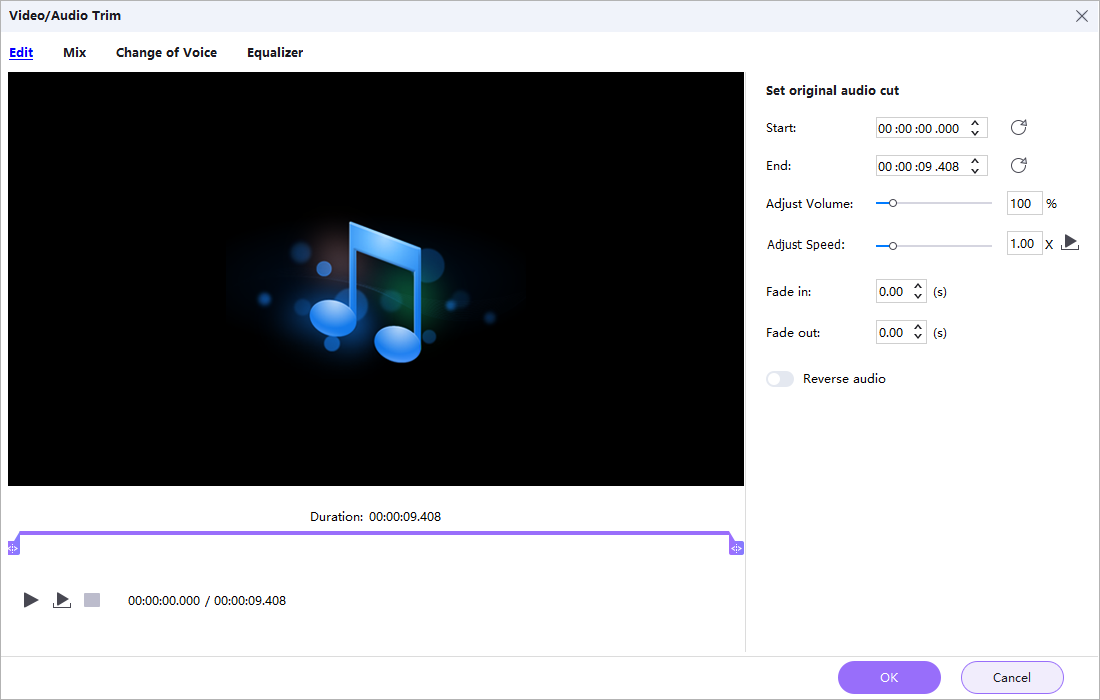
Open the cut tool
Add the source in GiliSoft Audio Converter Ripper and open the trimming workflow.
Set precise start and end points
Select a recognizable section and replay both boundaries several times.
Apply gentle fades when helpful
Prevent abrupt starts or clicks without making the ringtone slow to become audible.
Export, transfer, and test
Choose a compatible output, move it to the phone using the supported method, assign it, and test an incoming call.
Test the Ringtone in Real Conditions
Recognition
The useful part should begin quickly enough to identify the caller alert.
Speaker clarity
Speech or melody should remain clear on the phone speaker at normal volume.
Loop behavior
Listen for an awkward gap, click, or cut when the phone repeats the alert.
Installation
Confirm the file is assigned as a ringtone rather than merely copied to storage.
Important: Creating the audio clip does not automatically install or assign it on every phone. Follow the current device instructions after export.
Trim and Convert Ringtone Audio with GiliSoft
GiliSoft Audio Converter Ripper combines precise cutting with output conversion, fades, volume, mixing, compression options, and ID3 editing. It can prepare the clip on Windows before the phone-specific transfer and assignment step.
- Record the selected start time and duration for future revisions.
- Keep the ringtone source and exported device copy in separate folders.
- Test the actual incoming-call behavior, including repeat and maximum volume.
Troubleshoot Common Audio Workflow Problems
- The phone cannot select the file: Confirm the required ringtone format, storage location, import method, and device policy.
- The ringtone starts too quietly: Choose a stronger opening or shorten a long fade-in.
- A click is heard at the boundary: Move the cut point or apply a short suitable fade.
- The file is too long: Shorten it according to the target device or carrier requirement.
- It sounds harsh on the phone: Reduce level carefully and test another section with less dense high-frequency content.
- The ringtone is copied but not assigned: Open the phone sound settings and select the imported file using the device-supported process.
Use Audio You Are Allowed to Edit
A personal ringtone clip can still contain copyrighted music or another person’s voice. Use authorized source material and do not redistribute the clip unless the relevant rights allow it.
Frequently Asked Questions
How long should a ringtone be?
There is no single universal length. Check the target phone and carrier, then choose a short recognizable section.
Which format should I export?
Use a format explicitly accepted by the target phone and its ringtone import workflow.
Can I make a ringtone from an MP3?
Yes. Add the MP3, trim the desired range, and export a compatible ringtone copy.
Can I make a ringtone from video audio?
Yes when you have permission. Extract or trim the required audio and confirm it works without visual context.
Why does the ringtone not appear on the phone?
The file may need a specific format, folder, sync process, import step, or assignment in sound settings.
Should I use fades?
Short fades can prevent clicks and abrupt edges, but a long fade-in may make the alert too quiet at the start.